
Move Custom-Made StudySync Content Between Subscriptions Using a Migration Code
Learn how to teachers and administrators can easily move their custom-made content from their old StudySync subscription to their new one.
- PreK-12
- Customer Support
- Classroom Teacher
- School Administrator
- Middle School
- High School
- Direct Login & Auto-Rostering
- Direct Login & Manual-Rostering
- SSO & Auto-Rostering
- SSO & Manual-Rostering
- Core
- Literacy
- StudySync 2021
- StudySync 2015 & 2017
- StudySync
- Tools & Resources
- Online Assessments
- Grades & Assignments


When moving to a new StudySync subscription, you can bring your user‑created custom content with you by using a Migration Code. This code links your old account to your new one, so your custom content transfers seamlessly. Follow the provided instructions below to locate and save your Migration Code before leaving your current subscription, as you’ll need it when you sign into the new one.
Note: For the migration to be completed successfully, the name and user role (teacher or administrator) must match in both accounts.
Transfer all of your user‑created materials, including:
- Texts
- Blasts
- Units
- Prompts
- Assessments
- Assignment Templates
- Rubrics
Note: Only the custom content you personally created will transfer. Other teachers or administrators will need to complete their own migration steps for you to access any custom items they created in your new account.
Get Your Migration Code from Your Current Subscription
1. Log into your current StudySync subscription.
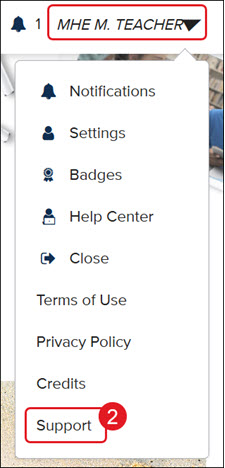
2. Click on your name at the top-right and select Support from the menu.
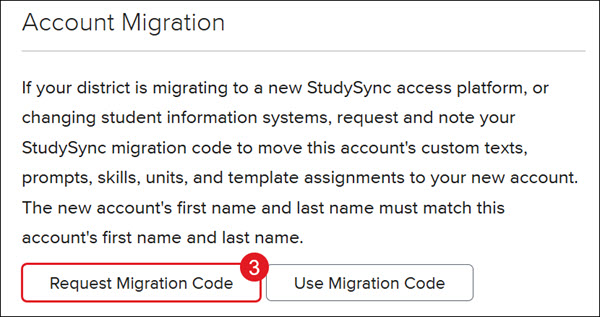
3. Click the Request Migration Code button.
4. When your code appears, write it down or take a screenshot so you can reference it later.
Apply Your Migration Code in Your New Subscription
1. Log in to your new StudySync subscription.
2. Click on your name at the top-right and select Support from the menu.
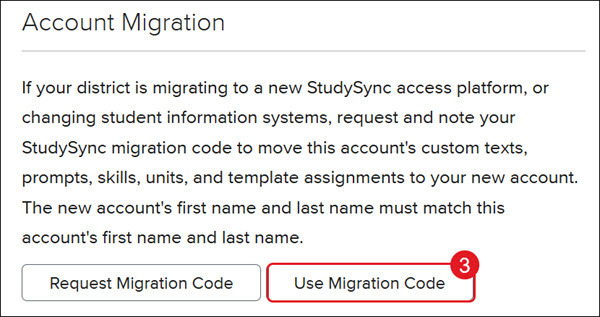
3. Click the Use Migration Code button.
4. Enter the code you saved from your previous subscription.
Once submitted, your eligible custom content will transfer to your new account.