Locating McGraw Hill Assessment IDs
Learn how to locate assessment IDs in for McGraw Hill assessments.
Tags
- Customer Support
- Middle School
- High School
- SSO & Auto-Rostering
- PreK-12
- Supplemental
- Visual & Performing Arts
- Health
- Literacy
- Social Studies
- Core
- AP, Honors & Electives
- SSO & Manual-Rostering
- Direct Login & Manual-Rostering
- Classroom Teacher
- Elementary School
- World Languages
- Math
- Intervention
- Direct Login & Auto-Rostering
- Science
- Preschool
- AP Biology
- AP Chemistry
- AP History & Geography
- AP Psychology
- AP Economics
- AP African American Studies
- AP Precalculus
- AP Statistics
- AP Computer Science
- AP Language and Composition
- AP Public Speaking
- AP Music Theory
- 5 Steps to a 5 - AP Test Prep
- Glencoe Health 2022
- Teen Health 2021
- Arrive Math
- Building Blocks 2024
- Building Blocks PreK 2025
- Number Worlds 2024
- SRA Reading Laboratory 2025
- SRA Reading Mastery Transformations
- McGraw Hill Literacy Emerge!
- McGraw Hill Literacy Summit!
- McGraw Hill Literacy Soar!
- Open Court Reading 2025
- CA Reveal Math (K-12)
- Illustrative Math
- Reveal Math (K-12)
- Texas Math
- CA Inspire Science 2020
- FL Science 2025 (K-12)
- Inspire Science 2020
- TN Science (K-12)
- TX Science 2025 (K-12)
- CA Impact 2019
- FL Social Studies 2024 (K-12)
- Impact Social Studies
- McGraw Hill Social Studies
- All Sorts 2026 (K-5)
- Asi se Dice 2024
- CTE - Health Science
- CTE - Agriculture
- CTE - Computing and Technology
- CTE - Culinary Arts
- CTE - Early Childhood Education
- CTE - Business, Marketing, and Finance
- CTE - Criminal Justice
- Online Assessments


For a full page view of the demo, click here.
For a Spanish version of the demo, click here.
If the Assessment IDs are different between teacher accounts, this means that a "copy" was made of an assessment. A copy is created when edits are made to the assessment before being assigned to students.
1. SSO or log in at my.mheducation.com.
2. Launch your course.
3. Depending on the course:
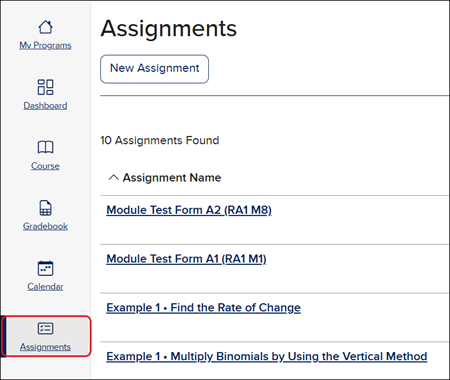
Navigate to the Assignments page.
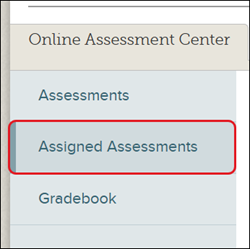
For some courses, you'll need to navigate to the Assessments page and then the Assigned Assessments tab.
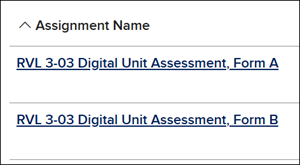
4. Click on the Assignment Name.
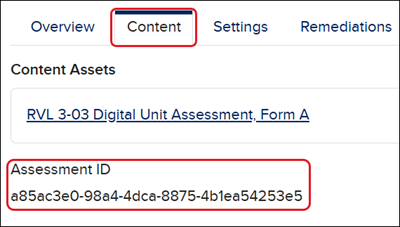
5. Click on the Content tab.
The Assessment ID is located under the Content Assets link.