
McGraw Hill Education Platform Status Center
Check the McGraw Hill Education Platform Status Center for real-time system availability and service updates.
Tags
SSO & Manual-Rostering
Customer Support
Direct Login & Auto-Rostering
School Student
Middle School
Troubleshooting
Direct Login & Manual-Rostering
High School
Classroom Teacher
School Parent
SSO & Auto-Rostering
PreK-12
School Administrator
Preschool
Elementary School


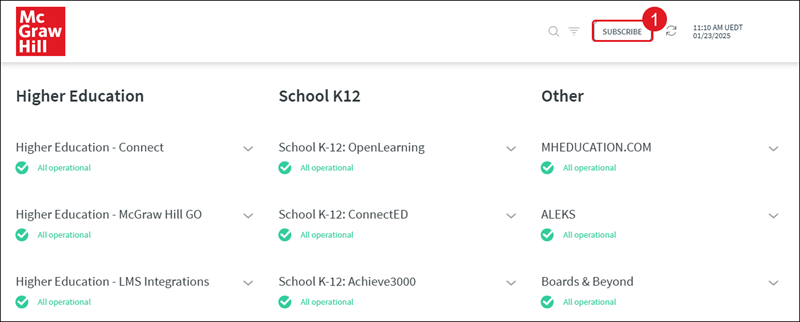
We recently updated the look on our Platform Status Center and recommend subscribing to the site. Get email notifications whenever McGraw Hill Platform Status Center starts, updates, or resolves a critical incident.
To manage your existing subscriptions, visit our Platform Status Center.
1. Click on the Subscribe button at the top of the page.
2. Enter a valid email address.
3. Check the box next to the sites and/or programs you want to receive updates for.
4. Click the Subscribe button.
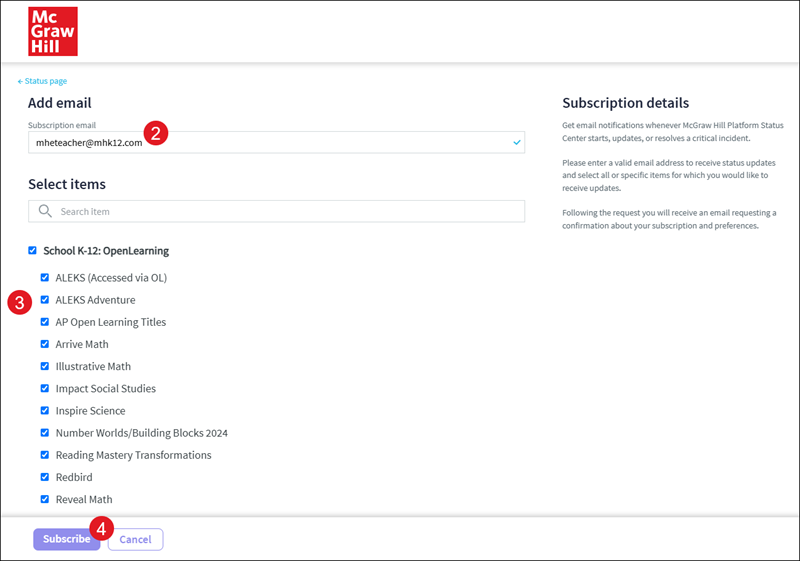
Following the request you will receive an email requesting a confirmation about your subscription and preferences.