Locate the Section Web Address for K-12 Connect® Classes
Locate the web address and QR Code for your K‑12 Connect® section to share with students for registration and access.
- AP Connect
- Getting Started & Orientation
- SSO & Manual-Rostering
- Customer Support
- Direct Login & Auto-Rostering
- Middle School
- Class Management
- Direct Login & Manual-Rostering
- High School
- AP, Honors & Electives
- Classroom Teacher
- SSO & Auto-Rostering
- PreK-12
- Dashboard & Navigation Overview


For a full page view of the demo, click here.
For a Spanish version of the demo, click here.
Note: Student Connect® codes will need to be purchased for students to be able to register for a class. Each section has their own registration information so be sure to provide the correct Section Web Address for each class for students to be able to successfully register for the course.
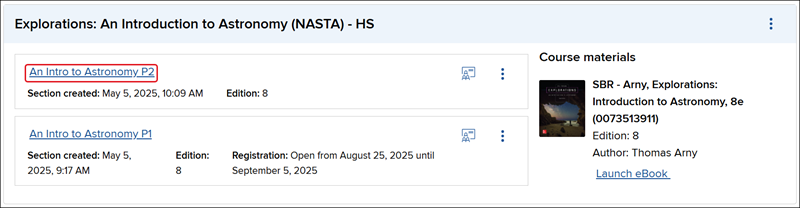
1. From the My Courses page, click on the Section name.
2. In the Section information box on the right of the page, locate the Section registration link section.
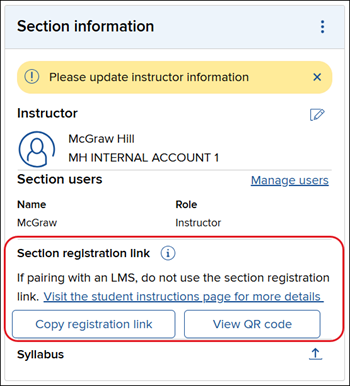
The Copy registration link is recommended if you plan on emailing or messaging the link to your students.
The View QR code will open a pop-up where students can use their phone or other devices to scan the QR code and navigate directly to the registration page for the class. You can also Download the QR code and send it to students.
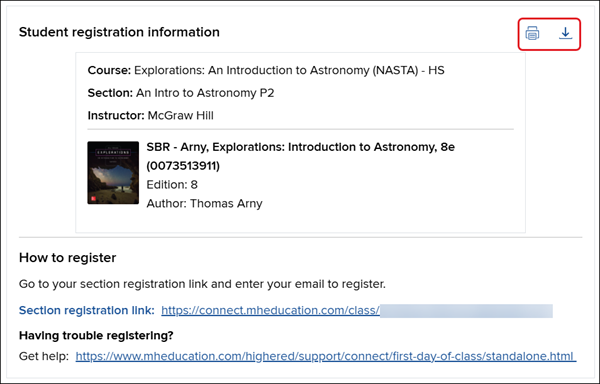
You can also email the registration information to students by downloading the student registration sheet.
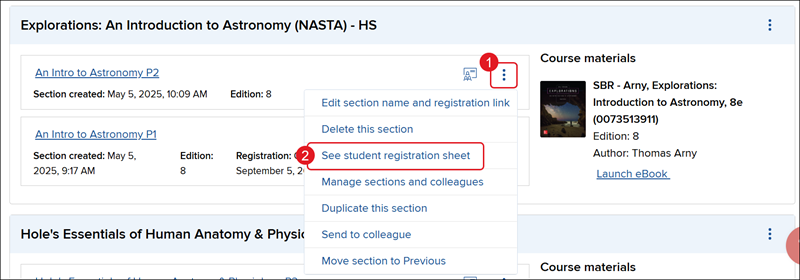
1. From the My Courses page, click on the Section name.
2. Click on See student registration sheet from the menu.
3. On the Student registration information pop-up, you can then Print or Download the registration link and send it to your students.