Support Topics/Classroom & Course Management/Plan & Present
prek-12
2026-03-24T18:49:50.586-03:00
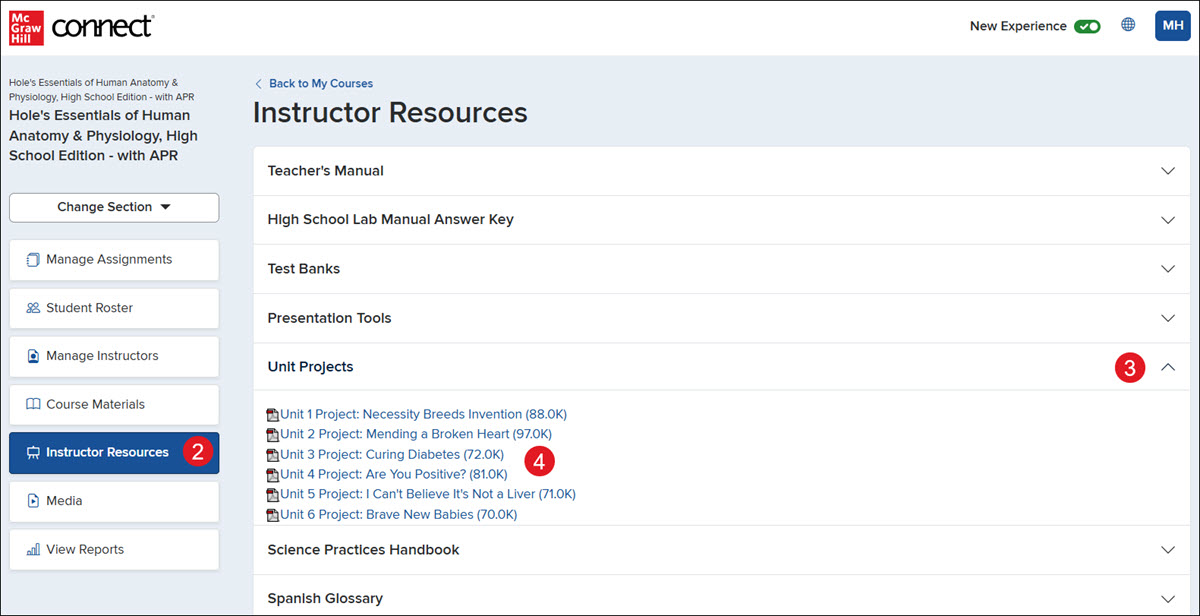
<p>1. Click on the section name.</p> <p>2. Click <strong>Instructor Resources</strong> from the navigation menu.</p> <p>3. Click on a blade to expand the section.</p> <p><strong>Note:</strong> Available resources will vary based on the course materials being used.</p> <p>4. Click on a provided link to open or download the resource.</p> <p><img src="/content/dam/mhe/support/support-images/dts-k12-images/k12-connect-instructor-resources/k12-connect-instructor-resources-2.jpg" data-assetref="k12-connect-instructor-resources-2-1788873376373"></p> dts K-12 Connect Library Resources Overview: step-by-step guidance for Connect, including key requirements, tips, and troubleshooting where needed. 2026-09-08 Access the K-12 Connect® Teacher Resources K-12 Connect Library Resources Overview: step-by-step guidance for Connect, including key requirements, tips, and troubleshooting where needed. Explore the Connect® library resources available for teachers.
Explore the Connect® library resources available for teachers.
1. Click on the section name. 2. Click Instructor Resources from the navigation menu. 3. Click on a blade to expand the section. Note: Available resources will vary based on the course materials being used. 4. Click on a provided link to open or download the resource.
dts
Customer Support, PreK-12, Classroom Teacher, High School, Direct Login & Auto-Rostering, Direct Login & Manual-Rostering, SSO & Auto-Rostering, SSO & Manual-Rostering, AP, Honors & Electives, AP Connect, Tools & Resources, Plan & Present