How to Adjust the Font in Chrome
Learn how to adjust font settings in Google Chrome to fix text display issues when viewing McGraw Hill digital content.
Tags
SSO & Manual-Rostering
Customer Support
Direct Login & Auto-Rostering
School Student
Middle School
Troubleshooting
Direct Login & Manual-Rostering
High School
Classroom Teacher
School Parent
SSO & Auto-Rostering
PreK-12
School Administrator
Preschool
Elementary School


If there is a situation where the text is not showing correctly when viewing your McGraw Hill online materials, you will most likely need to make changes to the font in your browser.
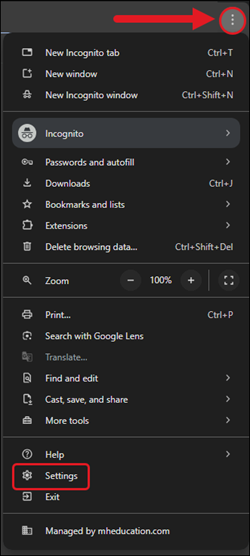
1. Click on the Customize and Control Google Chrome kebob menu at the top-right of the browser.
2. Click on Settings from the menu.
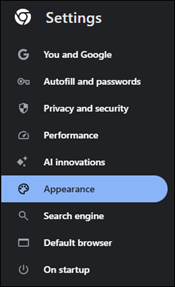
3. Click on Appearance from the lefthand menu.
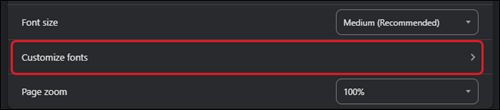
4. Click on Customize fonts at the bottom of the page.
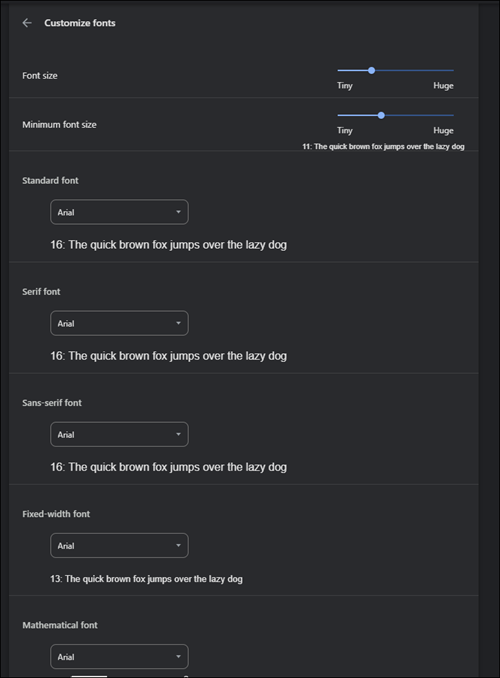
5. Select the desired font for each section. The settings will auto-save your changes.