Locate Glencoe Math eSolutions Manual
Locate and access the Glencoe Math eSolutions manual for instructional support and lesson planning.
- Math
- Getting Started & Orientation
- Glenoce Algebra 2 2018
- SSO & Manual-Rostering
- Customer Support
- Glencoe Math Course 1
- Direct Login & Auto-Rostering
- Glencoe Math Course 2
- Glencoe Math Course 3
- Tools & Resources
- Middle School
- Core
- Direct Login & Manual-Rostering
- High School
- Glencoe Algebra 1 2018
- Classroom Teacher
- SSO & Auto-Rostering
- PreK-12
- Glencoe Math
- Plan & Present


This article will assist in locating the eSolutions Manual for Glencoe Math Course 1, 2, and 3 and Glencoe Algebra 1, 2, and Geometry.
Home Location
1. Launch your Glencoe Math Teacher Edition.
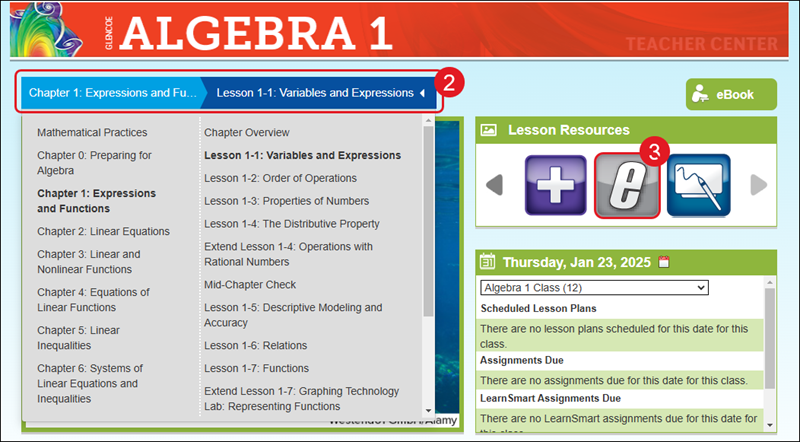
2. Select a Chapter and Lesson from the Navigation Bar.
3. Scroll through the Lesson Resources and click on the eSolutions (e) icon.
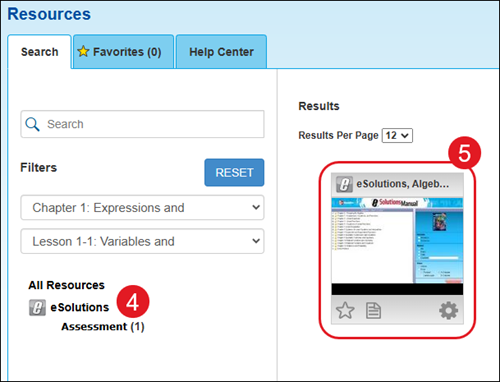
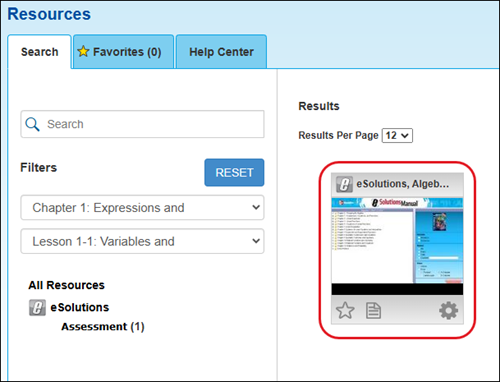
4. Click on the eSolutions tile on the Resources page. The resource will then open in a secondary browser window. If the resource does not open, you will want to double check your browser's blocker settings.
Resources Location
1. Launch your Glencoe Math Teacher Edition.
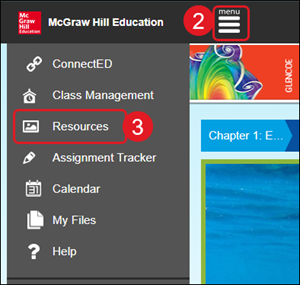
2. Click on Menu at the top-left of the program.
3. Click on Resources on the menu.
4. Click on the eSolutions filter option.
5. Click on the eSolutions tile on the Resources page. The resource will then open in a secondary browser window. If the resource does not open, you will want to double check your browser's blocker settings.