
Unstacking Everyday Mathematics® 4 Lessons in the Planner
Steps on how to unstack Everyday Mathematics® 4 lessons within the planner.
- Math
- SSO & Manual-Rostering
- Customer Support
- Direct Login & Auto-Rostering
- Core
- Plan & Present
- Direct Login & Manual-Rostering
- Classroom Teacher
- SSO & Auto-Rostering
- PreK-12
- Everyday Mathematics 4 (K-6)
- Elementary School
- Middle School
- Kindergarten
- 1st Grade
- 2nd Grade
- 3rd Grade
- 4th Grade
- 5th Grade
- 6th Grade


1. Launch your Everyday Math 4 Teacher Edition.


2. In the upper-left corner of the page, click on the Menu icon.

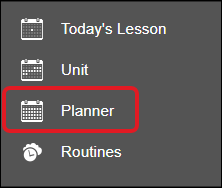
3. Click on Planner from the Navigation menu.
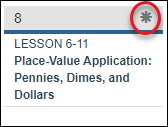
4. Select the star icon on the lesson day you want to adjust.
5. Select Extend Lesson from the pop-up menu.
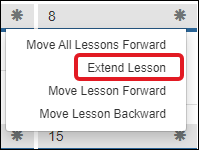
This will extend the lesson into another day so that it spans multiple days.
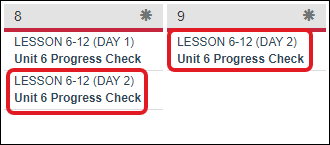
6. On the same daywhere the lessons are stacked, select the star icon again and select Move Lesson Forward.
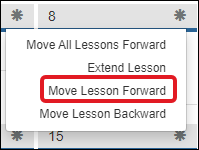
This will condense the lesson into the next day.
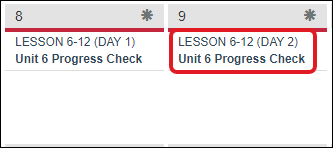
If you have multiple lessons stacked, and you would like to unstack them, follow these steps again until all the lessons are unstacked.
To move the lessons without stacking them, read the article: Everyday Math 4 - Moving Lessons in the Planner .
