Curriculum Administrator - Access District Banks
Access district assessment banks as a curriculum administrator.
- Direct Login & Manual-Rostering
- High School
- SSO & Auto-Rostering
- SSO & Manual-Rostering
- PreK-12
- Customer Support
- Online Assessments
- School Administrator
- Direct Login & Auto-Rostering
- Preschool
- Middle School
- Elementary School


This article walks Curriculum Administrators through accessing District Banks from within the Admin Tools.
For a full page view of the demo, click here.
For a Spanish version of the demo, click here.
You will need to assigned the Curriculum Administrator role to have access to the assessment banks. If you do not yet have an existing account, or if you have an account but not the proper role, reach out to an Organization Administrator in your district. District Organization Administrators can create new accounts and add roles to existing accounts at the district and school levels. School Organization Administrators can only create accounts and add roles for teachers and administrators for the school(s) they are associated with.
1. SSO or sign into your Administrator account at my.mheducation.com.
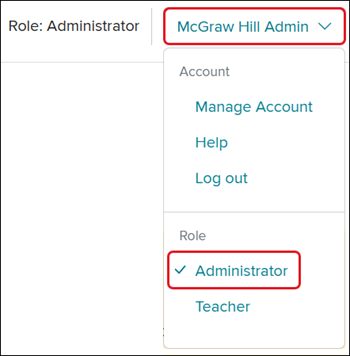
For users that have a Teacher and Administrator role, you will land on your Teacher profile.
To access the Admin Tools, click on the Profile button and select Administrator from the menu.
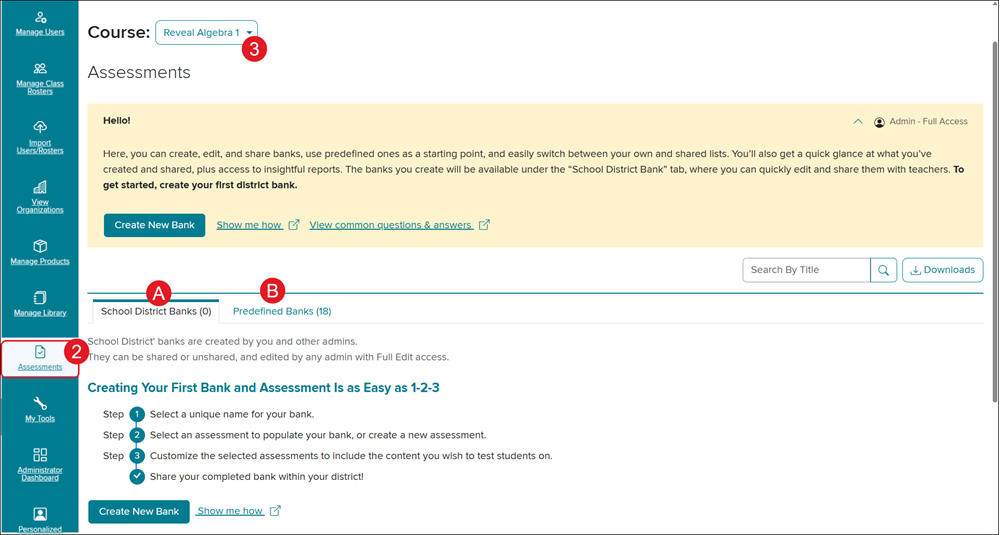
2. Click on Assessments from the navigation menu.
3. Select the program from the Course drop-down.
A. Click on the School District Banks tab to create/access new District Banks.
B. Click on Predefined Banks to access McGraw Hill created assessment banks.