How to Access the McGraw Hill Mobile Apps using Simplified Login
Learn how Simplified Login students sign in to the ConnectED mobile app using pictorial login options.
Tags
- Mobile Apps
- SSO & Manual-Rostering
- Customer Support
- Direct Login & Auto-Rostering
- School Student
- Middle School
- Direct Login & Manual-Rostering
- High School
- School Parent
- SSO & Auto-Rostering
- PreK-12
- Preschool
- Elementary School
- Log-In & Passwords
- Simplified Login
- Classroom Teacher
- Core
- Intervention
- Supplemental
- AP, Honors & Electives
- Literacy
- Math
- Science
- Social Studies
- Health
- Visual & Performing Arts
- World Languages


The McGraw Hill K-12 Portal and ReadAnywhere apps, when launched outside of the browser, can only accept regular usernames and passwords.
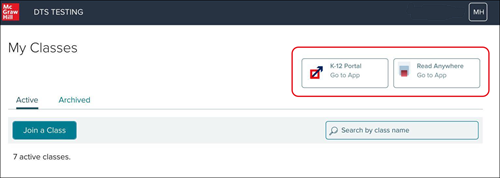
However, Simplified Login students can use the browser on their mobile device (such as Safari on an iPad, or Chrome on an Android device) to launch their account. After logging in to their account via their class Simplified Login page, click/tap the McGraw Hill K-12 Portal or ReadyAnywhere button at the top of the page to open the appropriate app. Students will be automatically signed in.
Note: If they do not yet have the app, they can use this article to download the app on their device.