
Activate All Sorts Online Program
Instructions for students on how to activate the All Sorts 2024 program.
Tags
- PreK-12
- Customer Support
- School Student
- School Parent
- Elementary School
- Direct Login & Auto-Rostering
- Direct Login & Manual-Rostering
- SSO & Auto-Rostering
- SSO & Manual-Rostering
- Supplemental
- Literacy
- All Sorts 2024 International
- Account Management
- Getting Started & Orientation
- Log-In & Passwords


To activate All Sorts Online you will need:
A. An All Sorts Online activation code. This will be in our book or provided by your school.
B. An account for All Sorts Online. Please ask your teacher for help if you don't have an account.
Steps to Activate All Sorts Online:
1. Log in to All Sorts Online.
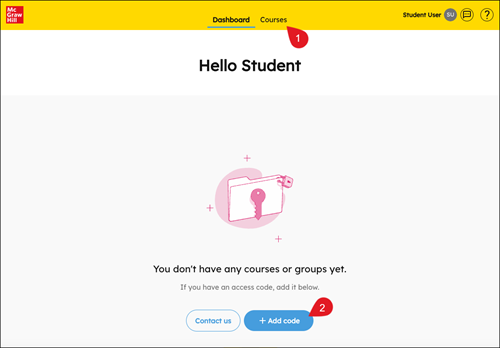
2. Click on Courses (1) then click the Add code button (2).
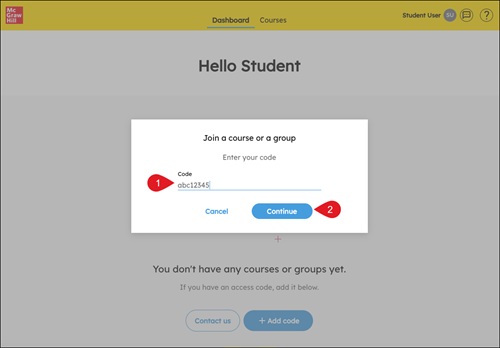
3. Type in the All Sorts Online activation code (1) and click Continue (2).
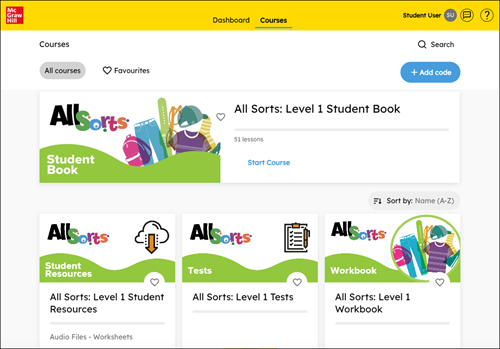
4. Your All Sorts books will now appear in the Courses area.
If you have any problems with this, please contact your teacher.
