
Student Not Showing in ALEKS Roster
Learn how to troubleshoot when a student is not showing in the ALEKS roster, including verifying Open Learning rostering and student launch steps.
- Customer Support
- PreK-12
- Classroom Teacher
- Elementary School
- Middle School
- High School
- Direct Login & Auto-Rostering
- Direct Login & Manual-Rostering
- SSO & Auto-Rostering
- SSO & Manual-Rostering
- Supplemental
- Math
- ALEKS
- ALEKS Adventure
- Class Management
- Getting Started & Orientation
- Back-to-School Setup


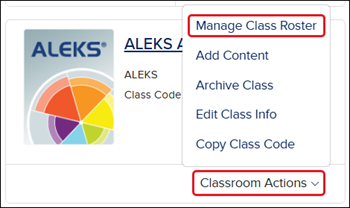
When students are added to your roster in Open Learning, they are automatically rostered into the ALEKS program. If you don't see students within your ALEKS roster who should be listed, you first want to make sure that you have rostered the student by clicking on the Classroom Actions button on your ALEKS course from the My Programs page and clicking on Manage Class Roster from the menu.
For steps on rostering students, see the Add and Remove Students from ALEKS Class Roster article.
If you've verified that the student is rostered in the class roster on Open Learning, but they are still not showing within the ALEKS roster, have the student launch their ALEKS course. Once the student has successfully launched their ALEKS course, refresh your teacher page or relaunch ALEKS.
If the student is still not showing in your ALEKS course after following these steps, you will need to contact our PreK-12 support team for further assistance.
