
Classic ALEKS Dashboard Navigation Overview
Navigate the classic view of the ALEKS dashboard to access classes, reports, and instructional tools.
- Customer Support
- PreK-12
- Classroom Teacher
- Elementary School
- Middle School
- High School
- Direct Login & Auto-Rostering
- Direct Login & Manual-Rostering
- SSO & Auto-Rostering
- SSO & Manual-Rostering
- Supplemental
- Math
- ALEKS
- Getting Started & Orientation
- Dashboard & Navigation Overview


Dashboard Overview
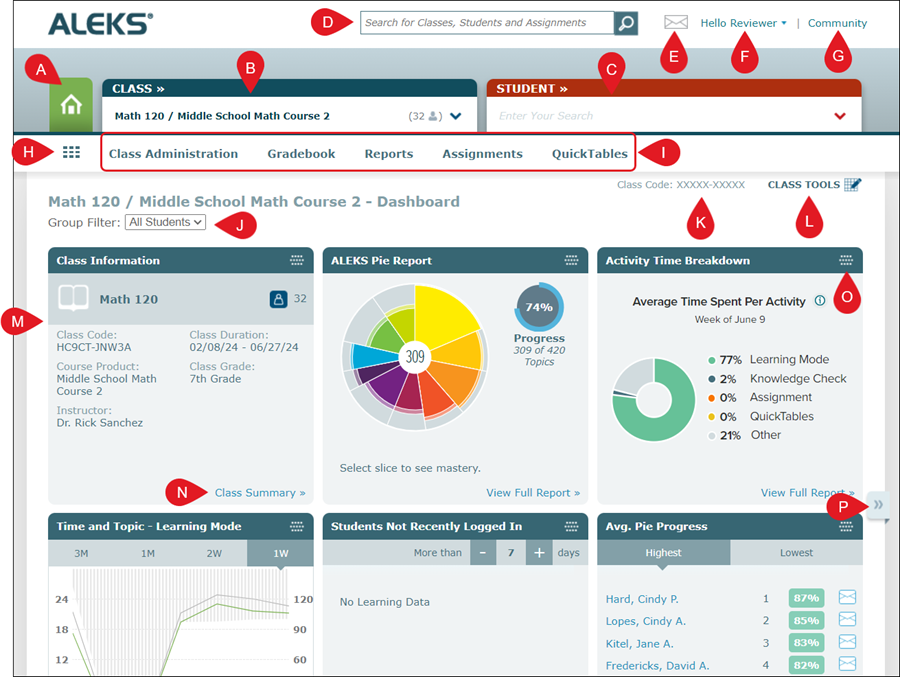
A. Instructor Dashboard Home button - click to navigate back to the default home page where no class is selected.
B. Class drop-down - where the list of classes and sub-classes can be found.
C. Student drop-down - lists the students rostered to the selected class.
D. Search - Locate information on classes, students, and assignments.
E. Message Center - click the envelope icon to send and receive any messages from students and the ALEKS team.
F. Profile drop-down - provides access to the settings, Message Center, and additional help links.
G. Community - a forum for educators to share ideas and collaborate with their colleagues.
H. Class/Student Home button - navigates you back to the home page for the class or student you have selected.
I. Navigation Menu - hover over the different menu headers to access additional pages.
J. Group Filter - easily navigate between any created groups.
K. Class Code - every class has its own class code specific for ALEKS. This code only shows when a class is selected. Note: This code is different from the class code found on your My Programs page.
L. Class Tools - access to quick links to the Forum, Calendar, Resources, and Student View.
M. Dashboard Tiles - the class tiles provide an overview of different reports and class details.
N. Tile Links - click the associated link located at the bottom-right of a class tile to navigate to that page to view additional details.
O. Move selector - click the icon in the top-right of a tile to move the tile to another location on your dashboard.
P. Page Navigator - click the arrows to the side of the dashboard to navigate through the different groups of tiles.
Instructor Dashboard
The instructor dashboard provides overall information about all classes assigned to the instructor and how many total students are assigned to the classes combined. The dashboard also includes tiles such as Announcements, Recently Viewed Classes, Students Not Recently Logged In, Pie Progress by Class, and the Time & Topic Report.
The instructor dashboard menus include Instructor Administration, Reports, and Insights.
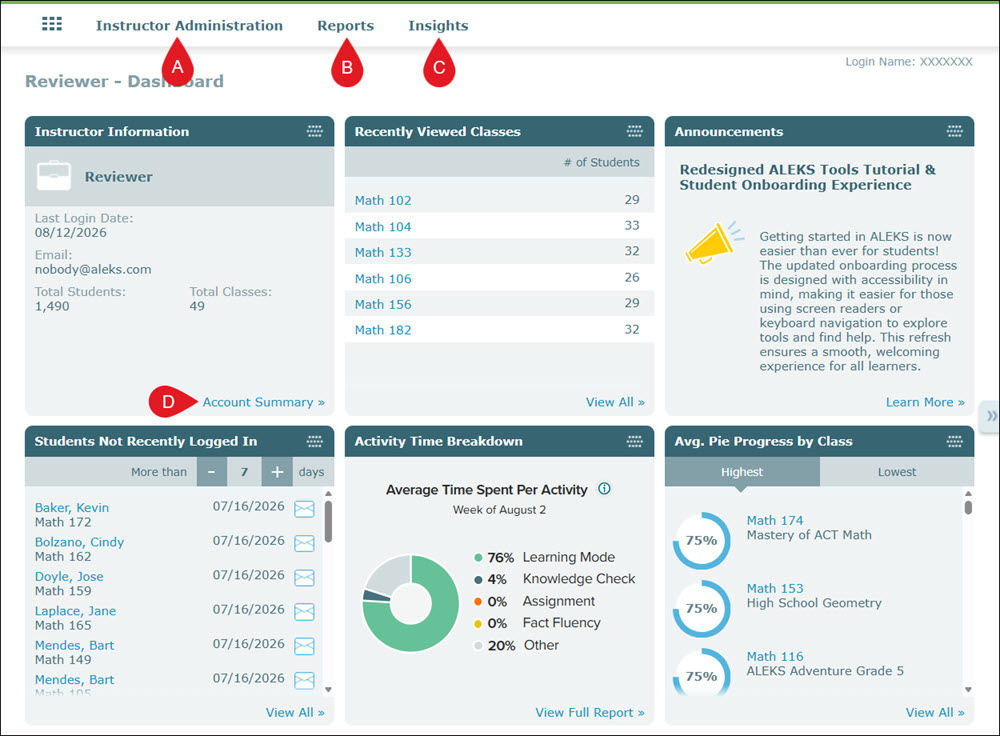
A. The Instructor Administration menu provides links to pages such as your class list and student roster.
B. The Reports menu includes links to Activity Time Breakdown and Custom Reports.
C. The Insights menu includes links to Failed Topics, Decreased Learning, Unusual Learning, and Procrastination page options.
D. Click on the associated link on a tile to navigate to the page for that option for additional details and data.
Class Dashboard
The class dashboard provides class information that includes the ALEKS Class Code, the Class Duration, and the Course Product assigned to the class. It has tiles that include an overall ALEKS Pie report for the class, an Activity Time Breakdown, Time and Topic report, topic breakdowns, and a list of Assignments.
The Class menus include Class Administration, Gradebook, Reports, and Assignments. The QuickTables menu is available for select courses.
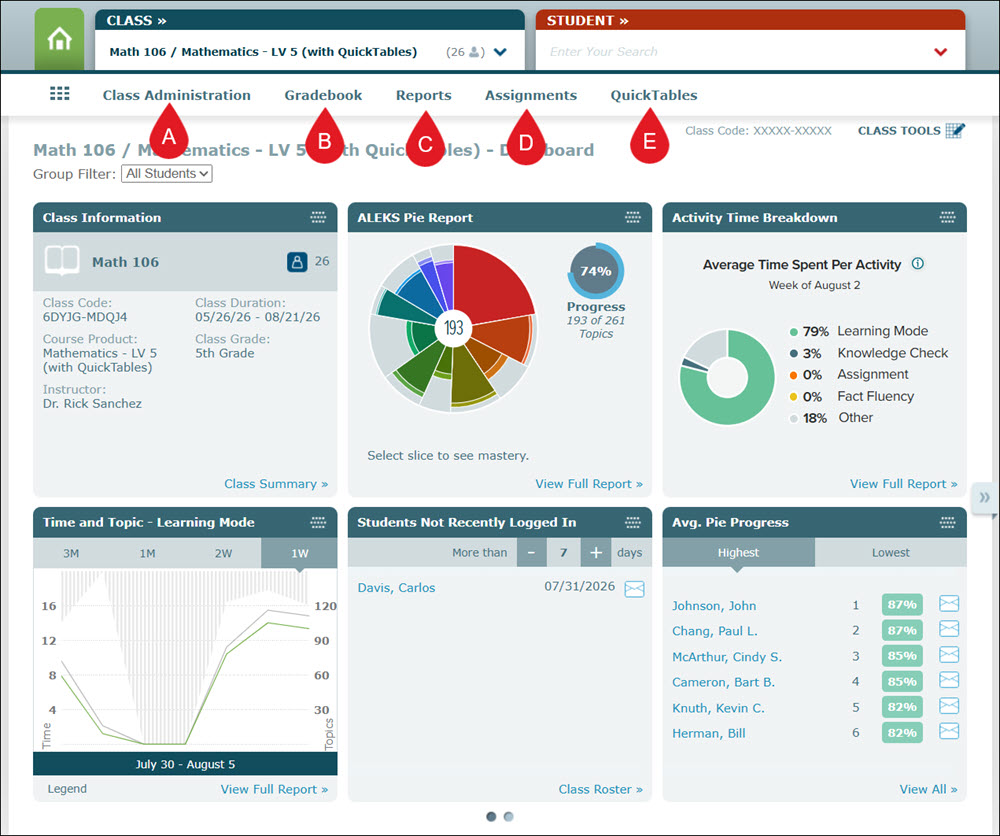
A. The Class Administration menu provides links to easily navigate to pages such as the Class Summary, Class List, and Class Roster.
B. The Gradebook menu provides access to set up the gradebook. Once the gradebook has been activated, the menu will also include options to the Class Gradebook and the Gradebook Log.
C. The Reports menu gives access to various reports, including Progress, Time & Topic, Activity Time Breakdown, Assignments, Standards, QuickTables, and more.
D. The Assignments menu provides access to manage Assignments and Worksheets.
E. The QuickTables menu includes links to manage and assign QuickTables for students to complete. This is only available for select programs.
Student Dashboard
The student dashboard provides account Information for the student, their ALEKS Pie data, Assignments, their Week's Pie Activity, Time and Topic report, and topics that they are ready to learn and need more practice on, among other information for the selected student.
The student dashboard menus include Student Administration, Reports, and Assignments. The QuickTables menu is available for select courses.
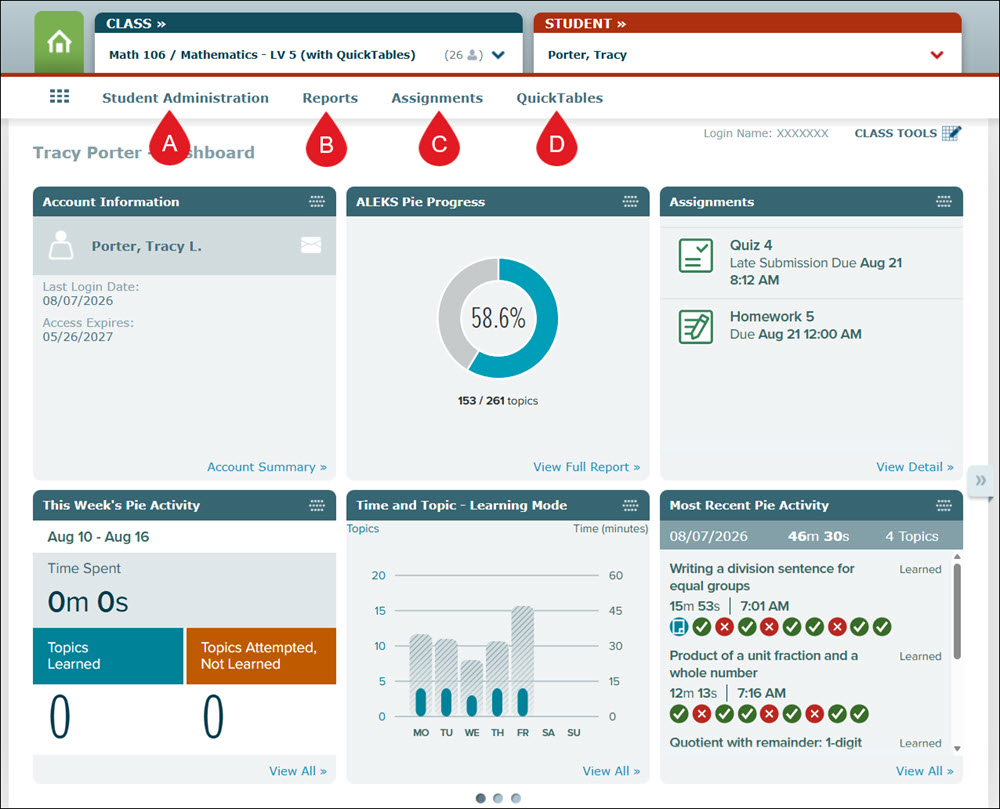
A. The Student Administration menu provides links to their account summary, moving them to another class, and the Cleanup Tool.
B. The Reports menu gives access to various reports including Progress, Time & Topic, Assignments, Standards, QuickTables, and more.
C. The Assignments menu includes access to managing Exceptions, Worksheets, and Class Assignments for the student, as well as being able to request or delay a Knowledge Check.
D. The QuickTables menu includes links to manage QuickTables for the selected student. This is only available for select programs.
