Classic ALEKS Class Duplication Settings
Allow class duplication in ALEKS to reuse course structure and settings.
- Customer Support
- PreK-12
- Classroom Teacher
- Elementary School
- Middle School
- High School
- Direct Login & Auto-Rostering
- Direct Login & Manual-Rostering
- SSO & Auto-Rostering
- SSO & Manual-Rostering
- Supplemental
- Math
- ALEKS
- ALEKS Adventure
- Class Management


View the demo in a separate tab.
View the Spanish version of the demo.
The Class Duplicate Settings option within ALEKS allows other teachers to duplicate your class settings to use when setting up their own class. This option is turned set to Private by default. Once you have made your class Public, teachers will be able to follow the steps in the create sub-class article to copy the class into their own.
1. SSO or log in at my.mheducation.com.
2. Launch ALEKS.
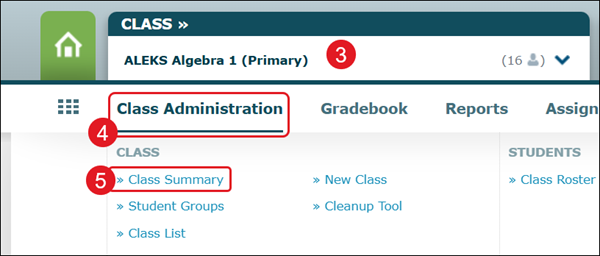
3. Select the Class from the drop-down.
4. Hover over Class Administration.
5. Select Class Summary from the menu.
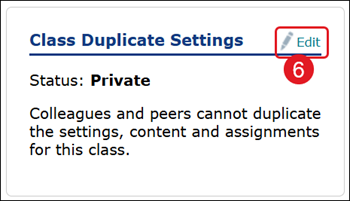
6. Locate Class Duplicate Settings and click Edit.
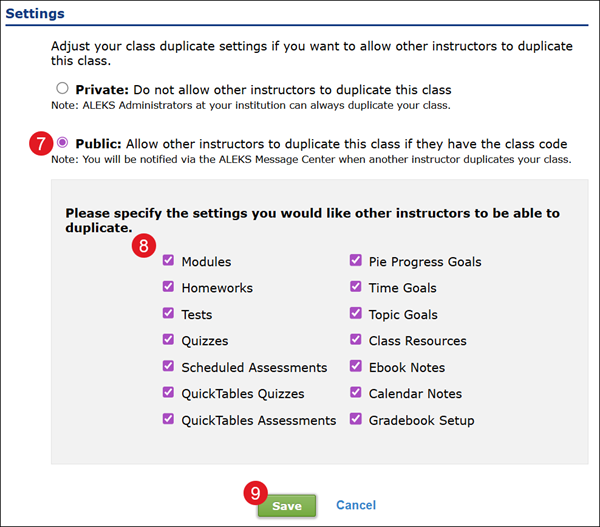
7. Select the radio button next to Public.
8. Check/uncheck the settings to share with other teachers.
9. Click the Save button.