Add Co-Teachers to K-12 Connect® Sections
Add additional teachers to your Connect sections to assist with teaching.
Tags
- Customer Support
- PreK-12
- Classroom Teacher
- High School
- Direct Login & Auto-Rostering
- Direct Login & Manual-Rostering
- SSO & Auto-Rostering
- SSO & Manual-Rostering
- AP, Honors & Electives
- AP Connect
- Class Management


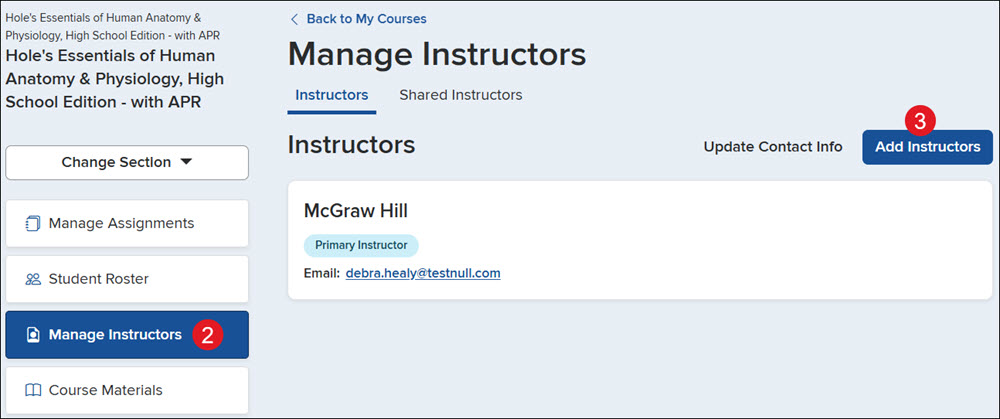
1. Click on the Section name.
2. Click on Manage Instructors from the left-hand menu.
3. Click the Add Instructors button.
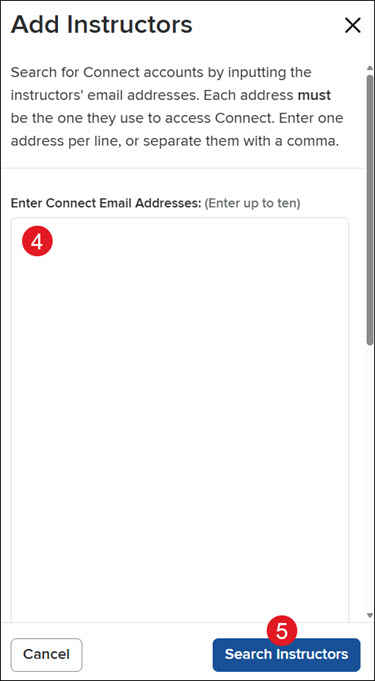
4. On the Add Instructors panel, enter up to 10 email addresses.
Note: The email address needs to match the email that the teacher uses to sign in to Connect.
5. Click the Search Instructors button.
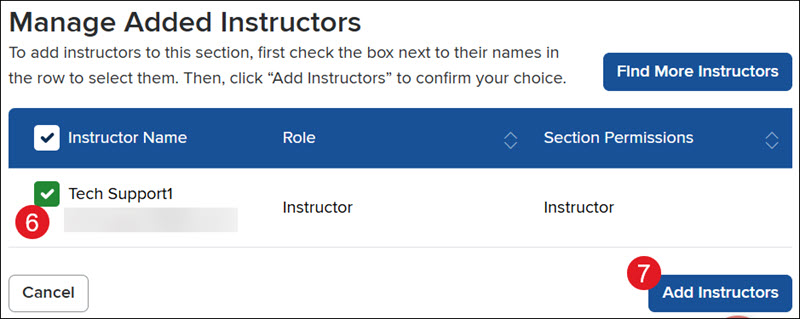
6. Checkmark the teacher(s) you want to add to the section.
A. Click the Find More Instructors button to add additional emails.
7. Click the Add Instructors button.