Actively Learn - Student Text Settings
Adjust student text settings in Actively Learn to customize the reading experience.
Tags
Supplemental
Resources
Getting Started & Orientation
Literacy
Actively Learn
SSO & Manual-Rostering
Customer Support
Social Studies
Direct Login & Auto-Rostering
School Student
Middle School
Direct Login & Manual-Rostering
High School
School Parent
SSO & Auto-Rostering
PreK-12
Science
Preschool
Elementary School


Students have the ability to customize how they experience texts on Actively Learn.
In their workspace and in their assignments in classes teachers can change text settings to better suit their working environment. Students can do the same in an assignment from their class view.
Note: PDF's do not include text settings.
- Select the text.
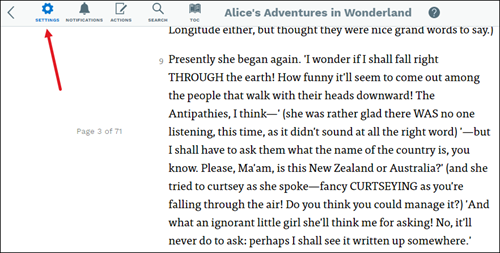
- Select Settings.
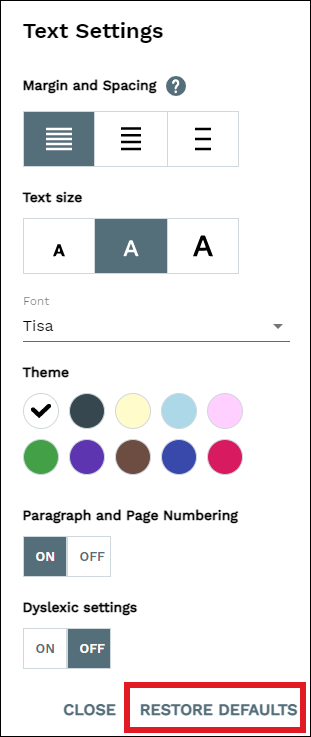
- Personalize the spacing, font size, color scheme, paragraph numbering, and font. You can Restore Defaults from this menu, too.
Dyslexic settings
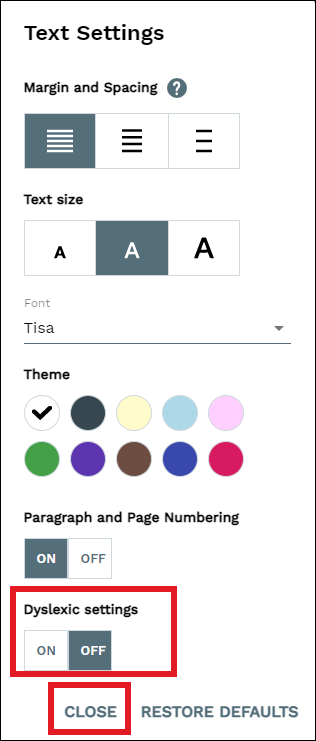
Actively Learn offers dyslexic settings, which use a font created to increase readability for readers with dyslexia. Students can access these settings by selecting Settings, turning on the dyslexic settings, and then hitting close in the text settings window.