
Pay for Rental Texts in Actively Learn
Learn how Actively Learn invoice requests work and how administrators can pay for text rental licenses using a purchase order.
- PreK-12
- Customer Support
- School Administrator
- Elementary School
- Middle School
- High School
- Direct Login & Auto-Rostering
- Direct Login & Manual-Rostering
- SSO & Auto-Rostering
- SSO & Manual-Rostering
- Supplemental
- Literacy
- Science
- Social Studies
- Actively Learn
- Products & Licenses


When teachers submit for purchasing text rental licenses, this sends a request to their administrator for them to purchase the licenses. From here, administrators can easily pay using a purchase order.
After an administrator receives an email, like the example shown below, all they need to do is simply click the blue Pay now button. This will navigate to a secure payment page. Once payment is complete, the rental texts will be immediately available in the requesting teachers account.
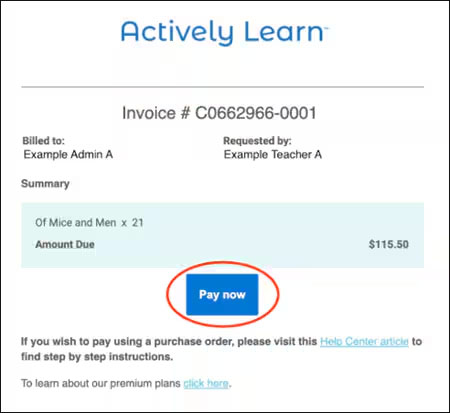
To pay with a PO, treat the email invoice as an official quote. Using this “quote” have your purchasing department or administrator create a purchase order payable to Actively Learn. When making your PO, you must be sure to include the invoice number referenced at the top of the quote (the number circled in red in the example below). In order for our team to process your PO, it must include that invoice number.
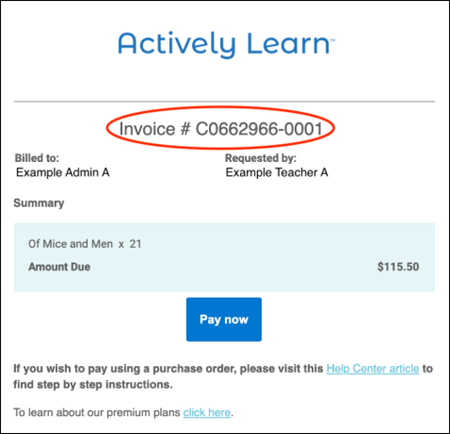
Please note, any PO sent to our team that does not reference an invoice number will not be processed by our team and will result in a delay in the requested texts being added to the teachers Actively Learn account.
Purchase orders should be sent to our team at help@activelylearn.com. Purchase orders with all of the necessary information are typically processed within 24 hours of receipt, and an official invoice will be issued shortly after. Payment should not be submitted until you have received an official invoice from our team that will reference your purchase order number.