
Invite Colleagues to Co-Author Actively Learn Assignments
Learn how teachers co-author Actively Learn assignments to collaboratively design texts, questions, and instructional activities.
- Customer Support
- PreK-12
- Classroom Teacher
- Elementary School
- Middle School
- High School
- Direct Login & Auto-Rostering
- Direct Login & Manual-Rostering
- SSO & Auto-Rostering
- SSO & Manual-Rostering
- Supplemental
- Literacy
- Science
- Social Studies
- Actively Learn
- Grades & Assignments


When you want to have multiple teachers work together to add embedded materials into an assignment, it's best to use the co-author option available within Actively Learn.
Note: The original creator of an assignment has the ability to remove invited co-authors. If invited co-authors want to edit their own copy, they will want to duplicate the assignment.
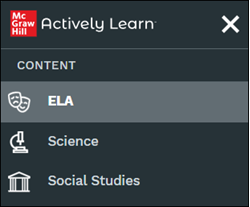
1. Click Menu at the top-left.
2. Click on a subject from the Content section.
Note: The available options depends on what was purchased by the district.
3. Click on a resource tile.
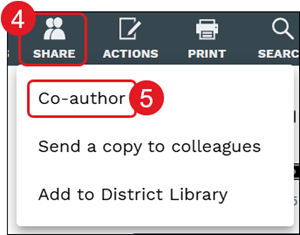
4. Click the Share button in the toolbar.
5. Click on Co-author from the menu.
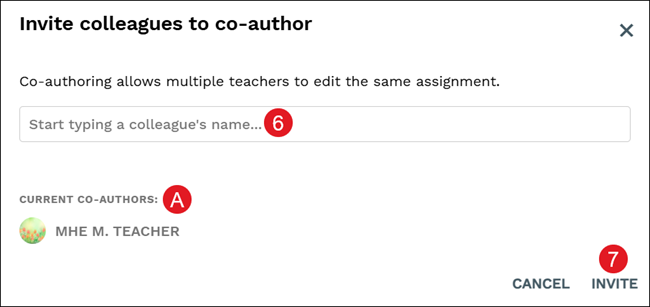
6. Type a colleague's name in the provided field and select their name from the list. You can add as many co-authors as you would like.
A. All co-author's will be listed, including the original owner.
7. Click the Invite button.
Users that were invited to co-author the assignment will receive an email advising of them being added.
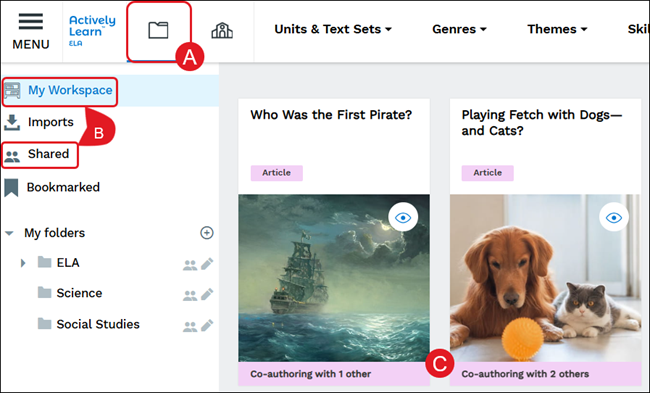
All co-authored resources can be located by navigating to My Workspace & Imports (folder icon) (A). They can be found on the My Workspace or Shared pages (B).
Each resource that has been selected to co-author will show with a banner (C) across the bottom of the resource tile.
For steps on customizing assignments, refer to the Customize Actively Learn Text Assignments and Customize Actively Learn Video Assignments articles.
