Actively Learn - Assignment Data
Analyze assignment data in Actively Learn to understand student performance, participation, and reading behaviors.
Tags
- Supplemental
- Getting Started & Orientation
- Literacy
- Actively Learn
- SSO & Manual-Rostering
- Customer Support
- Grades & Assignments
- Social Studies
- Direct Login & Auto-Rostering
- Middle School
- Direct Login & Manual-Rostering
- High School
- Classroom Teacher
- SSO & Auto-Rostering
- PreK-12
- Science
- Preschool
- Elementary School


Information about student performance is generated when they interact with text and assignments are graded. Assignment data gives you a great overview of how your class, or individual students, are doing for that assignment.
For each assignment, you can see information about how your students are engaging with texts.
- Select a class from the main menu, then click the Assignment tab. Click on the assignment you want to see the data for.
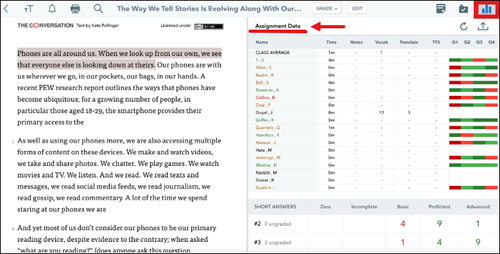
- Within the assignment, select the Assignment Data icon.
The data includes:
- How much time students have spent reading the assignment
- How many notes they have taken in the text
- How your class is doing on each question
- Where & what your students are discussing in the text (based on replies to shared notes) in the discussion panel
- What words your students are defining in the text
- What words your students are translating in the text
- How many times your students are using the text to speech in the text
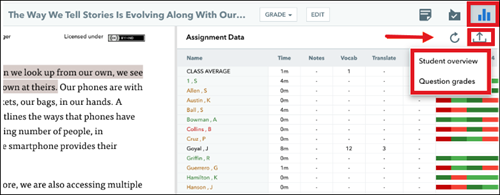
Export Grades
If you need to export your grades to a spreadsheet, just select the export icon in your assignment reports.
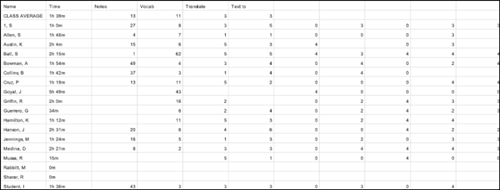
Student overview export includes:
- Name
- Reading time
- Notes
- Vocabulary lookups
- Translation lookups
- Text to Speech
- Questions answered
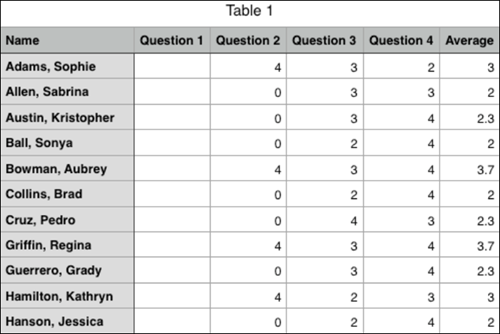
Question grades export include:
- Name
- Grade for each question
- Average grade for each student