
Access and Use NWEA® MAP® Data in Achieve3000 Literacy
Learn how teachers can access their NWEA® MAP® Growth data in Achieve3000 Literacy.
- PreK-12
- Customer Support
- Classroom Teacher
- Elementary School
- Middle School
- High School
- Direct Login & Auto-Rostering
- Direct Login & Manual-Rostering
- SSO & Auto-Rostering
- SSO & Manual-Rostering
- Supplemental
- Literacy
- Achieve3000 Literacy
- NWEA
- Reports & Analytics


Article Contents
Frequently Asked Questions (FAQ)
Import Instructions
If your school/district has purchased the NWEA® MAP® Assessment integration, you can manually import your student data into Achieve3000 Literacy and take advantage of the Informed Learning Paths. To import NWEA MAP data, you'll need to reach out to your District or School Administrator.
Access and Use NWEA MAP Data
Access Report
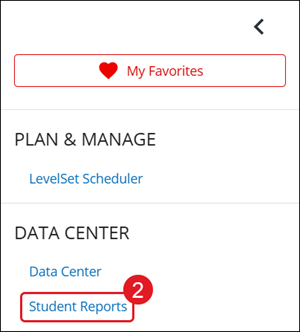
1. Click to Open side menu.
2. Click on Student Reports.
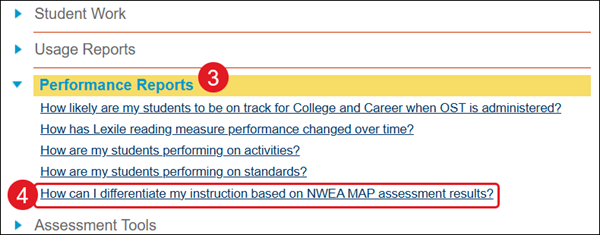
3. Expand the Performance section.
4. Click the How can I differentiate my instruction based on NWEA MAP assessment results? report link.
5. Select the class from the drop-down.
6. Click the View Report button.
Navigating NWEA Data
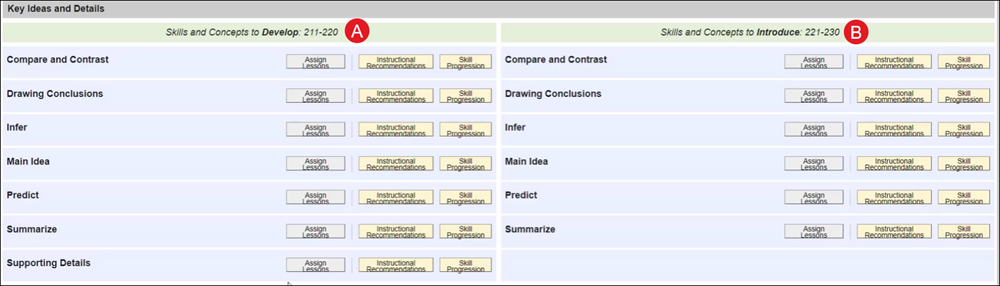
Data is broken down by RIT bands. Informed learning path provides information on which students are ready to learn specific skills to help differentiated instruction and skill groups.
The left side contain skill sand concepts to develop (A), while the right side provides a list of skills and concepts to introduce (B).
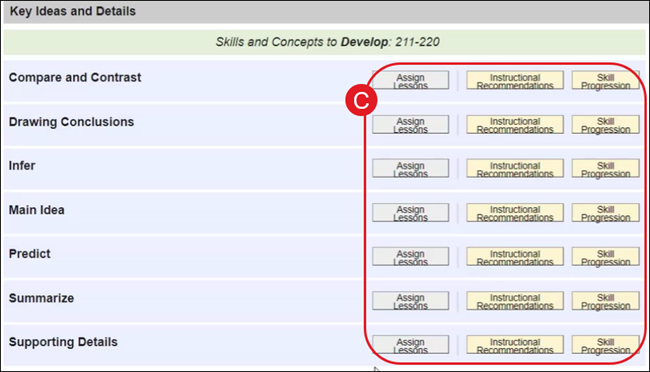
Each skill provides options to Assign Lessons, view Instructional Recommendations, and view Skill Progression (C).
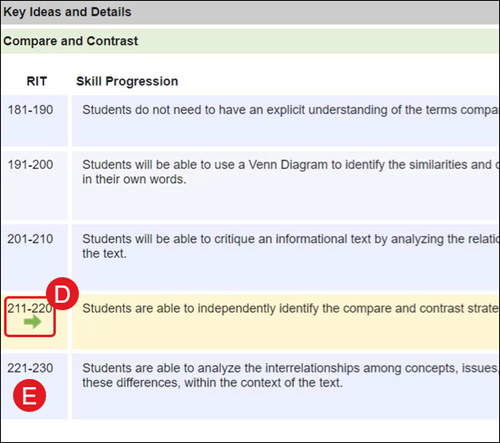
Click on the Skill Progression button to see a full list of progression for RIT bands. The current level is marked with a green arrow (D). The next RIT band down is what can be introduced to students (E).
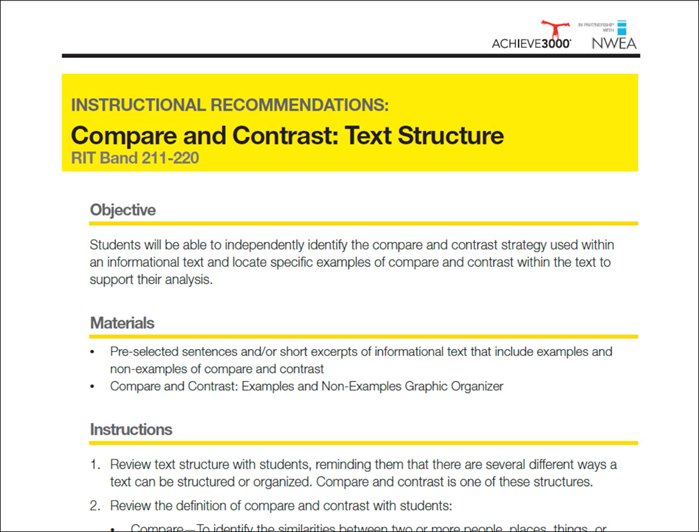
The Instruction Recommendations include a complete lesson plan with a corresponding graphic organizer.
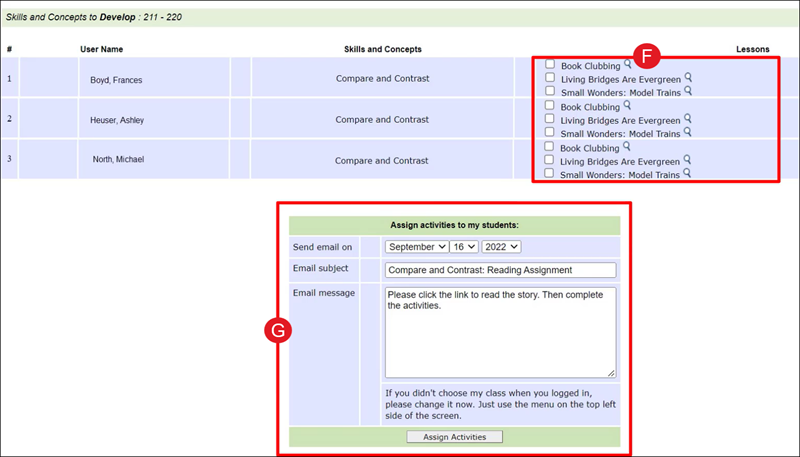
The Assign Lessons option provides a list of lessons (F) for each student that have not been read or assigned to the student. These will provide the student with more practice for the skill.
G. Select the date from the drop-downs and add any necessary instruction in the Email message, then click the Assign Activities button.
Frequently Asked Questions (FAQ)
Achieve3000® has joined forces with Northwest Evaluation Association™ (NWEA™) to develop a powerful new integration that will allow educators to create MAP® Informed Learning Paths. This product combines the differentiated instruction of Achieve3000 with the skills and concepts measured by Measures of Academic Progress® (MAP) Interim Assessments and required for College and Career Readiness.
What is NWEA?
NWEA stands for Northwest Evaluation Association. It is a not-for-profit organization whose research-based assessments, professional development, and alliances with researchers and community groups support educators in the U.S. and beyond. Their flagship product, Measures of Academic Progress (MAP) Interim Assessments, provides educators with research-based data that inform and advance student learning on Common Core standards. You can learn more about NWEA at NWEA.org.
What is MAP Assessment?
MAP stands for Measures of Academic Progress. It is a computer adaptive interim assessment from NWEA used by educators across the world to measure student academic growth and achievement. MAP is a cross-grade assessment; it adapts to each student’s learning level rather than only measuring answers to grade level questions. Using MAP three times a year—in the fall, winter and spring— allows teachers to use MAP data to differentiate instruction during the school year. Each student’s performance on the test is measured by his or her RIT score for each skill.
What is a RIT score?
MAP assessments use an equal-interval scale known as the RIT scale (for Rasch Unit) to measure student achievement and growth. The RIT scale, based on Item Response Theory, was developed by NWEA over 30 years ago and is a proven, stable scale for educational assessment. The RIT scales are continuous across grades, making them ideal to study student achievement and growth both within a school year and across many years. The RIT value of a test item is obtained using a rigorous calibration process in which each item is field tested with thousands of students across the nation. Student responses on these items are used to generate a final RIT score for each student. The numerical (RIT) value assigned to a student represents the level of test item complexity at which he or she is capable of answering correctly about 50% of the time. It is simply the most accurate way to pinpoint a student’s readiness for new concepts.
What is a Comprehensive Data File?
The Comprehensive Data File (CDF) is the file that NWEA provides to your district or school with your MAP assessment results. It breaks down the RIT scores for each student for each goal and the set of skills associated with that goal.
How can NWEA data be imported into Achieve3000?
NWEA data can be imported through a CDF file, or through the NWEA API for Clever customers.
Who can configure NWEA data to be imported through the API?
Users with a role of District Assessment Coordinators in the NWEA MAP Growth Administration tool can enable NWEA data sharing to Achieve3000 through the NWEA API.
Who imports the CDF file into Achieve3000?
The district or school administrator usually imports the CDF file into Achieve3000’s system. A teacher could also do the import if authorized by your administration.
Why does my administrator need to import the CDF file into Achieve3000?
Administrators must import that CDF into Achieve3000 in order to generate the “Class Breakdown by RIT” report.
Will the CDF import correctly if there are math skills and math RIT scores included?
Yes, the import tool will ignore the math skill and math RIT scores and only import the reading skills and reading RIT scores.
When is the CDF imported?
The CDF is imported after NWEA reports your MAP assessment results. When the CDF is imported, the results from the previous assessment will be overwritten in the system so that only the latest assessment results are used.
How is the CDF used to create the correlation to Achieve3000 lessons?
Student results in the CDF are imported into the Achieve3000 system by using our import feature. The data is then organized and used to create a MAP Informed Learning Path.
What is a MAP Informed Learning Path?
The MAP Informed Learning Path displays for the group of students the teacher has selected from the Class Breakdown by RIT report. This is where the teacher has access links to assigned lessons and views Instructional Recommendations and the Skills Progression for each skill for the student RIT range. These links are created by correlating content based on the Achieve3000 standards to the skills for the goal.
Why do you provide a Class Breakdown by RIT?
The results from the CDF are used to group the students in a class according to their RIT score to facilitate assigning lessons to students at the same level.
What information do the Instructional Recommendations and Skills Progressions give for each skill in the MAP Informed Learning Path?
The Instructional Recommendations for each skill provide additional activities for the teacher to assign to the students working on that skill. The Skills Progression is a hierarchy of the skills by RIT range. This provides the teacher with a brief description of what is covered for the skill at each RIT range.
Do you have content correlated to the Literary Reading goal that is included in the MAP assessment?
Achieve3000 content does not correlate to the Literary Reading goal in MAP assessments because it is based on fiction and literary text. Achieve3000 primarily focuses on nonfiction, informational text.
