
View Completed Student Achieve3000 Literacy Work
View student work in Achieve3000 Literacy to monitor completion and progress.
- Customer Support
- PreK-12
- Classroom Teacher
- Elementary School
- Middle School
- High School
- Direct Login & Auto-Rostering
- Direct Login & Manual-Rostering
- SSO & Auto-Rostering
- SSO & Manual-Rostering
- Supplemental
- Literacy
- Achieve3000 Literacy
- Grades & Assignments


From within the teacher view of the lesson, to view a specific student's work, select the user from the Students drop-down.
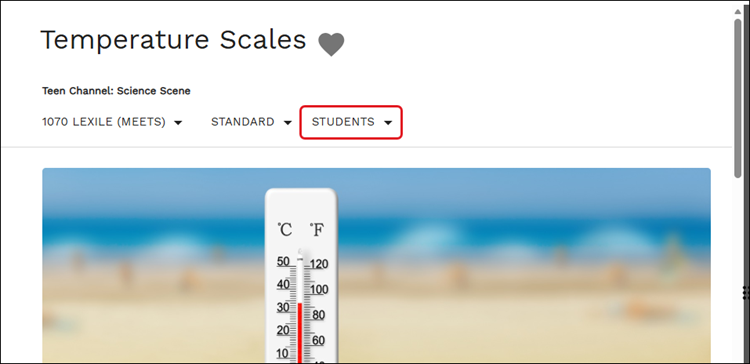
A secondary web page will open with the selected student's work.
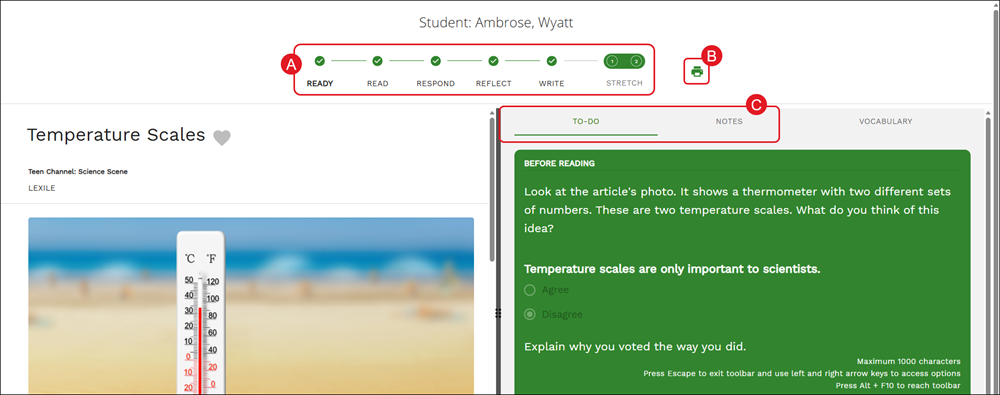
A. Click on the lesson points to navigate between the different questions the student answered.
B. Click the Print icon to save/download the lesson article and questions.
Note: Printing the lesson on this page does not include the answers that the student submitted for the lesson, but it does include the Poll results.
C. Click between the To-Do and Notes tabs to view student responses to questions and notes entered by the student.
To view reports for lessons completed by students, refer to the Navigating Achieve3000 Literacy Student Reports article.