
Achieve3000 Literacy - Identifying Students Who Have Not Yet Taken LevelSet
Identify students who have not yet taken the Achieve Literacy LevelSet placement assessment.
- Supplemental
- Getting Started & Orientation
- Literacy
- SSO & Manual-Rostering
- Customer Support
- Online Assessments
- Direct Login & Auto-Rostering
- Middle School
- Direct Login & Manual-Rostering
- High School
- Classroom Teacher
- SSO & Auto-Rostering
- PreK-12
- Preschool
- Achieve3000 Literacy
- Elementary School


Students should complete the LevelSet assessment before accessing any content on the Achieve3000 system. Without taking LevelSet, the content will not be differentiated to the student's unique lexile level.
Follow these steps to identify students who have not yet taken the test:
1. From the Teacher Dashboard, click to open the Side Menu.
2. Select Student Reports from the menu under the Data Center section.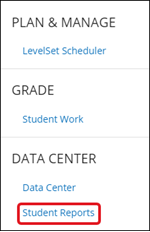
You can also access the Student Reports page by clicking on your name at the top right of the page, and selecting Reports from the menu.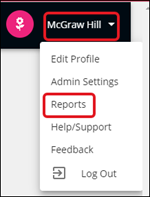
3. Click the arrow next to the Assessment Tools section. Select Which of my students have not taken LevelSet? from the menu.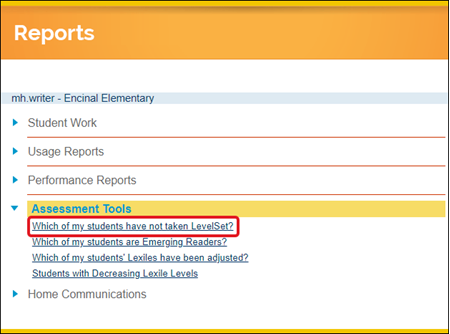
A list of students will appear that have not yet started or are in progress.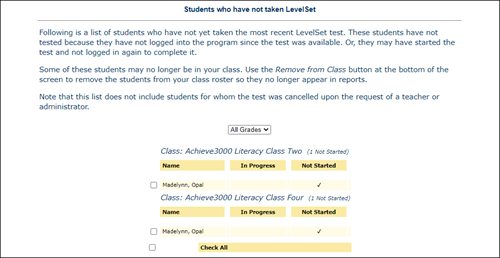
For information on other available Student Reports, read the Achieve3000 Literacy - Student Reports article.