Note: If the class was created for you by the district, you will need to reach out to the district help desk to have the Student Edition assigned to your account.
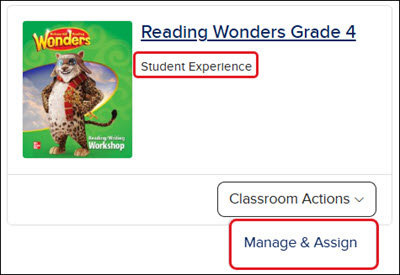
If it shows Student Experience on the class tile and only shows the Manage & Assign option on the menu, this means that only the Student Edition was redeemed to your teacher account.
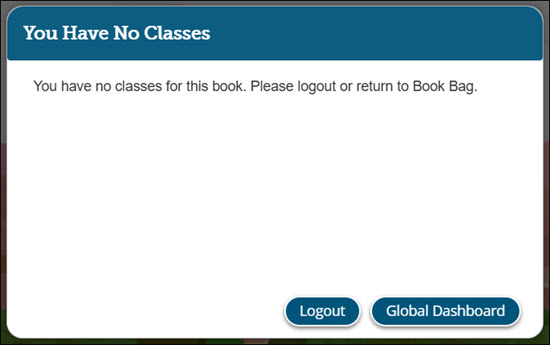
If you only have the Student Edition redeemed for certain programs, such as Wonders and Everyday Math 4, you will not be able to access the student version of the program. Instead, you'll get a message that you have no classes for that book.
The Teacher Edition will need to be redeemed and a class created. For steps on creating a class, see the Create and Edit a Class article.
Note: If the content was assigned to your account by your district, you will need to reach out to your district help desk to have a class created.
glencoe-health
mcgraw-hill-health
building-blocks
connecting-math-concepts
number-worlds
corrective-reading
early-interventions-in-reading
spelling-mastery
wonderworks
maravillas
ocr-foundational-skills-kit
open-court-reading
studysync
wonders
wow
core-plus-math
everyday-math
glencoe-math
my-math
mcgraw-hill-pre-algebra
glencoe-science
inspire-science
iscience
networks
music-its-role
spotlight-on-music
asi-se-dice
instructor
prek-12
Customer Support, PreK-12, Classroom Teacher, Preschool, Elementary School, Middle School, High School, Direct Login & Auto-Rostering, Direct Login & Manual-Rostering, SSO & Auto-Rostering, SSO & Manual-Rostering, Core, Intervention, Supplemental, AP, Honors & Electives, Literacy, Math, Science, Social Studies, Health, Visual & Performing Arts, World Languages, Glencoe Health 2014, McGraw Hill Health 2014, Building Blocks 2015, Connecting Math Concepts, Number Worlds 2015, Corrective Reading, Early Interventions in Reading, Spelling Mastery, WonderWorks 2022 & 2014, Maravillas 2020 & 2017, OCR Foundational Skills Kit, OCR Word Analysis Kit, Open Court Reading 2016, 2018, 2023, StudySync 2015 & 2017, Wonders, Wonders 2014, Wonders 2023 2020 2017, Wonders Balanced Literacy 2016, Wonders EL 2016, World of Wonders 2017, Core Plus Math 2015, Everyday Mathematics 4 (K-6), Glencoe Algebra 1 2014, Glencoe Algebra 1 2018, Glencoe Algebra 2 2014, Glenoce Algebra 2 2018, Glencoe Math, Glencoe Geometry 2014, Glencoe Geometry 2018, Glencoe Math Course 1, Glencoe Math Course 2, Glencoe Math Course 3, Glencoe Math Accelerated, McGraw Hill My Math, McGraw Hill My Math 2013 & 2016, McGraw Hill My Math 2018, Pre-Algebra 2012, Glencoe Science, Glencoe Science 2017, Inspire Science 2017, iScience 2017, Networks, Networks 2014 (K-5), Networks 2014 & 2016, Networks 2018, Music! Its Role, Spotlight on Music, Asi se Dice 2016, Dashboard & Navigation Overview, Getting Started & Orientation
dts
2026-08-20T15:13:34.724-04:00
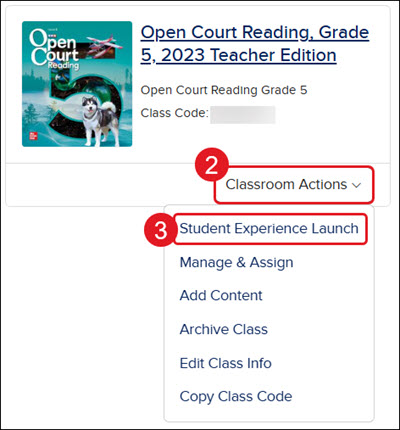
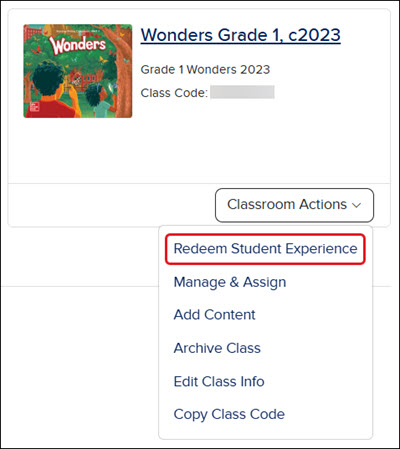
Teachers can easily access the Student Edition of select programs from their My Programs page. 1. SSO or sign in at my.mheducation.com. 2. On the class tile, click the Classroom Actions button. 3. Click on Student Experience Launch from the menu. If the menu shows Redeem Student Edition instead, you will need to follow the Redeem a ConnectED Master Code steps. Note: If the class was created for you by the district, you will need to reach out to the district help desk to have the Student Edition assigned to your account. If it shows Student Experience on the class tile and only shows the Manage & Assign option on the menu, this means that only the Student Edition was redeemed to your teacher account. If you only have the Student Edition redeemed for certain programs, such as Wonders and Everyday Math 4, you will not be able to access the student version of the program. Instead, you'll get a message that you have no classes for that book. The Teacher Edition will need to be redeemed and a class created. For steps on creating a class, see the Create and Edit a Class article. Note: If the content was assigned to your account by your district, you will need to reach out to your district help desk to have a class created.
Help us improve!
Let us know how we can improve our support information by providing feedback in this short survey.
Top
Regional Page Available
It looks like you're outside the United States. Do you want to see your regional version of this page?