
Access Manager Overview
Explore Access Manager tools and resources for managing users, roles, and digital access.
- SSO & Auto-Rostering
- PreK-12
- Customer Support
- School Administrator
- Direct Login & Auto-Rostering
- Access Manager
- Account Management
- Core
- Intervention
- Supplemental
- AP, Honors & Electives
- Literacy
- Math
- Science
- Social Studies
- Health
- Visual & Performing Arts
- World Languages
- Preschool
- Elementary School
- Middle School
- High School
- Reveal Math (K-12)
- AP Biology
- AP Chemistry
- AP History & Geography
- AP Psychology
- AP Economics
- AP African American Studies
- AP Precalculus
- AP Statistics
- AP Computer Science
- AP Language and Composition
- AP Public Speaking
- AP Music Theory
- 5 Steps to a 5 - AP Test Prep
- Glencoe Health 2022
- Teen Health 2021
- Arrive Math
- Building Blocks 2024
- Building Blocks PreK 2025
- Number Worlds 2024
- SRA Reading Mastery Transformations
- SRA Reading Laboratory 2025
- Achieve3000 Literacy
- Actively Learn
- McGraw Hill Literacy Emerge!
- McGraw Hill Literacy Summit!
- McGraw Hill Literacy Soar!
- Open Court Reading 2025
- Redbird
- StudySync 2021
- ALEKS
- ALEKS Adventure
- CA Reveal Math (K-12)
- Illustrative Math
- Redbird Math
- CA Inspire Science 2020
- FL Science 2025 (K-12)
- Inspire Science 2020
- TN Science (K-12)
- TX Science 2025 (K-12)
- CA Impact 2019
- FL Social Studies 2024 (K-12)
- Impact Social Studies
- McGraw Hill Social Studies
- All Sorts 2026 (K-5)
- Asi se Dice 2024
- CTE - Health Science
- CTE - Agriculture
- CTE - Computing and Technology
- CTE - Culinary Arts
- CTE - Early Childhood Education
- CTE - Business, Marketing, and Finance
- CTE - Criminal Justice
- Glencoe Health 2014
- McGraw Hill Health 2014
- 2Inform
- Building Blocks 2015
- Connecting Math Concepts
- Number Worlds 2015
- Corrective Reading
- Early Interventions in Reading
- Spelling Mastery
- WonderWorks 2022 & 2014
- Maravillas 2020 & 2017
- OCR Foundational Skills Kit
- OCR Word Analysis Kit
- StudySync
- StudySync 2015 & 2017
- Wonders
- Wonders 2014
- Wonders 2023 2020 2017
- Wonders Balanced Literacy 2016
- Wonders EL 2016
- World of Wonders 2017
- Core Plus Math 2015
- Everyday Mathematics 4 (K-6)
- Glencoe Algebra 1 2014
- Glencoe Algebra 2 2014
- Glencoe Algebra 1 2018
- Glenoce Algebra 2 2018
- Glencoe Math
- Glencoe Geometry 2014
- Glencoe Geometry 2018
- Glencoe Math Course 1
- Glencoe Math Course 2
- Glencoe Math Course 3
- McGraw Hill My Math
- McGraw Hill My Math 2013 & 2016
- McGraw Hill My Math 2018
- Pre-Algebra 2012
- Glencoe Science
- Glencoe Science 2017
- Inspire Science 2017
- iScience 2017
- Networks
- Networks 2014 (K-5)
- Networks 2014 & 2016
- Networks 2018
- Music! Its Role
- Spotlight on Music
- Asi se Dice 2016


Direct Login and Auto-Rostering
Single Sign-On (SSO) and Auto-Rostering
This article applies to districts that use the SSO and Auto-Rostering Access and Direct Login and Auto-Rostering Services.
SSO applies to districts that use an SSO portal, district website, or Learning Management System (LMS) to access McGraw Hill digital programs, and Direct Login means that teachers, students, and administrators log in at my.mheducation.com. Auto-Rostering means that account creation, class setup, and roster management are automated through a process handled by your district.
Not sure which Access Service your district uses? Click here to learn more about the four Access Services that we support.
Access Manager is a tool available to district-level Organization Administrators in auto-rostering districts. On Access Manager, you can view and manage your district’s roster data sent to us via API or SFTP. You can also upload your district’s roster data and assign content. This article provides a general overview of Access Manager and links to support resources.
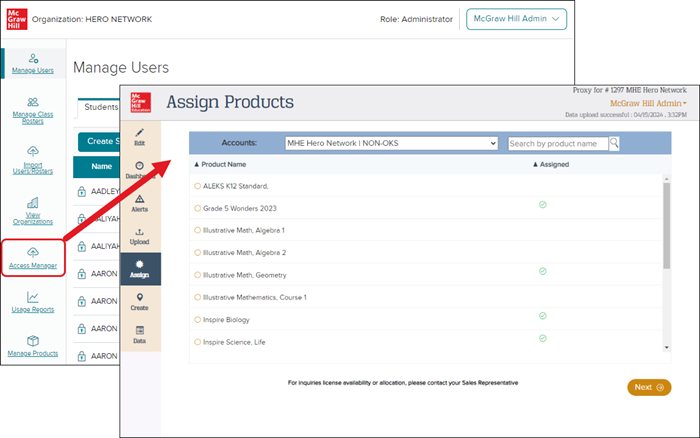
Set-up Instructions
Access Manager set-up instructions are provided by our Digital Integration Services team when establishing your integration service. This article addresses the ongoing administrator tasks that you complete on Access Manager.
Account Access
District-level Organization Administrators can launch Access Manager from the Admin Tools. If you need an account, a district-level Organization Administrator can create an account for you. Contact K-12 Technical Support if you are unable to identify someone in your district with this level of access.
Access Manager Pages
Below is a brief description of each Access Manager page and links to resources that provide more information.
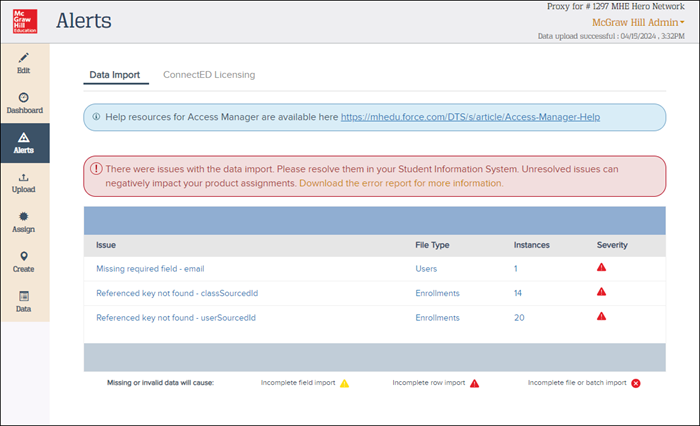
Alerts:
This page displays data import messages. If a data import is unsuccessful, you can view a summary of errors and download error reports that contain more detail. Learn more: Fixing Common Errors.
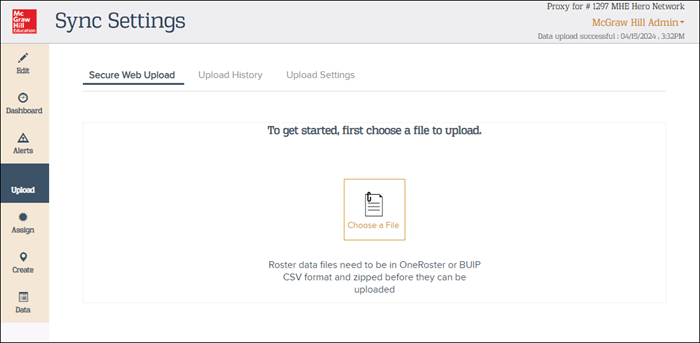
Upload:
On this page, you can upload your data files manually on Access Manager. Be sure to upload the zipped file that contains your OneRoster® .csv files or BUIP.csv file.
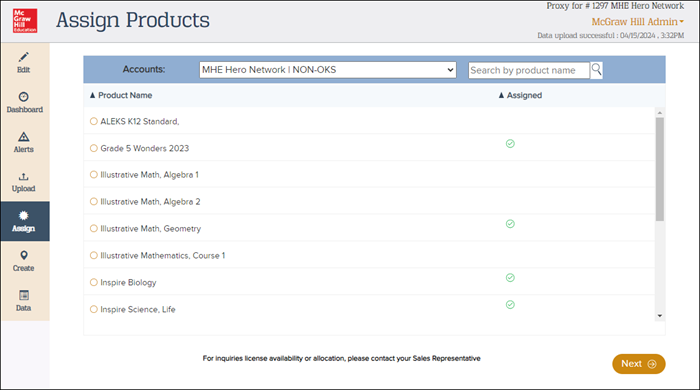
Assign:
This page displays content assignments. You can also assign content manually by course and class for content that is not assigned via your roster data. ConnectED program content can also be assigned to individual users. Assigning content is often done by someone in the Curriculum Department since they are likely more familiar with McGraw Hill programs. If someone in your Curriculum Department assigns content on Access Manager, they need a district-level Organization Administrator account to complete this task. Learn more: Assign Content on Access Manager.
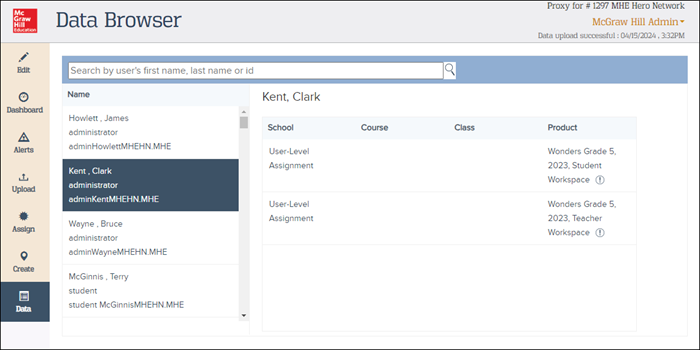
Data:
This page provides you with a view of your processed roster data. You can search for and view users by first name, last name, or ID number. Select a user to view the user’s school affiliation, course names, class names, teacher names, and content assigned.
OneRoster® is a trademark of the IMS Global Learning Consortium, Inc. (www.imsglobal.org)