
Connect - Temporary Access
Learn what Temporary Access is and how it allows short-term access to digital products.
- Higher Ed Student
- Resources
- Higher Education
- Customer Support
- Connect


Note: "Temporary Access" is the current terminology for what was previously referred to as "Courtesy Access."
What Is Connect Temporary Access?
With Temporary Access, students can access a course on Connect for 14 days without an access code or purchasing access online. This option provides interim access to the course for those who may be waiting on financial aid or their campus bookstore to restock access codes.Temporary access for a single ISBN can only be used once per 90 day period.
Important information about Temporary Access:
- Temporary access for a single ISBN can only be used once per 90 day period.
- The 14-day free access period begins on the day you register for the course.
- Any work you complete during the 14-day free access period will be saved when you officially register for the course.
- Use the same email address to re-register once your 14-day free access expires. If you re-register under a different email address, any work you completed during the 14-day free access window will not transfer to your new account. To avoid potential account pairing issues, we recommend using your school email address when you request temporary access and when you purchase Connect online or via an access code.
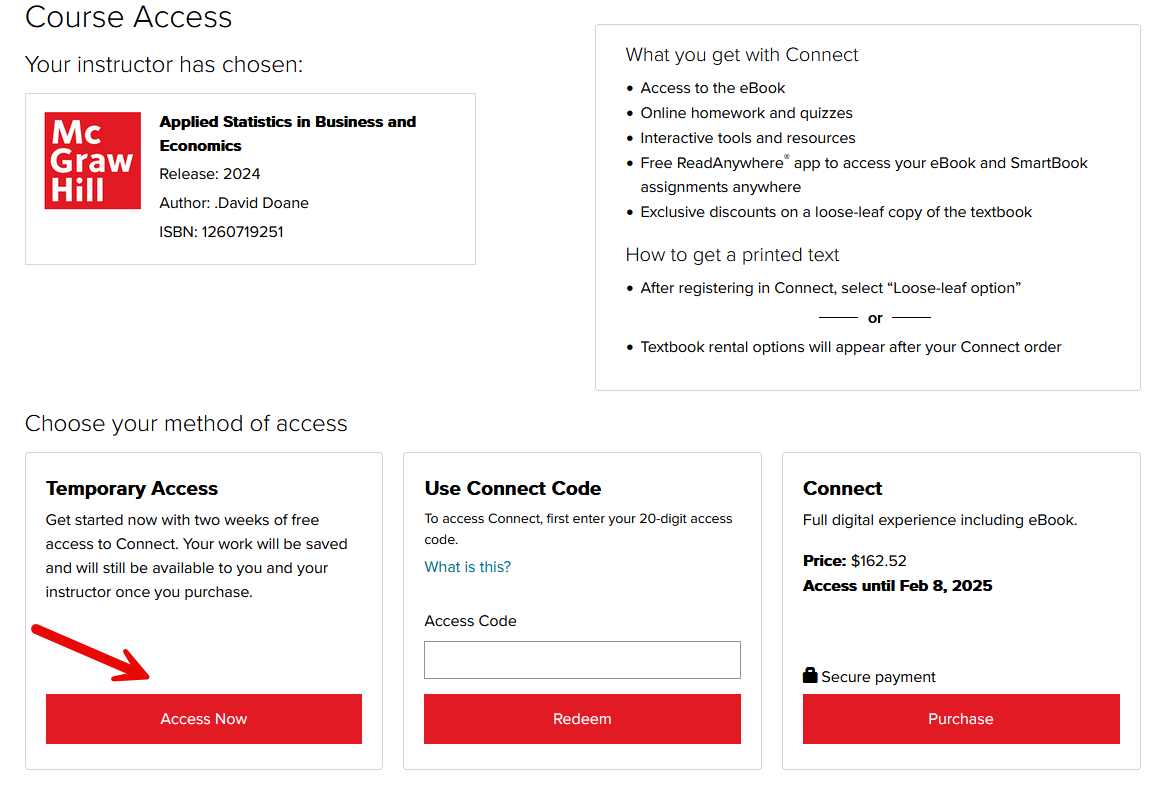
Once you access the section URL and create your Connect account, if the option is still available you'll see the registration screen shown below. Select Access Now under Temporary Access to gain temporary access to the course.
Why is Temporary access not available?
Temporary access is intended to only be available at the start of the course and is available immediately when the instructor creates the Connect section. Once the 3rd student registers for the Connect section within a seven-day period, a countdown begins. 14 days later, the 14-day temporary access option is removed and students can no longer register for the section using this option.
Once you access the section URL and create your Connect account, if the option is still available you'll see the registration screen shown below. Select Access Now under Temporrary Access to gain temporary access to the course.
How Does Temporary Access Work with Inclusive Access?
Temporary Access is not available for courses using Inclusive Access. With Inclusive Access, your course materials are provided automatically through your institution when you enroll. However, if your Inclusive Access is not available or is still pending, we recommend registering for Temporary Access so you can begin working in your course while the issue is resolved. If you are unsure whether your course uses Inclusive Access, check with your instructor or campus bookstore.
