
Proctorio - “You don’t have access to this service”
Understand why Proctorio shows an access error and what steps to take to resolve it.
Tags
- Higher Ed Student
- Error Messages
- Higher Education
- Customer Support


This to address the message student receiving when attempting to download the Proctorio extension in Google
Issue: Students are unable to download the Proctorio extension in Chrome to work their Proctored assignment
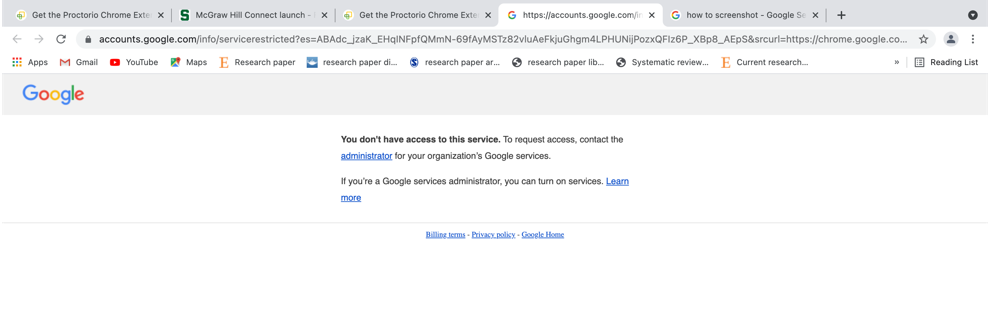
Cause: Student’s institution might be using a Google Enterprise account so their admin control which apps or extensions users can install or block altogether.
Solution for Students:
1. Changing the Chrome profile on the Chrome browser so it is not tied to the school’s account
Solution for Students:
1. Changing the Chrome profile on the Chrome browser so it is not tied to the school’s account
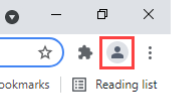
- Clicking on the image for Google Account next to the three dots to the right of the Chrome browser:
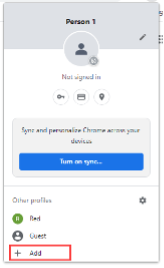
- Click on Add to add a new person to your profile
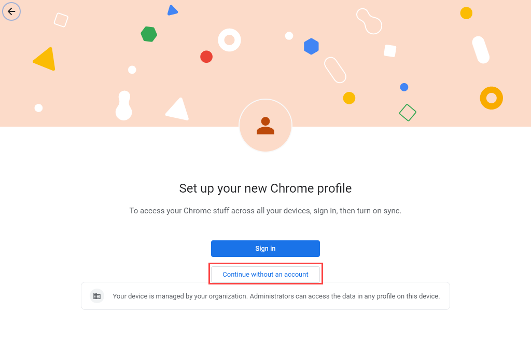
- To set up a new Chrome profile, please select the option to Continue without an account:
- Then please type in your name, and click Done
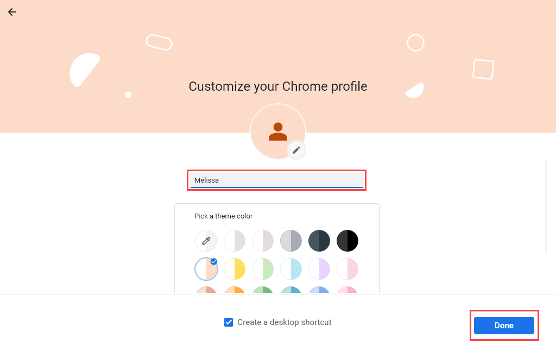
- After a new profile is added, please go to getproctorio.com to install the extension again.
2. If the student has a personal Chrome profile, they can use this instead by log into Chrome using their personal email address.
