
Incomplete Connect assignments sync with 0 points in LTI Advantage
Understand why incomplete Connect assignments may sync with zero points when using LTI Advantage.
- Higher Ed Student
- Higher Education
- Customer Support
- Connect
- Instructor


Incomplete assignments or assignments that have not been submitted will not display a score in Connect. By default with LTI Advantage, a score of 0 will be sent to your LMS for those assignments after the assignment due date passes.
If the late submission policy is enabled or if you grant students an exception, the 0 score will be sent after the late submission or exception date.
You can disable this behavior by clicking on the gear icon from the Grade sync widget in the LTIA Advantage tool.
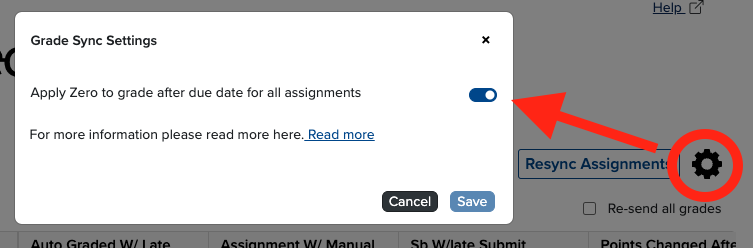
Please note that if you turn this setting off after 0 scores have already been sent to your LMS, the 0 scores will remain in the LMS grade book as we do not remove scores. However, you if remove the 0 scores manually, 0 scores will not be resent when scores are resynced.
