
Connect - Using the question filter
Learn how instructors use the question filter in Connect to refine assignments and assessments.
Tags
- Higher Education
- Customer Support
- Connect
- Instructor


When adding questions to an assignment, use the question category filters located on the left side of the add questions page to narrow down your questions results list.
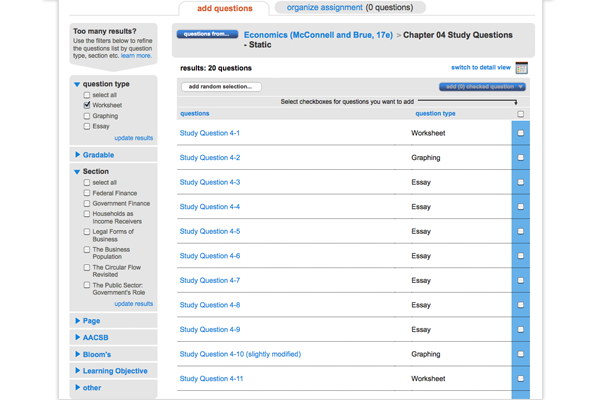
- To view filter options for each category, click the category name to reveal the options for that category.
- Select as many filter options as you'd like and click update results.
- The updated results will show all the questions that match any one of the options you selected for that category.
- If you filter numerous categories, your question criteria builds, so that the results will show only the questions that satisfy at least one of your selected options from every category you filtered.
- Select as many filter options as you'd like and click update results.
- The updated results will show all the questions that match any one of the options you selected for that category.
- If you filter numerous categories, your question criteria builds, so that the results will show only the questions that satisfy at least one of your selected options from every category you filtered.
The exact question categories you see will depend on the question source you’re using, but they will still work the same!
