Connect - Registration from Brightspace (student)
Learn how students register for Connect through Brightspace.
Tags
- Higher Ed Student
- Higher Education
- Customer Support
- Connect


- Here we’ll explain how to pair your existing Brightspace course with a new Connect class and register for Connect (create a Connect account). Once you've logged into Brightspace, select the class you want to pair. Then, in the Connect area, click Begin (A).
- On the Connect welcome page, click Register (A).
- Enter your email address (A) and click Begin (B).
- Enter the required information to register and create your Connect account. When finished, click Next Step (A).
- Choose one of three ways to register for your class:
Register with an access code (A)
Purchase access with a credit card (B)
Start courtesy access (C), a 14-day trial of your Connect course. Courtesy access is particularly useful for students who are awaiting financial aid and for those who may drop the class. - Review the class information before continuing. When ready, click Confirm (A).
- When you've completed registration, you'll see a Success page from which you can Go to Connect (A).
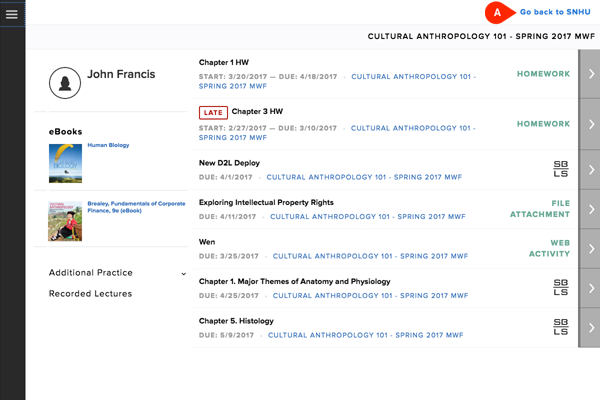
- Explore your new Connect class! You can return to Brightspace at any time by clicking the link at the top of the page (A).