
Connect - Getting to Know Connect (for students)
Introduce students to Connect features and navigation.
Tags
- Higher Ed Student
- Higher Education
- Customer Support
- Connect


When you first enter Connect, you'll land on your To Do list, which surfaces all of your most pressing assignments. In the left panel, which can be expanded and collapsed (A), you'll find vital information for your studies.
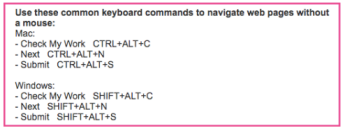
Click on your name (B) to find messages from your instructor, system notifications, a link to the Connect help center and a logout link. Use the Assignments menu (C) to find the To Do list, which a list of assignments due in the next 48 hours, and an assignment calendar. The Classes menu (D) contains a list of all of your classes. For scores and reports on your class performance, visit the Results menu (E).
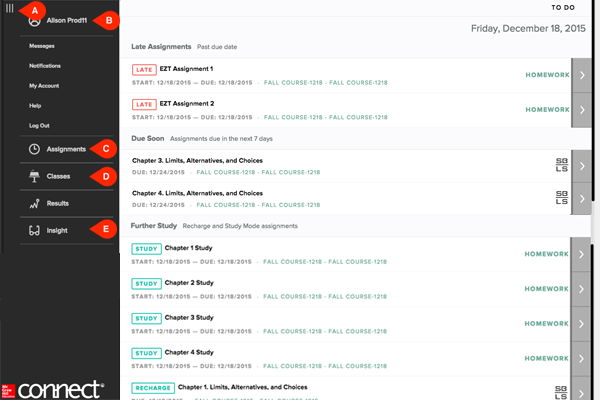
Click on your name (B) to find messages from your instructor, system notifications, a link to the Connect help center and a logout link. Use the Assignments menu (C) to find the To Do list, which a list of assignments due in the next 48 hours, and an assignment calendar. The Classes menu (D) contains a list of all of your classes. For scores and reports on your class performance, visit the Results menu (E).
Best Practice:
- If you cannot locate your assignments in the To Do page, you can filter the page to attempt to locate the assignment or navigate to your Classes section to locate the section and list of all available assignments.
