Grade assignments quickly using the Express Grade feature in Connect.
Tags
Higher Ed Student
Higher Education
Customer Support
Connect
Instructor
Assignment Management
Share:
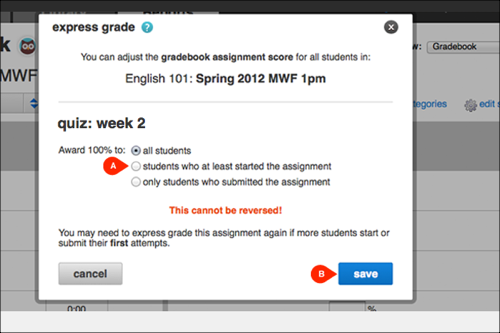
If your course has a gradebook (currently only World Language courses do), you can express grade entire assignments to swiftly award 100% scores to a section of your course. Simply choose whether to award 100% to all students (in that section), just the students who started the assignment, or just the students who submitted the assignment (A). Then click
save (B).
Express grading an assignment will override any scores you previously gave for that assignment, and can only be reversed if you manually enter new scores. Express graded assignments are marked by green tags in your gradebook. If you choose to express grade, it does not affect the reports.
Note: You cannot express grade writing assignments.
Help us improve!
Let us know how we can improve our support information by providing feedback in this short survey.
Top
Regional Page Available
It looks like you're outside the United States. Do you want to see your regional version of this page?
connect
student
instructor
Personas
Personas/Higher Ed Educator
Personas/Higher Ed Educator/Instructor
Support Topics
Support Topics/Classroom & Course Management
Support Topics/Classroom & Course Management/Assignment Management
Asset Format Type
Asset Format Type/Customer Support
Business Unit
Business Unit/Higher Education
Personas/Higher Ed Student
Programs & Solutions
Programs & Solutions/Connect
highered
2026-03-24T18:38:40.862-03:00
If your course has a gradebook (currently only World Language courses do), you can express grade entire assignments to swiftly award 100% scores to a section of your course. Simply choose whether to award 100% to all students (in that section), just the students who started the assignment, or just the students who submitted the assignment (A). Then click <strong>save</strong> (B). <br /> <br /> <img alt="" src="/content/dam/mhe/support/support-images/migrated/rtaImage-194900458.jpeg" /> <br /> <br />Express grading an assignment will override any scores you previously gave for that assignment, and can only be reversed if you manually enter new scores. Express graded assignments are marked by green tags in your gradebook. If you choose to express grade, it does not affect the reports. <br /> <br /> <strong>Note:</strong> You cannot express grade writing assignments. CXG Grade assignments quickly using the Express Grade feature in Connect. 2025-11-19 Connect - Express Grade Grade assignments quickly using the Express Grade feature in Connect. Grade assignments quickly using the Express Grade feature in Connect.
Grade assignments quickly using the Express Grade feature in Connect.
If your course has a gradebook (currently only World Language courses do), you can express grade entire assignments to swiftly award 100% scores to a section of your course. Simply choose whether to award 100% to all students (in that section), just the students who started the assignment, or just the students who submitted the assignment (A). Then click save (B). Express grading an assignment will override any scores you previously gave for that assignment, and can only be reversed if you manually enter new scores. Express graded assignments are marked by green tags in your gradebook. If you choose to express grade, it does not affect the reports. Note: You cannot express grade writing assignments.