Connect - Editing Questions in an Assignment
Edit questions in a Connect assignment to update wording, scoring, feedback, or answer options.
- Higher Ed Student
- Higher Education
- Customer Support
- Connect
- Instructor
- Assignment Management


From your Section Home, select the assignment whose questions you want to edit. From the assignment options menu (A), select edit assignment (B).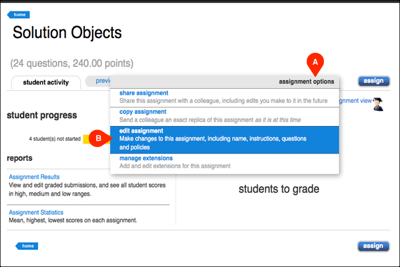
Select the question you wish to edit. Then click on the tool icon (A) to begin editing the question.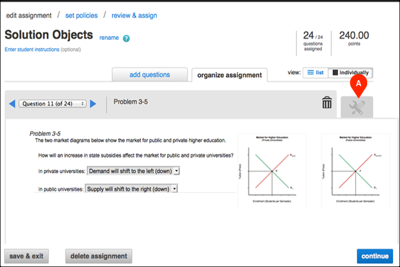
Make your desired changes to the question. Once you are finished, click save (A) at the top right. Then click exit (B) at the top left.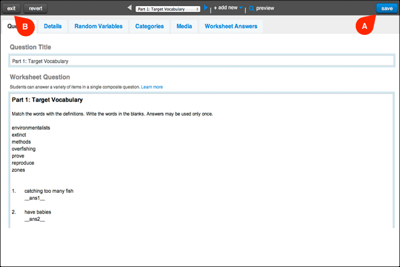
To edit additional questions, click the dropdown menu at the top of the page (A) and select the next question you wish to edit. Make your desired changes to the question, click save (B) and then click exit (C).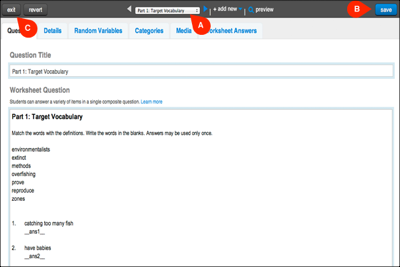
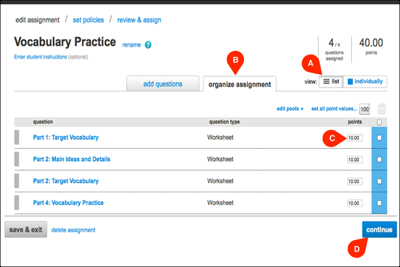
After editing your questions, you can adjust point values by selecting the list icon (A) under the organize assignment tab (B). Enter the desired point values (c) in the points column. Once you are finished, click continue (D) to proceed.