Connect - Control when Students see Assignment Answer Feedback
Manage when students can view answer feedback for assignments.
Tags
- Higher Education
- Customer Support
- Connect
- Instructor


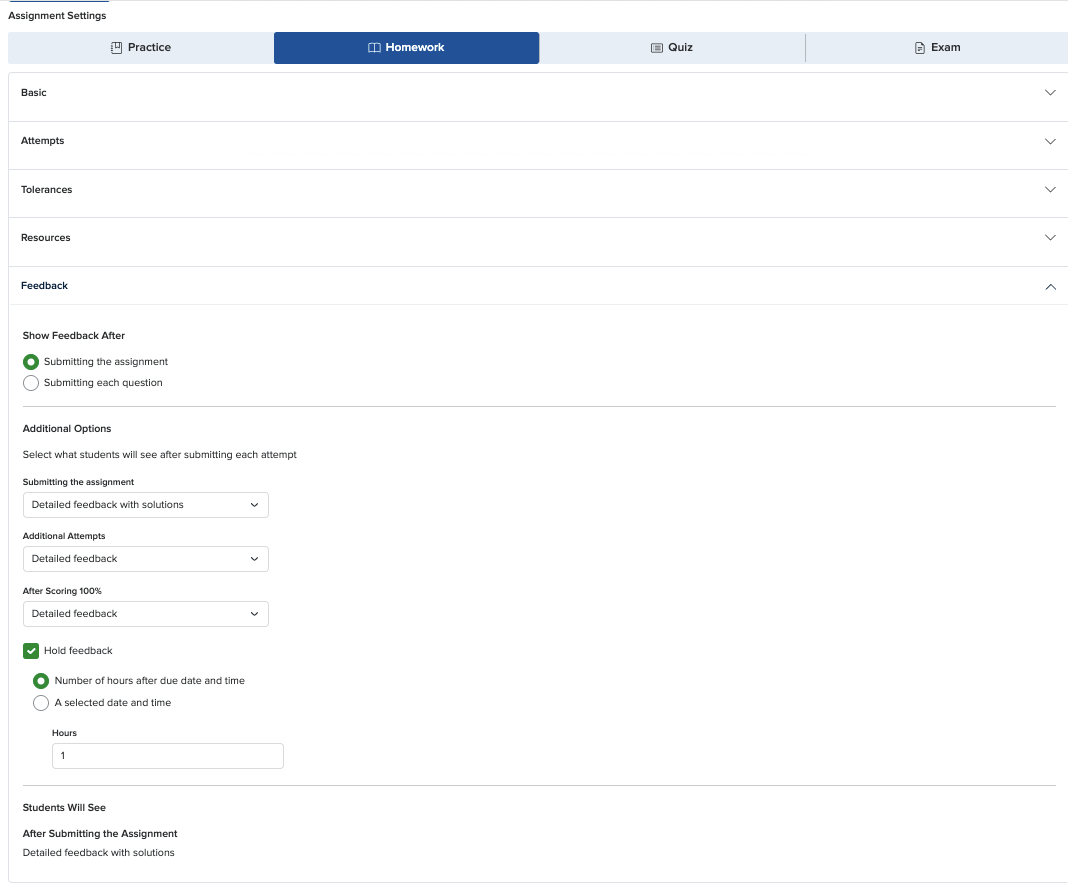
When you create an assignment, you can control when feedback is displayed in the policies section under feedback. Your students can receive feedback after completing assignment attempts or after submitting each question.
Show feedback after attempts:
- Students will not get any feedback while they are completing their attempts. Unless you selected allow students to check their work, within the “resources” settings. In that case, your students will see whether their answers are correct on the questions that they check their work.
- Select the specific feedback you want your students to see after each attempt from the drop-down menus and decide the amount of feedback you want your students to get after completing each attempt.
- You also have the option of holding feedback, which will hold your students’ feedback (from all attempts) until the desired date and time and then provide them with the feedback from each attempt all at once.
Show feedback after each question:
- Students will get feedback while they are completing their attempts. After submitting each question, your students will see their scores, the correct answer, an explanation (when available) and the solution.