Connect - Calculating the Total Grade in the Gradebook
See how Connect calculates the total grade in the gradebook.
Tags
- Higher Education
- Customer Support
- Connect
- Instructor


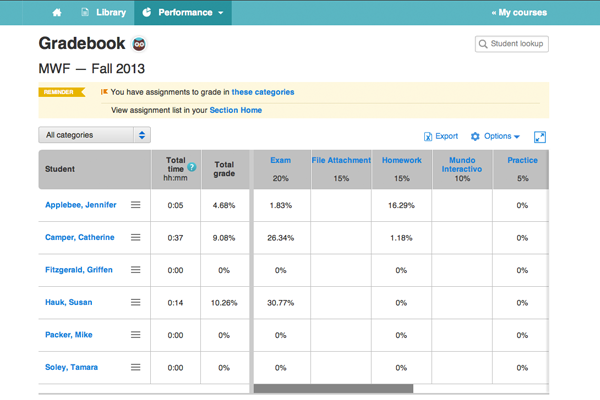
This is a breakdown of how grades are calculated in the gradebook. The gradebook is currently only available for World Language titles.
Within a category, each assignment is weighted based on the total points possible. The points earned on each assignment are summed and then divided by the total points possible for that category.
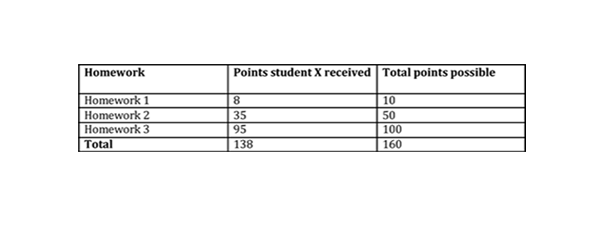
Above is an example of how gradebook calculates each category for a student.
138 divided by 160 (136/160) = .8625 = 86.25%
So, student X has an 86.25% in the Homework category.
calculate the total grade of a student, first all the categories are calculated as we have just described.
Then each category score is converted to a decimal by moving the decimal point two places to the left (ex. 75.5% becomes .755) and multiplied by the weight it’s worth in the total grade. Each category’s weight is listed under the category name in the gradebook and can be changed in gradebook settings. Remember that it must add up to 100%.
After multiplying each category score by its weight, the new totals for each category are added together to give you the total score (in percent).
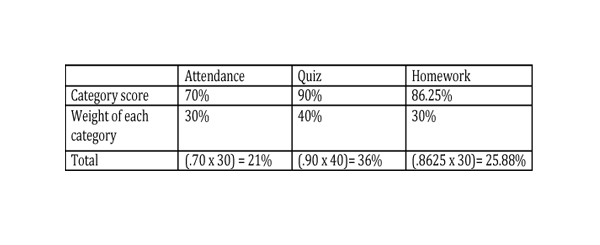
Above is an example of how gradebook calculates the total score of each student based on.
21 + 36 + 25.88 = 82.88%
So the total grade for student X is 82.88%
Note: If a category has zero submissions, the weight of the other categories with submissions increases proportionally to add up to 100%.