
Connect - Adding Drop Dates
Add drop dates in Connect to manage student enrollment and grading.
Tags
- Higher Ed Student
- Higher Education
- Customer Support
- Connect
- Instructor
- Reports & Analytics


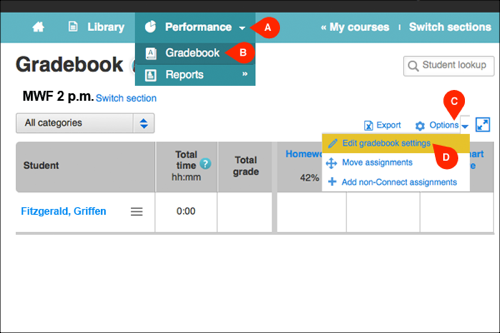
Assignment drop-date settings are located in the gradebook. From the
Performance tab (A), click
Gradebook (B). In gradebook, click
Options (C) and then select
Edit gradebook settings (D) from the dropdown menu.
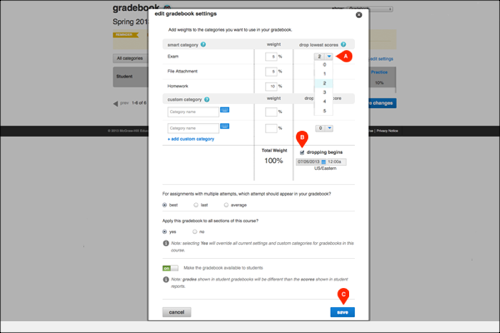
Next to each assignment category, you can select the number of low assignment scores you wish to drop within that category (A). Check the box next to dropping begins (B) and select the date when the scores should be dropped. Click save (C) to save your changes.
Next to each assignment category, you can select the number of low assignment scores you wish to drop within that category (A). Check the box next to dropping begins (B) and select the date when the scores should be dropped. Click save (C) to save your changes.
