Can I upload my own content?
Learn how to upload your own content in Create, including supported file types, formatting requirements, and usage guidelines.
- Higher Education
- Customer Support
- Create
- User Guides & Account Management
- Instructor


Create allows you to upload your own custom content to use in a Project. Content can be text, spreadsheets, presentations, pictures, or graphics.
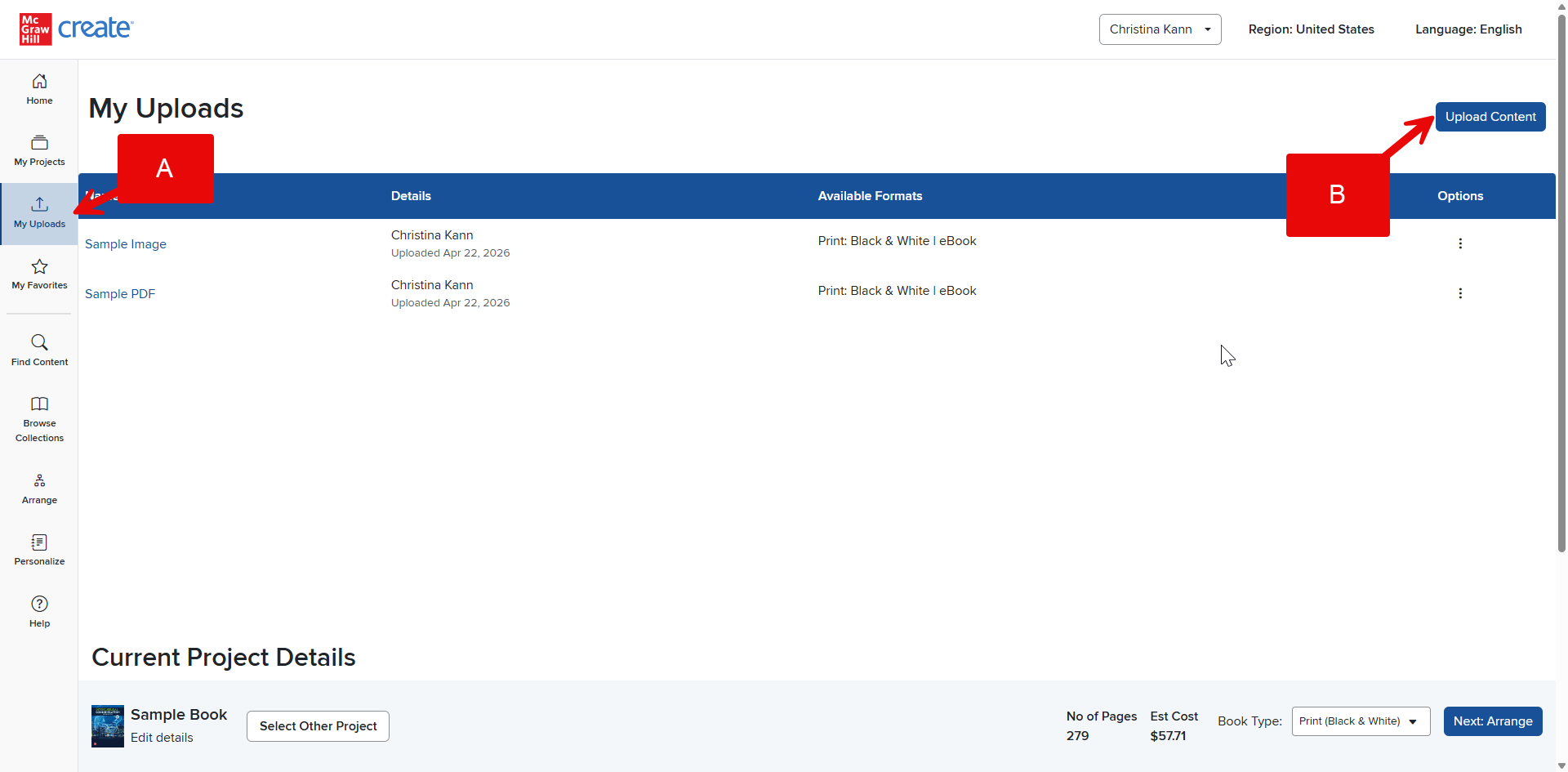
Step 1: Click My Uploads (A) in your Account Menu.
Step 2: Locate the file on your computer using the Upload Content button (B). Supported file types are listed to the right (C), so be sure the file you select is one of these.
Step 3: Input your file’s Display Title and Author Name, and be sure you have permission to use the upload before checking the Terms and Conditions verification box.
Step 4: Click Upload (D). Your My Uploads page will refresh, and a small message will confirm your upload.
Step 5: Once your content has been uploaded, you’ll see it listed in your My Uploads list where the uploader originally was. From here, you can click Add to Project as well as Edit, Favorite, or Delete it.