
Add LTI Advantage shortcut to Moodle
Add a Connect tool link to a Moodle course using LTI Advantage for streamlined access.
Tags
- Higher Education
- Customer Support
- Connect
- Instructor


Note: The tool link is intended to allow quick access to the Connect home page. When launching Connect using this tool link, assignment deployment options will not be available.
- Navigate to your Moodle course.
- Click the Turn editing on button (if it is off).
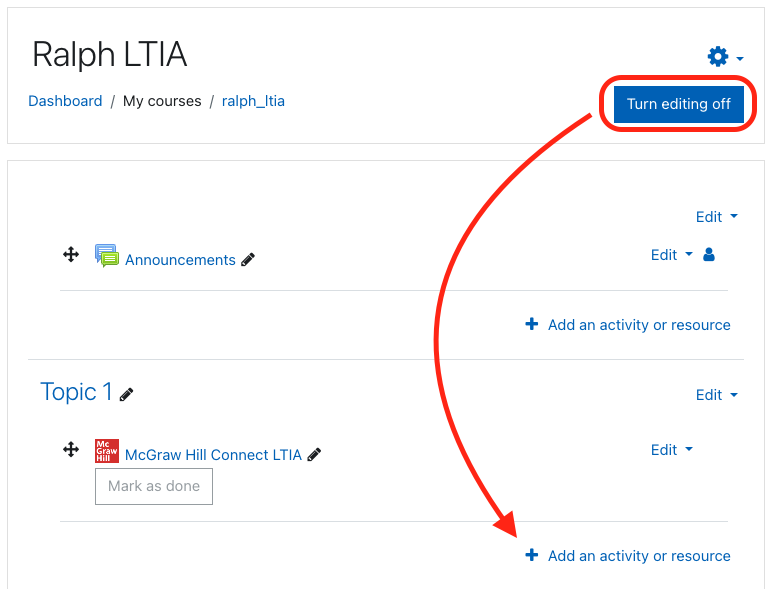
- Select + Add an activity or resource link.
- Select McGraw Hill Connect LTIA from the list (this title may differ in your Moodle instance).
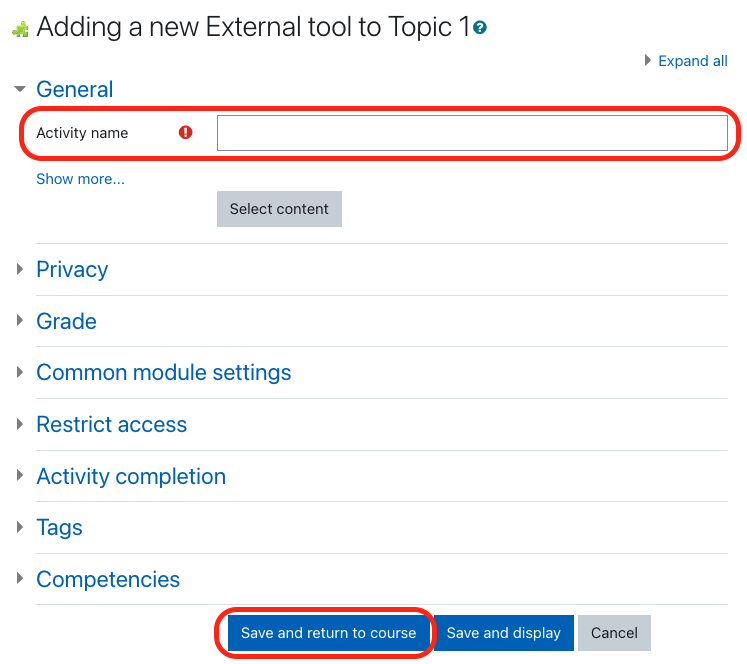
- Provide a name for the tool link.
- Click Save and return to course.
- The link will now appear in your course content.
You and your students can now use this tool link to quickly launch the Connect section home page.
