
Access Your ALEKS Teacher Account
Access your ALEKS teacher account to manage assignments and reports.
- PreK-12
- Customer Support
- Classroom Teacher
- Elementary School
- Middle School
- High School
- Direct Login & Manual-Rostering
- Direct Login & Auto-Rostering
- Core
- Math
- ALEKS
- ALEKS Adventure
- Log-In & Passwords
- Account Management


Direct Login and Auto-Rostering
Direct Login and Manual Rostering
This article applies to districts that use Direct Login Access Service. Direct Login means that teachers, students, and administrators log in at my.mheducation.com.
If you are unsure which Access Service applies to your district, please see this article for more information.
View the demo in a separate tab.
View the Spanish version of the demo.
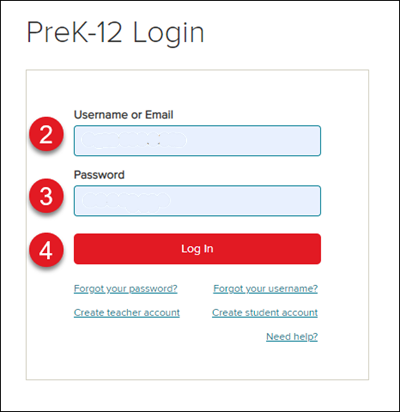
1. Navigate to my.mheducation.com.
2. Enter your username in the Username or Email field.
3. Enter your password in the Password field.
Note: Your password is case-sensitive, your username is not.
4. Click the Log In button to launch your teacher account.
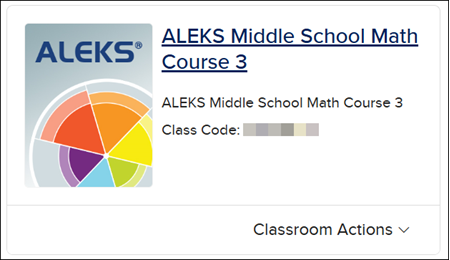
5. After creating and rostering your classes, click on the ALEKS icon or class name on the class card to launch the program.
Additional Articles
- If you need assistance retrieving your teacher username or password, refer to the Recover Your Teacher/Admin Username or Password article.
- If you need to register for a new teacher account, refer to the Create a Teacher Account article.
- If you need your district registration code, contact your Organization Administrator for assistance.
