Create Achieve3000 Literacy Class Announcements
Post class announcements using the Achieve Literacy announcement banner.
Tags
- Customer Support
- PreK-12
- Classroom Teacher
- Elementary School
- Middle School
- High School
- Direct Login & Auto-Rostering
- Direct Login & Manual-Rostering
- SSO & Auto-Rostering
- SSO & Manual-Rostering
- Supplemental
- Literacy
- Achieve3000 Literacy
- Dashboard & Navigation Overview
- Tools & Resources


Teachers have the ability to create a Class Announcement banner which will display on their students’ home page for that class. This banner can be helpful in keeping students on task, directing them to start with a specific lesson, or simply greeting them to make sure they’re logged in to the correct class.
Note: Only one class announcement can be created at a time.
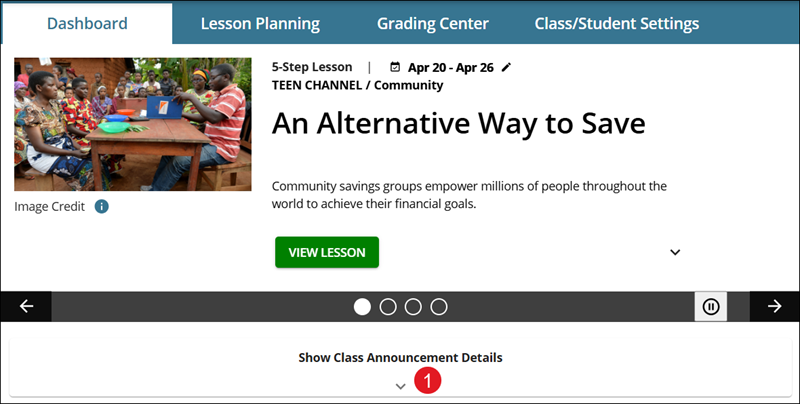
1. On the Dashboard, under the featured lessons/carousel, click the Show Class Announcement Details drop-down to expand the section.
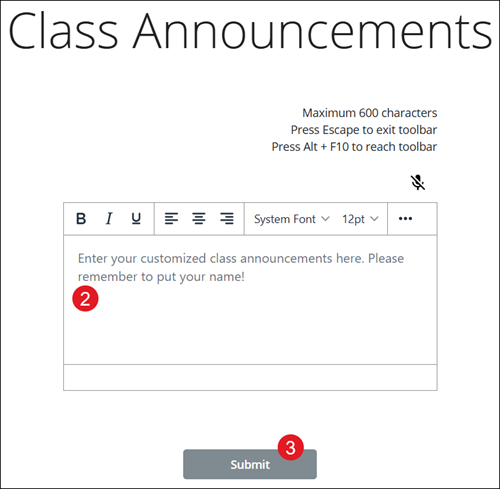
2. In the provided field, enter a customized class announcement.
3. Click the Submit button.