Connect - Editing or Deleting a Course or Section
Edit or delete a Connect course or section to keep your course list up to date.
Tags
- Higher Education
- Customer Support
- Connect
- Course Management
- Instructor


To delete a course:
Deleting a course will delete all of the course sections, assignments, student roster and any grade report data contained in the course. A course must have at least one section in order to be deleted. You cannot retrieve a course that has been deleted.
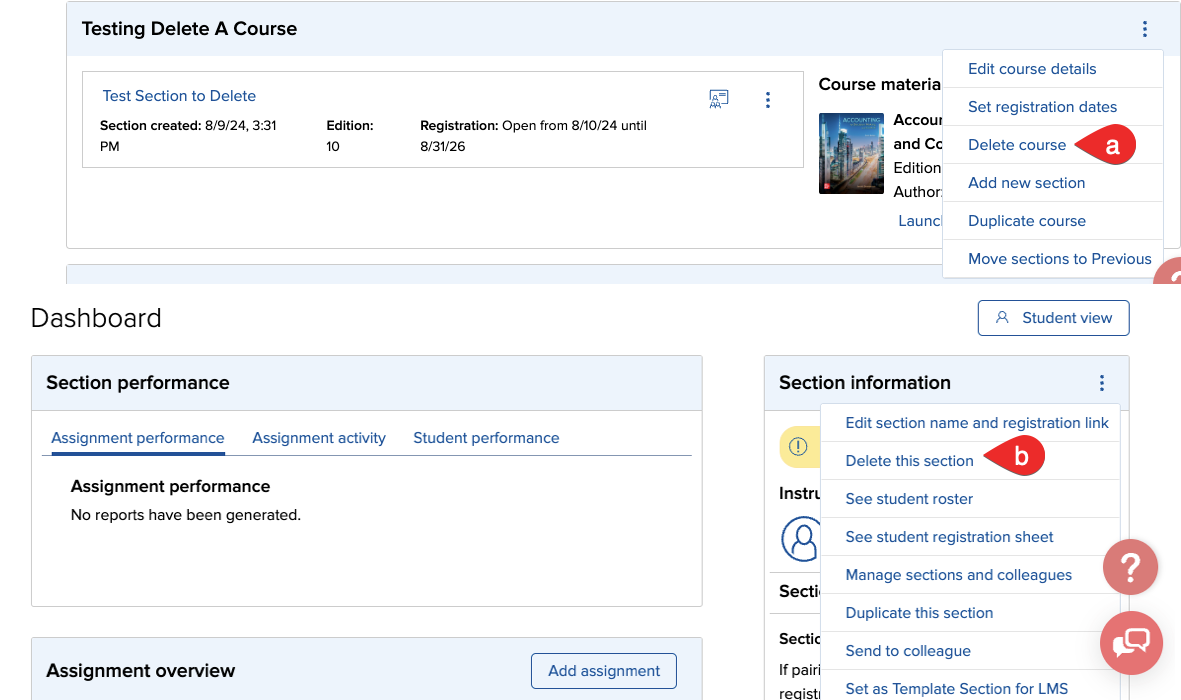
- On the My Courses page select Delete course from the course options menu (a). Click Confirm on the confirmation window.
- The course is deleted. A confirmation appears at the top of your courses page and the course and section(s) are no longer listed.
To delete a section
Deleting a section will also delete all grade report data for that section. You cannot delete a section if it is the only one in the course; You must delete the course instead.
- On the Course Dashboard page select Delete section from the section options menu (B).
You will be asked to verify that you want to delete the section. Click Confirm. A confirmation appears at the top of your courses page and the course and section(s) are no longer listed.