Connect - Delete Assignments
Select assignments, choose Delete, and confirm. This permanently removes them and all data for all sections; it cannot be undone.
Tags
- Higher Education
- Customer Support
- Connect
- Instructor
- Assignment Management


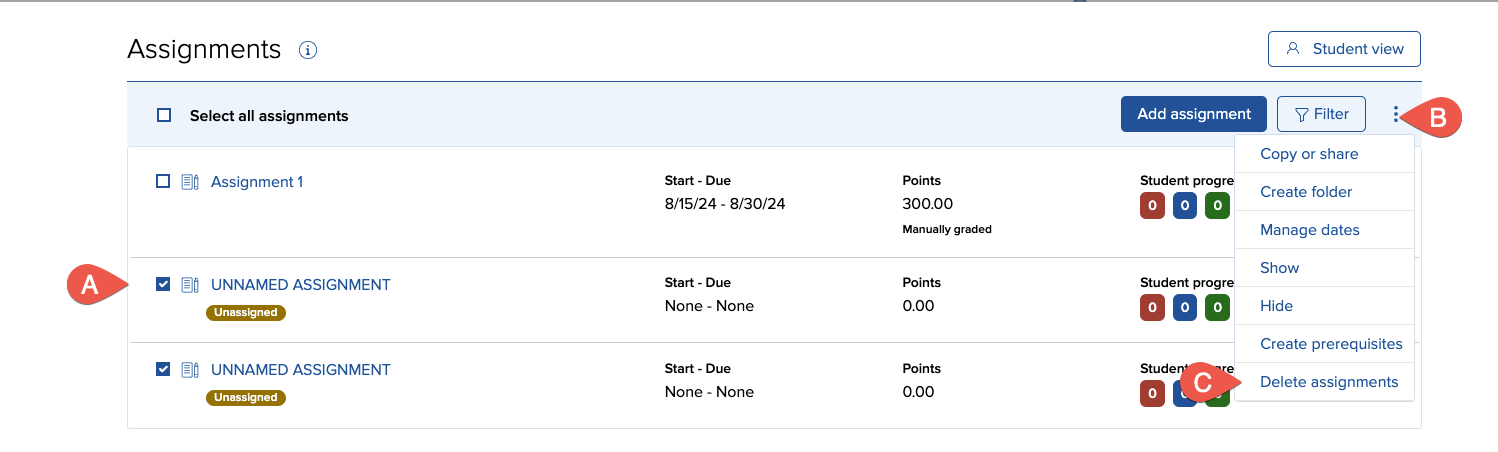
- Select the assignment(s) you want to delete by checking the boxes (A) at the end of each assignment row.
- From the Options menu (B), select delete (C).
- A prompt will appear stating that the assignment(s) and all reporting data (if available) will be lost when the assignments are deleted. Additionally, this affects ALL assigned sections. You cannot undo this!
- Click OK. A confirmation message appears briefly before you are returned to the group assignment list.