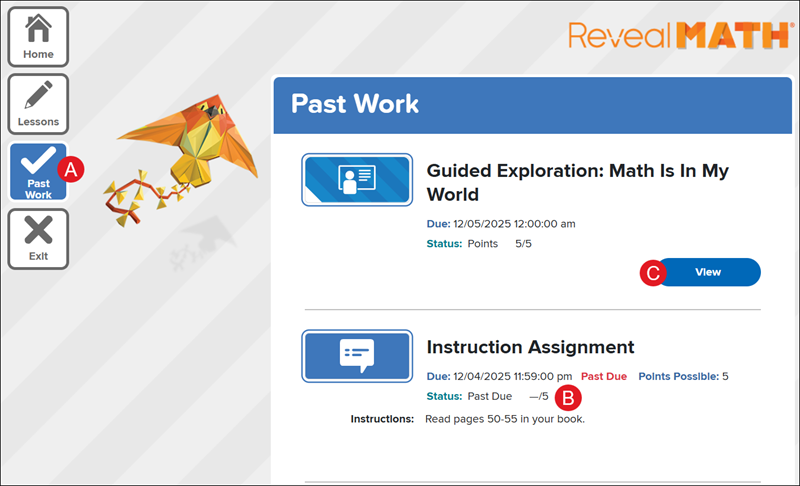
A. All submitted and Past Due assignments can be found on the Past Work page.
B. The Due date, Points Possible, Status, and any Instructions provided by the teacher are found under the assignment title.
Note: If an assignment requires manual grading, the Status will show as Pending until the score is entered by the teacher.
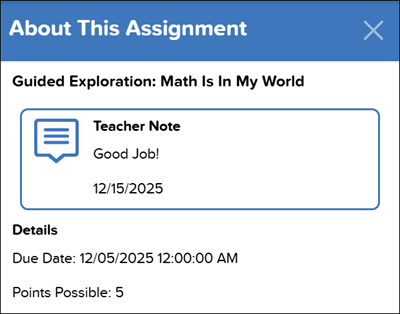
C. Click the View/Review button to view the assignment. This is also how students can view any Teacher Notes provided by the teacher for the assignment.
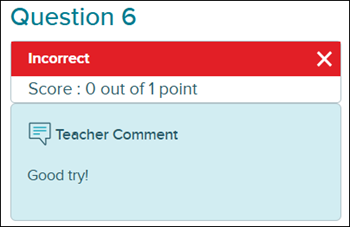
Students can only view Comments added by the teacher on a completed assessment where teachers allow students to view their completed assessment questions.
mcgraw-hill-science
arrive-math
inspire-science
number-worlds
impact
direct-instruction
reveal-math
mh-social-studies
building-blocks
mcgraw-hill-literacy
ap-edition
5-steps-to-a-5-test-prep
glencoe-health
teen-health
open-court-reading
illustrative-math
all-sorts
asi-se-dice
mcgraw-hill-cte
school-parent
student
prek-12
TX Science 2025 (K-12), Arrive Math, SSO & Manual-Rostering, Inspire Science 2020, Customer Support, Number Worlds 2024, Direct Login & Manual-Rostering, CA Impact 2019, School Parent, CA Inspire Science 2020, SSO & Auto-Rostering, PreK-12, Elementary School, FL Science 2025 (K-12), Math, Direct Instruction, Intervention, Literacy, Grades & Assignments, Social Studies, Direct Login & Auto-Rostering, School Student, Core, CA Reveal Math (K-12), FL Social Studies 2024 (K-12), Building Blocks PreK 2025, Building Blocks 2024, Science, McGraw Hill Literacy, Preschool, Dashboard & Navigation Overview, AP Biology, AP Chemistry, AP History & Geography, AP Psychology, AP Economics, AP African American Studies, AP Precalculus, AP Statistics, AP Computer Science, AP Language and Composition, AP Public Speaking, AP Music Theory, 5 Steps to a 5 - AP Test Prep, Glencoe Health 2022, Teen Health 2021, McGraw Hill Literacy Emerge!, McGraw Hill Literacy Summit!, McGraw Hill Literacy Soar!, Open Court Reading 2025, Illustrative Math, Reveal Math (K-12), TN Science (K-12), Impact Social Studies, McGraw Hill Social Studies, All Sorts 2026 (K-5), Asi se Dice 2024, CTE - Health Science, CTE - Agriculture, CTE - Computing and Technology, CTE - Culinary Arts, CTE - Early Childhood Education, CTE - Business, Marketing, and Finance, CTE - Criminal Justice
dts
2026-03-24T18:56:07.152-03:00
For a full page view of the demo, click here. For a Spanish version of the demo, click here. A. All submitted and Past Due assignments can be found on the Past Work page. B. The Due date, Points Possible, Status, and any Instructions provided by the teacher are found under the assignment title. Note: If an assignment requires manual grading, the Status will show as Pending until the score is entered by the teacher. C. Click the View/Review button to view the assignment. This is also how students can view any Teacher Notes provided by the teacher for the assignment. Students can only view Comments added by the teacher on a completed assessment where teachers allow students to view their completed assessment questions.
Top
Regional Page Available
It looks like you're outside the United States. Do you want to see your regional version of this page?