Your information will be used to provide you with the requested information and other information about McGraw Hill’s products and services. You may opt out at any time by contacting McGraw Hill’s local privacy officer or selecting “unsubscribe” at the bottom of any email you receive from us. For information on our privacy practices, visit the McGraw Hill Privacy Center.
Your information will be used to provide you with the requested information and other information about McGraw Hill’s products and services. You may opt out at any time by contacting McGraw Hill’s local privacy officer or selecting “unsubscribe” at the bottom of any email you receive from us. For information on our privacy practices, visit the McGraw Hill Privacy Center.
Validated Instructors Only
ISBN10:0071744541 |
ISBN13: 9780071744546
More information about this Print book can be found in the page section below.
Step 2. Register and authorize your Adobe ID (optional). To access your eBook on multiple devices, first create an Adobe ID. Then, open Adobe Digital Editions, go to the Help menu, and select "Authorize Computer" to link your Adobe ID.
Step 3. Open Your eBook. Use Adobe Digital Editions to open the file. If the eBook doesn’t open, contact customer service for assistance.
Publisher's Note: Products purchased from Third Party sellers are not guaranteed by the publisher for quality, authenticity, or access to any online entitlements included with the product.
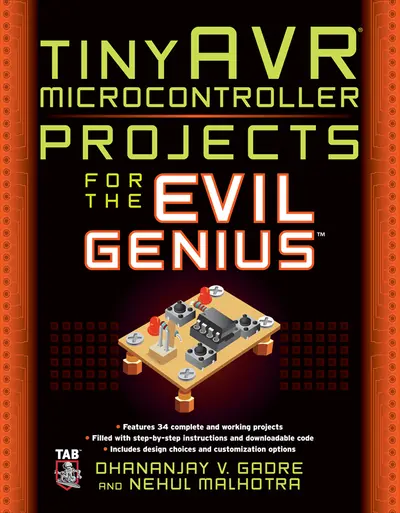
CREATE FIENDISHLY FUN tinyAVR MICROCONTROLLER PROJECTS
This wickedly inventive guide shows you how to conceptualize, build, and program 34 tinyAVR microcontroller devices that you can use for either entertainment or practical purposes. After covering the development process, tools, and power supply sources, tinyAVR Microcontroller Projects for the Evil Genius gets you working on exciting LED, graphics LCD, sensor, audio, and alternate energy projects.
Using easy-to-find components and equipment, this hands-on guide helps you build a solid foundation in electronics and embedded programming while accomplishing useful--and slightly twisted--projects. Most of the projects have fascinating visual appeal in the form of large LED-based displays, and others feature a voice playback mechanism. Full source code and circuit files for each project are available for download.
tinyAVR Microcontroller Projects for the Evil Genius:
Features step-by-step instructions and helpful illustrations
Allows you to customize each project for your own requirements
Offers full source code for all projects for download
Build these and other devious devices:
Flickering LED candle
Random color and music generator
Mood lamp
VU meter with 20 LEDs
Celsius and Fahrenheit thermometer
RGB dice
Tengu on graphics display
Spinning LED top with message display
Contactless tachometer
Electronic birthday blowout candles
Fridge alarm
Musical toy
Batteryless infrared remote
Batteryless persistence-of-vision toy
Each fun, inexpensive Evil Genius project includes a detailed list of materials, sources for parts, schematics, and lots of clear, well-illustrated instructions for easy assembly. The larger workbook-style layout and convenient two-column format make following the step-by-step instructions a breeze.
Make Great Stuff! TAB, an imprint of McGraw-Hill Professional, is a leading publisher of DIY technology books for makers, hackers, and electronics hobbyists.
Chapter 1 Tour de Tiny Chapter 2 LED Projects Chapter 3 Advanced LED Projects Chapter 4 Graphics LCD Projects Chapter 5 Sensor Projects Chapter 6 Audio Projects Chapter 7 Alternate Energy Projects Appendix A C Programming for AVR Microcontrollers Appendix B Designing and Fabricating PCBs Appendix C Illuminated LED Eye Loupe
Accessibility
Creating accessible products is a priority for McGraw Hill. We make accessibility and adhering to WCAG AA guidelines a part of our day-to-day development efforts and product roadmaps.
highered <p>Hello world</p> <ul> <li>Rent or purchase for a fraction of the printed textbook price</li> <li>Rental transaction occurs through McGraw Hill's authorized rental partner</li> </ul> <ul> <li>Purchase un-bound 3-ring binder ready textbook</li> <li>Flexibility and ease of selecting chapters to take where you want to go</li> </ul> <ul> <li>Rent or purchase for a fraction of the printed textbook price</li> <li>Easily highlight, take notes and search</li> <li>Download the free ReadAnywhere App for offline access and anytime reading</li> <li><b>Note:</b> the eBook does not include access to Connect. If your instructor assigned Connect, click the "Digital" tab.</li> </ul> Watch a quick video to learn more <p style="text-align: left;">* By purchasing <b>lifetime</b> access to this McGraw Hill eBook title, you have access to the title for as long as it is available through the McGraw Hill Bookshelf website.</p> <ul> <li><b>Note: Connect can only be accessed if your instructor is using Connect in your course.</b></li> <li>Personalize your learning, save time completing homework, and possibly earn a better grade</li> <li>Download free ReadAnywhere App for offline access to eBook for anytime reading</li> <li>Access to eBook, homework and adaptive assignments, videos, and study resources</li> </ul> Features <ul> <li>Rent for a fraction of the printed textbook price</li> <li>Complete text bound in hardcover or softcover</li> </ul> <div><b> Note:</b> Payment through authorized rental partners</div> Features <ul> <li><b>Digital access</b> to a comprehensive online learning platform</li> <li>Includes <b>homework</b>, <b>study tools</b>, <b>eBook, and adaptive assignments</b></li> <li>Download the <b>free </b><a href="/content/mhe/en_us/learning-solutions/digital-solutions/mhebook.html"><span class="link-dark-underline">ReadAnywhere app</span></a> to access the eBook offline</li> </ul> Features <p>Unbound loose-leaf version of full text</p> View shipping options <ul> <li>A <b>personalized </b>and dynamic learning experience</li> <li>Adaptive learning will <b>focus </b>your study time </li> <li>Integrated <b>eBook </b>for additional support</li> <li>Exercise and lecture videos, interactives, and extra practice materials</li> </ul> Features <p>Complete text bound in hardcover or softcover</p> View shipping options Features <p><b>Details</b> </p> <ul> <li>Includes: access to an online learning platform and full printed textbook rental available in hardcover or softcover</li> <li>Access resources and tools in one place: eBook, complete homework, and customized assignments based on your progress</li> <li>Easily access offline or on a mobile device by downloading the free<b> </b><a href="/content/mhe/en_us/learning-solutions/digital-solutions/mhebook.html"><span class="link-dark-underline">ReadAnywhere app</span></a></li> </ul> <ul> <li>Comprehensive online learning platform + unbound loose-leaf print text package</li> <li>Connect includes <b>homework</b>, <b>study tools,</b> <b>eBook, and adaptive assignments</b></li> <li>Download the <b>free </b><a href="/content/mhe/en_us/learning-solutions/digital-solutions/mhebook.html"><span class="link-dark-underline">ReadAnywhere app</span></a> to access the eBook offline</li> </ul> View shipping options Features <p><b>Receive instant access to:</b></p> <ul> <li>Personalize your learning, save time completing homework, and possibly earn a better grade</li> <li>Access to eBook, homework and adaptive assignments, videos, and study resources</li> <li>Diagnostic assessment platform combined with an online homework system</li> <li>Access to algorithmic homework assignments tied to textbook questions</li> <li>Immediate feedback and step-by-step solutions</li> </ul> <ul> <li>Comprehensive online learning platform + unbound loose-leaf print text <b>package</b></li> <li>ALEKS includes <b>videos</b>, <b>interactives</b>, and <b>practice materials</b></li> <li>Integrated <b>eBook </b>for additional support</li> <li><b>Adaptive learning</b> will focus your study time </li> </ul> View shipping options Features Features <ul> <li>Comprehensive online learning platform + bound traditional print text </li> <li>Connect includes <b>homework</b>, <b>study tools</b>, <b>eBook, and adaptive assignments</b></li> <li>Explore the <b>free </b><a href="/content/mhe/en_us/learning-solutions/digital-solutions/mhebook.html"><span class="link-dark-underline">ReadAnywhere app</span></a> app to access the eBook offline</li> </ul> <p><span><b>Note:</b> Connect can only be used if assigned by your instructor. </span></p> Learn more about Connect > <span><span><span class="link-dark-underline">Learn more about Connect ></span></span></span> Learn more about ALEKS 360> Features <ul> <li>Highlight, take notes, and search</li> <li>Download the<b> free </b><a href="/content/mhe/en_us/learning-solutions/digital-solutions/mhebook.html"><span class="link-dark-underline">ReadAnywhere app</span></a> for offline and mobile access</li> </ul> <div>Note:<b> Connect access NOT included.</b> If Connect is required for your course, click the "Connect" tab.</div> Check out this video to learn more about eBooks > Watch to learn more about the eBook <p><u>Watch to learn more about the eBook</u></p> <span><span><b>Note:</b> GO can only be used if assigned by your instructor. <a href="https://www.mheducation.com/highered/go"><span class="link-dark-underline"><b>Learn more about GO</b></span></a></span></span> Features <ul> <li><b>Digital access</b> to eBook+ embedded in your school's Learning Management System (LMS)</li> <li>Includes full <b>eBook</b> and chapter questions</li> <li>Download the<b> free</b> <a href="/content/mhe/en_us/learning-solutions/digital-solutions/mhebook.html" target="_self"><span class="link-dark-underline">ReadAnywhere app</span></a> for offline and mobile access</li> </ul> eBook Print Connect ALEKS GO GDP Online Only <p><span><b>Details:</b></span></p> <ul> <li>Normally the lowest price option for studen</li> <li>Integrates in your LMS</li> <li>Accessible tools for students, including read-aloud functionality, jump links and dynamic note-taking and highlighting features</li> </ul> <p><span><span><b>Details:</b></span></span></p> <ul> <li><span>Integrates in your LMS</span></li> <li><span>Prebuilt courses, presentation slides and instructor resources</span></li> <li><span>Test question banks, adaptive assignments, essay prompts, video content and more interactive exercises specific to your course subject</span></li> <li><span>eBook access (with included <a href="/content/mheducation/us/en/highered/digital-products/mhebook">ReadAnywhere app</a>)</span></li> <li><span><span>Print book add-on availability</span></span></li> <li><span><span>Remote proctoring</span></span></li> </ul> Connect - Take a Tour Connect - Take a Tour Connect - Take a Tour Take a Tour Connect - Take a Tour Connect - Learn More Connect - Learn More Connect - Learn More Learn More Connect - Learn More <p><b>Details:</b></p> <ul> <li>Rentable option</li> <li>Hardcopy and softcover formats</li> </ul> <p><b>Details:</b></p> <ul> <li>Integrates in your LMS</li> <li>Assignable readings</li> <li>Auto-graded chapter questions</li> </ul> Go - Take a Tour Go - Take a Tour Go - Take a Tour Take a Tour Go - Take a Tour Go - Learn More Go - Learn More Go - Learn More Learn More Go - Learn More <p><b>Details:</b></p> <ul> <li>Unbound loose-leaf version of full text</li> </ul> <p><b>Details:</b></p> <ul> <li>Comprehensive online learning platform + unbound loose-leaf print text package</li> <li>Connect includes <b>homework</b>, <b>study tools,</b> <b>eBook, and adaptive assignments</b></li> <li>Download the <b>free </b><a href="https://www.mheducation.com/highered/learning-solutions/digital-solutions/mhebook.html">ReadAnywhere app</a> to access the eBook offline</li> </ul> Features <ul> <li>Highlight, take notes, and search</li> <li>Download the<b> free </b><a href="/content/mhe/en_us/learning-solutions/digital-solutions/mhebook.html"><span class="link-dark-underline">ReadAnywhere app</span></a> for offline and mobile access</li> </ul> <div>Note:<b> Connect access NOT included.</b> If Connect is required for your course, click the "Connect" tab.</div> Check out this video to learn more about eBooks > Watch to learn more about the eBook <p><u>Watch to learn more about the eBook</u></p> Features <p>Access this eBook by following the instructions found below in How to access your eBook.</p> Features <p>More information about this Print book can be found in the page section below.</p> Features <p>More information about this eBook can be found in the page section below.</p> Request eBook Sample <p>Validated Instructors Only</p> Features <p>More information about this Print book can be found in the page section below.</p> <h2><span class="fs-5"><span class="fw-bolder">Product Information</span></span></h2> <p>First accordion item</p> <h2><span class="h3">Accessibility</span></h2> Review this product's accessibility information <p>Creating accessible products is a priority for McGraw Hill. We make accessibility and adhering to WCAG AA guidelines a part of our day-to-day development efforts and product roadmaps.</p> <p>For more information, visit our <a href="/content/highered/en_us/accessibility.html" target="_self">accessibility page</a>, or contact us at <a href="mailto:accessibility@mheducation.com">accessibility@mheducation.com</a></p> affordability icon <h2><span class="h3">Affordability</span></h2> Learn more about Inclusive Access <p>Reduce course material costs for your students while still providing full access to everything they need to be successful. It isn't too good to be true - it's Inclusive Access.</p> <p>Trouble downloading resources? Email <a href="mailto:MHPAcademic@mheducation.com">MHPAcademic@mheducation.com</a> for help.</p> <p><strong>Step 1<span aria-hidden="true">.</span> Download </strong><a href="https://www.adobe.com/solutions/ebook/digital-editions/download.html"><strong><u>Adobe Digital Editions</u></strong></a> to your PC or Mac desktop/laptop.</p> <p><strong>Step 2. Register and authorize your Adobe ID (optional). </strong>To access your eBook on multiple devices, first <a href="http://account.adobe.com/"><u>create an Adobe ID</u></a>. Then, open Adobe Digital Editions, go to the Help menu, and select <strong>"Authorize Computer"</strong> to link your Adobe ID.</p> <p><b>Step 3. Open Your eBook.</b> Use Adobe Digital Editions to open the file. If the eBook doesn’t open, contact <a title="mailto:MHP-Ebooks@mheducation.com" href="mailto:MHP-Ebooks@mheducation.com"><u>customer service</u></a> for assistance.</p> How to Access Your eBook Overview Table of Contents Sample sample-chapter Read Sample Chapter Author Bios Accessibility Affordability Downloads & Resources <p style="text-align: center;"><strong>Need support?</strong> We're here to help - <a href="/content/mheducation/us/en/highered/support.html" target="_self">Get real-world support and resources every step of the way.</a></p>