mcgraw hill social studies
aleks
illustrative math
actively learn
redbird
networks
impact social studies
arrive math
mcgraw hill my math
music! its role
wonders
corrective reading
achieve3000 literacy
redbird math
glencoe math
ocr foundational skills kit
spotlight on music
5 steps to a 5 - ap test prep
aleks adventure
2inform
studysync
glencoe science
connecting math concepts
reveal math (k-12)
spelling mastery
early interventions in reading
ap-edition
5-steps-to-a-5-test-prep
glencoe-health
teen-health
arrive-math
building-blocks
number-worlds
reading-laboratory
reading-mastery
achieve3000-literacy
actively-learn
mcgraw-hill-literacy
open-court-reading
aleks-adventure
reveal-math
illustrative-math
redbird-math
inspire-science
mcgraw-hill-science
impact
mh-social-studies
all-sorts
asi-se-dice
mcgraw-hill-cte
mcgraw-hill-health
connecting-math-concepts
corrective-reading
early-interventions-in-reading
spelling-mastery
wonderworks
maravillas
ocr-foundational-skills-kit
wow
core-plus-math
everyday-math
glencoe-math
my-math
mcgraw-hill-pre-algebra
glencoe-science
iscience
music-its-role
spotlight-on-music
mcgraw-hill-math
level-up
instructor
Programs & Solutions
Programs & Solutions/McGraw Hill Social Studies
Programs & Solutions/StudySync
Programs & Solutions/StudySync/StudySync 2015 & 2017
Context
Context/Education Level
Context/Education Level/High School
Context/Subject
Context/Subject/Science
Programs & Solutions/AP Edition
Programs & Solutions/AP Edition/AP Music Theory
Context/Integration Type
Context/Integration Type/SSO & Auto-Rostering
Programs & Solutions/ALEKS
Programs & Solutions/McGraw Hill Social Studies/FL Social Studies 2024 (K-12)
Programs & Solutions/Impact Social Studies
Programs & Solutions/Impact Social Studies/CA Impact 2019
Context/Subject/World Languages
Programs & Solutions/Illustrative Math
Programs & Solutions/Networks
Programs & Solutions/Networks/Networks 2014 (K-5)
Programs & Solutions/Actively Learn
Programs & Solutions/Building Blocks
Programs & Solutions/Building Blocks/Building Blocks 2015
Programs & Solutions/World of Wonders
Programs & Solutions/World of Wonders/World of Wonders 2017
Programs & Solutions/AP Edition/AP Public Speaking
Programs & Solutions/Redbird
Programs & Solutions/All Sorts
Programs & Solutions/All Sorts/All Sorts 2026 (K-5)
Programs & Solutions/McGraw Hill Pre-Algebra
Programs & Solutions/McGraw Hill Pre-Algebra/Pre-Algebra 2012
Programs & Solutions/McGraw Hill Literacy
Programs & Solutions/McGraw Hill Literacy/McGraw Hill Literacy Soar!
Programs & Solutions/Wonders
Programs & Solutions/Wonders/Wonders 2014
Context/Subject/Math
Programs & Solutions/McGraw Hill Math
Programs & Solutions/McGraw Hill Math/Texas Math
Programs & Solutions/AP Edition/AP Chemistry
Programs & Solutions/Building Blocks/Building Blocks 2024
Programs & Solutions/Arrive Math
Context/Subject/Literacy
Programs & Solutions/McGraw Hill My Math
Programs & Solutions/McGraw Hill CTE
Programs & Solutions/McGraw Hill CTE/CTE - Health Science
Programs & Solutions/AP Edition/AP History & Geography
Programs & Solutions/Networks/Networks 2018
Programs & Solutions/Music! Its Role
Programs & Solutions/McGraw Hill My Math/McGraw Hill My Math 2018
Programs & Solutions/Reveal Math (K-12)
Programs & Solutions/Reveal Math (K-12)/CA Reveal Math (K-12)
Programs & Solutions/McGraw Hill Health
Programs & Solutions/McGraw Hill Health/McGraw Hill Health 2014
Programs & Solutions/McGraw Hill Literacy/McGraw Hill Literacy Emerge!
Programs & Solutions/Wonders/Wonders EL 2016
Context/Education Level/Preschool
Programs & Solutions/McGraw Hill Science
Programs & Solutions/McGraw Hill Science/FL Science 2025 (K-12)
Programs & Solutions/Corrective Reading
Programs & Solutions/Achieve3000 Literacy
Programs & Solutions/Number Worlds
Programs & Solutions/Number Worlds/Number Worlds 2024
Programs & Solutions/Redbird Math
Personas
Personas/School Educator
Personas/School Educator/Classroom Teacher
Programs & Solutions/Reading Laboratory
Programs & Solutions/Reading Laboratory/SRA Reading Laboratory 2025
Programs & Solutions/Building Blocks/Building Blocks PreK 2025
Programs & Solutions/AP Edition/AP Economics
Programs & Solutions/Wonders/Wonders Balanced Literacy 2016
Programs & Solutions/McGraw Hill Science/TN Science (K-12)
Programs & Solutions/Glencoe Math
Programs & Solutions/Glencoe Math/Glencoe Math Course 1
Programs & Solutions/Teen Health
Programs & Solutions/Teen Health/Teen Health 2021
Programs & Solutions/McGraw Hill CTE/CTE - Criminal Justice
Programs & Solutions/Glencoe Math/Glencoe Math Course 2
Programs & Solutions/Glencoe Math/Glencoe Math Course 3
Programs & Solutions/Core Plus Math
Programs & Solutions/Core Plus Math/Core Plus Math 2015
Context/Integration Type/SSO & Manual-Rostering
Business Unit
Business Unit/PreK-12
Programs & Solutions/AP Edition/AP Precalculus
Programs & Solutions/OCR Foundational Skills Kit
Programs & Solutions/AP Edition/AP Biology
Context/Integration Type/Direct Login & Auto-Rostering
Programs & Solutions/Spotlight on Music
Programs & Solutions/Number Worlds/Number Worlds 2015
Programs & Solutions/Glencoe Health
Programs & Solutions/Glencoe Health/Glencoe Health 2022
Programs & Solutions/Open Court Reading
Programs & Solutions/Open Court Reading/Open Court Reading 2025
Programs & Solutions/McGraw Hill CTE/CTE - Culinary Arts
Asset Format Type
Asset Format Type/Customer Support
Context/Curriculum Type
Context/Curriculum Type/Supplemental
Programs & Solutions/AP Edition/AP Statistics
Programs & Solutions/McGraw Hill Science/TX Science 2025 (K-12)
Programs & Solutions/Wonders/Wonders 2023 2020 2017
Context/Subject/Health
Programs & Solutions/Asi Se Dice
Programs & Solutions/Asi Se Dice/Asi se Dice 2024
Programs & Solutions/5 Steps to a 5 - AP Test Prep
Programs & Solutions/ALEKS Adventure
Programs & Solutions/Level Up
Programs & Solutions/Level Up/Level Up 9–12
Programs & Solutions/Glencoe Health/Glencoe Health 2014
Context/Curriculum Type/Career & Technical Education
Programs & Solutions/Networks/Networks 2014 & 2016
Programs & Solutions/Open Court Reading/Open Court Reading 2016, 2018, 2023
Programs & Solutions/Glencoe Math/Glencoe Algebra 2 2014
Programs & Solutions/McGraw Hill CTE/CTE - Agriculture
Programs & Solutions/2Inform
Programs & Solutions/Glencoe Math/Glencoe Algebra 2 2018
Context/Curriculum Type/AP, Honors & Electives
Programs & Solutions/WonderWorks
Programs & Solutions/WonderWorks/WonderWorks 2022 & 2014
Context/Curriculum Type/Intervention
Programs & Solutions/McGraw Hill CTE/CTE - Computing and Technology
Programs & Solutions/iScience
Programs & Solutions/iScience/iScience 2017
Programs & Solutions/Open Court Reading/OCR Word Analysis Kit
Programs & Solutions/Everyday Mathematics
Programs & Solutions/Everyday Mathematics/Everyday Mathematics 4 (K-6)
Programs & Solutions/Asi Se Dice/Asi se Dice 2016
Context/Integration Type/Direct Login & Manual-Rostering
Context/Curriculum Type/Core
Programs & Solutions/AP Edition/AP Language and Composition
Programs & Solutions/Glencoe Science
Programs & Solutions/Inspire Science
Programs & Solutions/Inspire Science/Inspire Science 2020
Context/Subject/Visual & Performing Arts
Programs & Solutions/AP Edition/AP Computer Science
Programs & Solutions/Inspire Science/Inspire Science 2017
Context/Subject/Social Studies
Programs & Solutions/Glencoe Math/Glencoe Algebra 1 2018
Programs & Solutions/Connecting Math Concepts
Context/Education Level/Middle School
Programs & Solutions/Glencoe Math/Glencoe Algebra 1 2014
Programs & Solutions/Glencoe Math/Glencoe Geometry 2014
Programs & Solutions/Maravillas
Programs & Solutions/Maravillas/Maravillas 2020 & 2017
Programs & Solutions/McGraw Hill CTE/CTE - Early Childhood Education
Programs & Solutions/Glencoe Science/Glencoe Science 2017
Programs & Solutions/AP Edition/AP African American Studies
Programs & Solutions/Glencoe Math/Glencoe Math Accelerated
Support Topics
Support Topics/Getting Started & Orientation
Support Topics/Getting Started & Orientation/End-of-Year Tasks
Programs & Solutions/Glencoe Math/Glencoe Geometry 2018
Programs & Solutions/McGraw Hill CTE/CTE - Business, Marketing, and Finance
Support Topics/Classroom & Course Management
Support Topics/Classroom & Course Management/Class Management
Context/Education Level/Elementary School
Programs & Solutions/Level Up/Level Up K–5
Programs & Solutions/McGraw Hill Literacy/McGraw Hill Literacy Summit!
Programs & Solutions/McGraw Hill My Math/McGraw Hill My Math 2013 & 2016
Programs & Solutions/AP Edition/AP Psychology
Programs & Solutions/StudySync/StudySync 2021
Programs & Solutions/Spelling Mastery
Programs & Solutions/Inspire Science/CA Inspire Science 2020
Programs & Solutions/Reading Mastery
Programs & Solutions/Reading Mastery/SRA Reading Mastery Transformations
Programs & Solutions/Level Up/Level Up 6–8
Programs & Solutions/Early Interventions in Reading
prek-12
2026-03-24T18:28:46.042-03:00
<p><a href="https://hub.mheducation.com/share/9oned9dzegip" target="_blank">View the demo in a separate tab.</a></p> <p><a href="https://hub.mheducation.com/share/wfixpsi4noiw" target="_blank">View the Spanish version of the demo.</a></p> <p> </p> <p>McGraw Hill Education does not archive classes from previous years for teachers. This means that those classes will continue to appear on your My Programs page unless you manually archive them.</p> <p>If you plan to keep the same names for your classes, such as naming them after the class period, you will see duplicate class names in your class list, which could cause confusion as to which is the current class.</p> <p>At the end of every school year, if you want to keep the same class name and/or any assignments and customizations that were made, you should make a copy of the class and then archive the old class. But please note, making a copy of the class is not available for every program.</p> <p>If making a copy of the class is not an option for the program you use, we recommend archiving the old class and creating a new one or changing the name of the previous year's class to include the school year.</p> <p><strong>Note for ConnectED Programs:</strong> If the class was <a href="https://www.mheducation.com/prek-12/support/knowledge/connected---create-edit-and-delete-a-class.html" target="_blank">deleted within the program</a>, the archive option will not be available. You will first need to create a class by clicking on the title of the program before being able to remove it from your teacher account.</p> <p> </p> <h2 class="fs-5">Article Contents</h2> <p><a href="#archive" target="_self">Archive Class</a></p> <p><a href="#unarchive" target="_self">Unarchive Class</a></p> <p> </p> <h3 class="fs-5"><a id="archive"></a>Archive a Class</h3> <ol> <li>On your <strong>My Programs</strong> page, click the <strong>Classroom Actions </strong>button.<br> <br> </li> <li>Click <strong>Archive Class</strong> from the menu.<br> <br> <img src="/content/dam/mhe/support/support-images/dts-k12-images/archive-unarchive-classes/archive-unarchive-1.jpg" data-assetref="archive-unarchive-1-1787595578363"><br> <br> </li> <li>On the <strong>Archive Class</strong> pop-up, click the <strong>Archive Class </strong>button.<br> <br> <img src="/content/dam/mhe/support/support-images/dts-k12-images/archive-unarchive-classes/archive-unarchive-2.jpg" data-assetref="archive-unarchive-2-1787595637617"><br> <br> A. You will see a message at the top of the screen that the class was successfully archived.<br> <br> B. The class will then move to your<strong> Archived</strong> tab on your <strong>My Programs</strong> page.<br> <br> <img src="/content/dam/mhe/support/support-images/dts-k12-images/archive-unarchive-classes/archive-unarchive-3.jpg" data-assetref="archive-unarchive-3-1787596369581"><br> <br> The class is still accessible to you as a teacher, but the students will no longer see it on their dashboard unless you <a href="#unarchive"><strong>Unarchive</strong> the class</a>.</li> </ol> <p> </p> <h3 class="fs-5"><a id="unarchive"></a>Unarchive a Class</h3> <p>If a class was removed by mistake, or you decide you still want to use the class, you can unarchive the class. Any students assigned to the roster will have access to the class once again. All scores will also still be available for the assignments.</p> <ol> <li>On your <strong>My Programs</strong> page, click the <strong>Archived</strong> tab.<br> <br> <img src="/content/dam/mhe/support/support-images/dts-k12-images/archive-unarchive-classes/archive-unarchive-4.jpg" data-assetref="archive-unarchive-4-1787595908928"><br> <br> </li> <li>Click on the <strong>Classroom Actions </strong>button.<br> <br> </li> <li>Click <strong>Unarchive Class</strong> from the menu.<br> <br> <img src="/content/dam/mhe/support/support-images/dts-k12-images/archive-unarchive-classes/archive-unarchive-5.jpg" data-assetref="archive-unarchive-5-1787595982406"><br> <br> </li> <li>On the <strong>Unarchive Class </strong>pop-up, click the <strong>Unarchive Class</strong> button to confirm.<br> <br> <img src="/content/dam/mhe/support/support-images/dts-k12-images/archive-unarchive-classes/archive-unarchive-6.jpg" data-assetref="archive-unarchive-6-1787596154040"><br> <br> A. You will see a message at the top of the screen that the class was successfully unarchived.<br> <br> B. The class will then move back to your <strong>Active </strong>tab on your <strong>My Programs </strong>page.<br> <br> <img src="/content/dam/mhe/support/support-images/dts-k12-images/archive-unarchive-classes/archive-unarchive-7.jpg" data-assetref="archive-unarchive-7-1787596290016"></li> </ol> <p> </p> <h3 class="fs-5">Related Articles</h3> <ul> <li><a href="https://www.mheducation.com/prek-12/support/knowledge/connected-why-do-i-have-to-delete-or-rename-my-classes-from-last-year.html" target="_blank">Reason to Delete or Rename Classes From Previous Year</a></li> </ul> <ul> <li><a href="https://www.mheducation.com/prek-12/support/knowledge/open-learning-platform-class-management.html" target="_blank">Open Learning Class Management Resources</a></li> </ul> <ul> <li><a href="https://www.mheducation.com/prek-12/support/knowledge/teacher-class-management.html" target="_blank">ConnectED Class Management Resources</a></li> </ul> <ul> <li><a href="https://www.mheducation.com/prek-12/support/knowledge/end-of-year-teacher-resources.html" target="_blank">End-of-Year Teacher Resources for Manual Rostering Districts</a></li> </ul> <ul> <li><a href="https://www.mheducation.com/prek-12/support/knowledge/end-of-year-teacher-resources-for-auto-rostering-districts.html" target="_blank">End-of-Year Teacher Resources for Auto-Rostering Districts</a></li> </ul> dts Learn how teachers archive and unarchive classes to manage student access and past courses. 2026-06-18 Archive or Unarchive Classes Learn how teachers archive and unarchive classes to manage student access and past courses. Learn how teachers archive and unarchive classes to manage student access and past courses.
Learn how teachers archive and unarchive classes to manage student access and past courses.
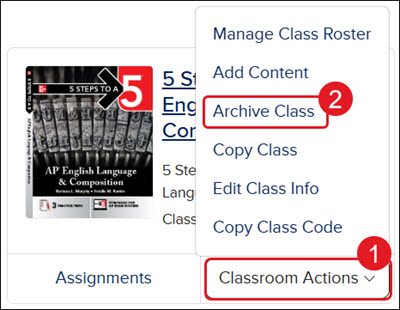
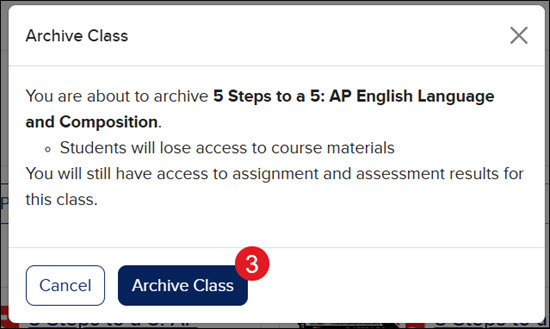
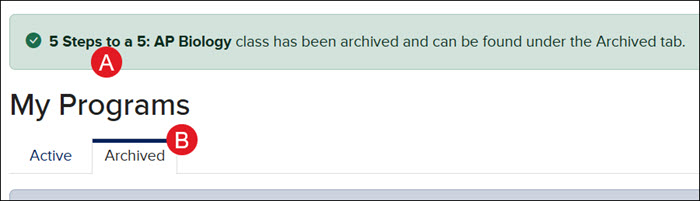
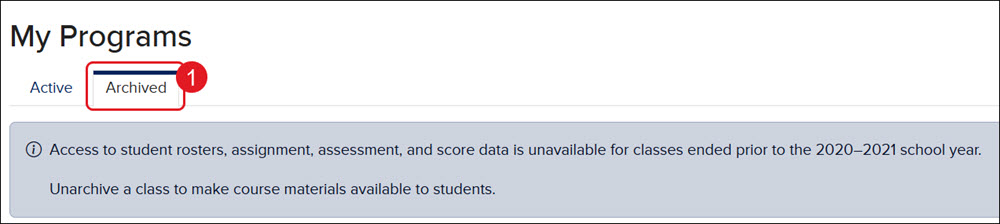
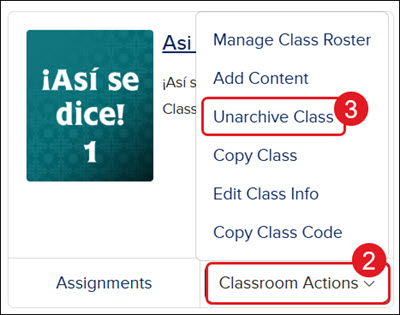
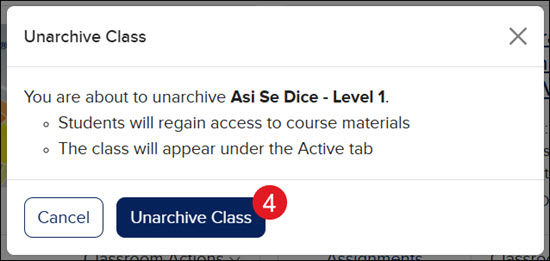
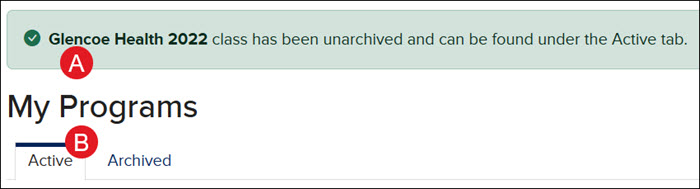
View the demo in a separate tab. View the Spanish version of the demo. McGraw Hill Education does not archive classes from previous years for teachers. This means that those classes will continue to appear on your My Programs page unless you manually archive them. If you plan to keep the same names for your classes, such as naming them after the class period, you will see duplicate class names in your class list, which could cause confusion as to which is the current class. At the end of every school year, if you want to keep the same class name and/or any assignments and customizations that were made, you should make a copy of the class and then archive the old class. But please note, making a copy of the class is not available for every program. If making a copy of the class is not an option for the program you use, we recommend archiving the old class and creating a new one or changing the name of the previous year's class to include the school year. Note for ConnectED Programs: If the class was deleted within the program, the archive option will not be available. You will first need to create a class by clicking on the title of the program before being able to remove it from your teacher account. Article Contents Archive Class Unarchive Class Archive a Class On your My Programs page, click the Classroom Actions button. Click Archive Class from the menu. On the Archive Class pop-up, click the Archive Class button. A. You will see a message at the top of the screen that the class was successfully archived. B. The class will then move to your Archived tab on your My Programs page. The class is still accessible to you as a teacher, but the students will no longer see it on their dashboard unless you Unarchive the class. Unarchive a Class If a class was removed by mistake, or you decide you still want to use the class, you can unarchive the class. Any students assigned to the roster will have access to the class once again. All scores will also still be available for the assignments. On your My Programs page, click the Archived tab. Click on the Classroom Actions button. Click Unarchive Class from the menu. On the Unarchive Class pop-up, click the Unarchive Class button to confirm. A. You will see a message at the top of the screen that the class was successfully unarchived. B. The class will then move back to your Active tab on your My Programs page. Related Articles Reason to Delete or Rename Classes From Previous Year Open Learning Class Management Resources ConnectED Class Management Resources End-of-Year Teacher Resources for Manual Rostering Districts End-of-Year Teacher Resources for Auto-Rostering Districts
dts
Customer Support, PreK-12, Classroom Teacher, Preschool, Elementary School, Middle School, High School, Direct Login & Auto-Rostering, Direct Login & Manual-Rostering, SSO & Auto-Rostering, SSO & Manual-Rostering, Core, Intervention, Supplemental, AP, Honors & Electives, Career & Technical Education, Literacy, Math, Science, Social Studies, Health, Visual & Performing Arts, World Languages, AP Biology, AP Chemistry, AP History & Geography, AP Psychology, AP Economics, AP African American Studies, AP Precalculus, AP Statistics, AP Computer Science, AP Language and Composition, AP Public Speaking, AP Music Theory, 5 Steps to a 5 - AP Test Prep, Glencoe Health 2022, Teen Health 2021, Arrive Math, Building Blocks 2024, Building Blocks PreK 2025, Number Worlds 2024, SRA Reading Laboratory 2025, SRA Reading Mastery Transformations, Achieve3000 Literacy, Actively Learn, McGraw Hill Literacy Emerge!, McGraw Hill Literacy Summit!, McGraw Hill Literacy Soar!, Open Court Reading 2025, Redbird, StudySync 2021, ALEKS, ALEKS Adventure, CA Reveal Math (K-12), Illustrative Math, Redbird Math, Reveal Math (K-12), CA Inspire Science 2020, FL Science 2025 (K-12), Inspire Science 2020, TN Science (K-12), TX Science 2025 (K-12), CA Impact 2019, FL Social Studies 2024 (K-12), Impact Social Studies, McGraw Hill Social Studies, All Sorts 2026 (K-5), Asi se Dice 2024, CTE - Business, Marketing, and Finance, CTE - Health Science, CTE - Computing and Technology, CTE - Agriculture, CTE - Culinary Arts, CTE - Early Childhood Education, CTE - Criminal Justice, Glencoe Health 2014, McGraw Hill Health 2014, 2Inform, Building Blocks 2015, Connecting Math Concepts, Number Worlds 2015, Corrective Reading, Early Interventions in Reading, Spelling Mastery, WonderWorks 2022 & 2014, Maravillas 2020 & 2017, OCR Foundational Skills Kit, OCR Word Analysis Kit, Open Court Reading 2016, 2018, 2023, StudySync, StudySync 2015 & 2017, Wonders, Wonders 2014, Wonders 2023 2020 2017, Wonders Balanced Literacy 2016, Wonders EL 2016, World of Wonders 2017, Core Plus Math 2015, Everyday Mathematics 4 (K-6), Glencoe Algebra 1 2014, Glencoe Algebra 1 2018, Glencoe Algebra 2 2014, Glencoe Algebra 2 2018, Glencoe Math, Glencoe Geometry 2014, Glencoe Geometry 2018, Glencoe Math Course 1, Glencoe Math Course 2, Glencoe Math Course 3, Glencoe Math Accelerated, McGraw Hill My Math, McGraw Hill My Math 2013 & 2016, McGraw Hill My Math 2018, Pre-Algebra 2012, Glencoe Science 2017, Glencoe Science, Inspire Science 2017, iScience 2017, Networks, Networks 2014 (K-5), Networks 2014 & 2016, Networks 2018, Music! Its Role, Spotlight on Music, Asi se Dice 2016, Texas Math, Level Up K–5, Level Up 6–8, Level Up 9–12, Class Management, End-of-Year Tasks