
Wonders/Maravillas - Student Search
Learn how students use search in Wonders to quickly find lessons and resources by keyword and filters.
- Resources
- Getting Started & Orientation
- Literacy
- SSO & Manual-Rostering
- Customer Support
- Direct Login & Auto-Rostering
- Wonders 2014
- Maravillas 2020 & 2017
- School Student
- Core
- Direct Login & Manual-Rostering
- Wonders Balanced Literacy 2016
- Wonders 2023 2020 2017
- School Parent
- SSO & Auto-Rostering
- PreK-12
- Preschool
- Elementary School


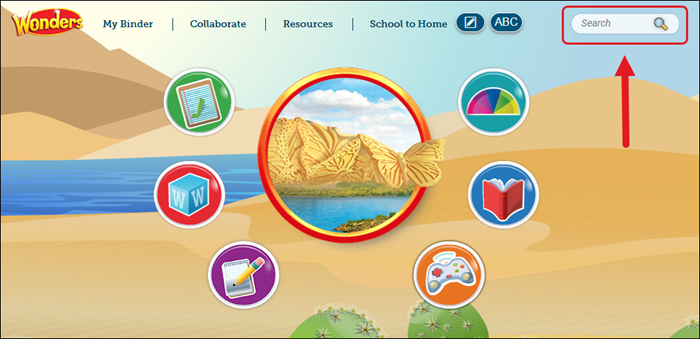
Access Search anywhere in the Wonders program at the far right of the Navigation Banner.
Search for Resources by Keyword
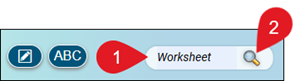
1. Type a keyword in the Search field.
2. Click the magnifying icon or press the Enter key.
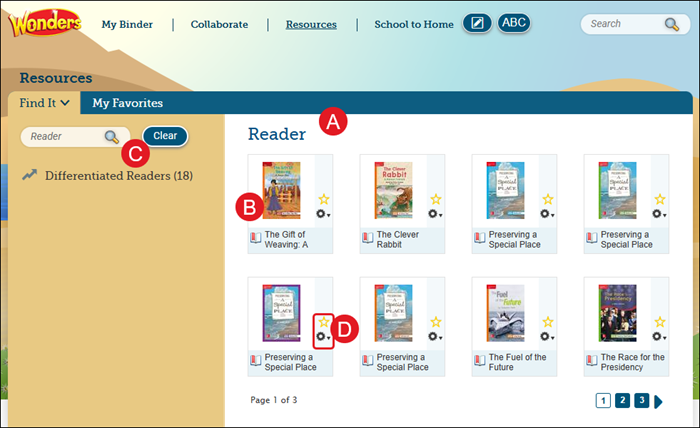
A. The results of the search appear on the Resources page. This contains all lessons and resources where the keyword appears.
B. Click on the resource to open it.
C. Filter the results by clicking the categories on the left side of the results.
D. You can mark any of the results as a Favorite, view the Details, and Standards associated to the resource.
Refer to the Wonders/Maravillas - Student Resources article for more information about the available Wonders resources.