Pearson Review of Progress & Learning (PRoPL) practice tests are available to all students and are designed to help students become familiar with the item types and digital interactions they will encounter during the actual assessment. The practice test consists entirely of non-secure items and does not impact the student scores.
Pearson Arc Secure Browser Extension
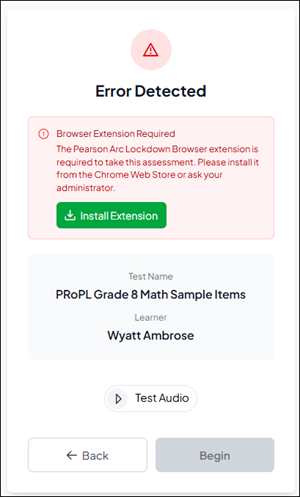
To access any of the PRoPL assessments, the secure browser extension must be installed on the student device. This step is to ensure that the required extension is functioning properly prior to testing day, reducing the likelihood of technical issues during the secure assessment.
The Secure Browser Extension can be downloaded directly from the student experience.
Test administrators are encouraged to verify that all devices have the secure browser extension installed and operational before students begin the practice test.
Programs & Solutions/McGraw Hill Literacy/McGraw Hill Literacy Summit!
Programs & Solutions/ALEKS
Programs & Solutions/McGraw Hill Literacy/McGraw Hill Literacy Soar!
Personas
Personas/School Educator
Personas/School Educator/Classroom Teacher
Context/Subject/Math
Asset Format Type
Asset Format Type/Customer Support
Context/Curriculum Type/Supplemental
Programs & Solutions/Reveal Math (K-12)
Programs & Solutions/Reveal Math (K-12)/CA Reveal Math (K-12)
Context/Education Level/Middle School
Support Topics
Support Topics/Assessments & Reporting
Support Topics/Assessments & Reporting/Online Assessments
Programs & Solutions/McGraw Hill Literacy/McGraw Hill Literacy Emerge!
Context/Integration Type/SSO & Manual-Rostering
prek-12
2026-03-24T19:13:16.050-03:00
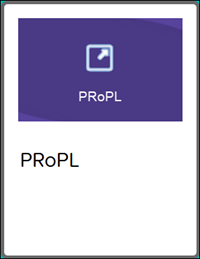
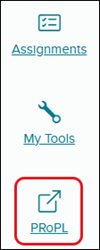
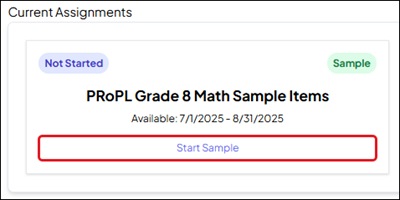
<p><a href="https://hub.mheducation.com/share/oiuru0efpqnt" target="_blank">View the demo in a separate tab.</a></p> <p><a href="https://hub.mheducation.com/share/tusix2dub0xm" target="_blank">View the Spanish version of the demo.</a></p> <p> </p> <p><span>Pearson Review of Progress & Learning (PRoPL) practice tests are available to all students and are designed to help students become familiar with the item types and digital interactions they will encounter during the actual assessment. The practice test consists entirely of non-secure items and does not impact the student scores.</span></p> <p> </p> <h3><span style="font-weight: normal;">Pearson Arc Secure Browser Extension</span></h3> <p><span>To access any of the PRoPL assessments, the secure browser extension must be installed on the student device. This step is to ensure that the required extension is functioning properly prior to testing day, reducing the likelihood of technical issues during the secure assessment. </span></p> <p>The <strong>Secure Browser Extension</strong> can be downloaded directly from the student experience.</p> <p><span>Test administrators are encouraged to verify that all devices have the secure browser extension installed and operational before students begin the practice test. </span></p> <p><span><img src="/content/dam/mhe/support/support-images/migrated/rtaImage--232765962.jpeg" data-assetref="rtaImage--232765962-1778865878986"></span></p> <p><span> </span></p> <h3><span style="font-weight: normal;">Access Practice Test</span></h3> <p><span>1. SSO or sign in at <a href="https://my.mheducation.com/" target="_blank">my.mheducation.com</a>.</span></p> <p>2. Launch <strong>PRoPL</strong>.</p> <p>For <strong>grades K-5</strong>, click on the <strong>PRoPL tile</strong> from your <strong>Home </strong>screen.</p> <p><img src="/content/dam/mhe/support/support-images/migrated/rtaImage--232707340.jpeg" width="179" height="232" data-assetref="rtaImage--232707340-1778865878987"></p> <p>For <strong>grades 6-8</strong>, click on <strong>PRoPL </strong>from your navigation menu.</p> <p><img src="/content/dam/mhe/support/support-images/migrated/rtaImage--232727532.jpeg" data-assetref="rtaImage--232727532-1778865878987"></p> <p>The assessment program will open in a separate browser tab.</p> <p>3. Under <strong>Current Assignments</strong>, click the <strong>Start Sample</strong> button.</p> <p><img src="/content/dam/mhe/support/support-images/migrated/rtaImage--232706197.jpeg" data-assetref="rtaImage--232706197-1778865878987"></p> dts Use PRoPL practice tests to prepare students for testing day. 2026-06-16 PRoPL Practice Tests Use PRoPL practice tests to prepare students for testing day. Learn about the available practice tests for PRoPL.
Learn about the available practice tests for PRoPL.
View the demo in a separate tab. View the Spanish version of the demo. Pearson Review of Progress & Learning (PRoPL) practice tests are available to all students and are designed to help students become familiar with the item types and digital interactions they will encounter during the actual assessment. The practice test consists entirely of non-secure items and does not impact the student scores. Pearson Arc Secure Browser Extension To access any of the PRoPL assessments, the secure browser extension must be installed on the student device. This step is to ensure that the required extension is functioning properly prior to testing day, reducing the likelihood of technical issues during the secure assessment. The Secure Browser Extension can be downloaded directly from the student experience. Test administrators are encouraged to verify that all devices have the secure browser extension installed and operational before students begin the practice test. Access Practice Test 1. SSO or sign in at my.mheducation.com. 2. Launch PRoPL. For grades K-5, click on the PRoPL tile from your Home screen. For grades 6-8, click on PRoPL from your navigation menu. The assessment program will open in a separate browser tab. 3. Under Current Assignments, click the Start Sample button.
dts
Customer Support, PreK-12, Classroom Teacher, Elementary School, Middle School, High School, Direct Login & Auto-Rostering, Direct Login & Manual-Rostering, SSO & Auto-Rostering, SSO & Manual-Rostering, Core, Supplemental, Literacy, Math, CA Reveal Math (K-12), Reveal Math (K-12), McGraw Hill Literacy Emerge!, McGraw Hill Literacy Summit!, McGraw Hill Literacy Soar!, ALEKS, Online Assessments