mh-social-studies
aleks
illustrative-math
actively-learn
redbird
networks
impact
arrive-math
my-math
music-its-role
wonders
corrective-reading
achieve3000-literacy
redbird-math
glencoe-math
ocr-foundational-skills-kit
spotlight-on-music
5-steps-to-a-5-test-prep
aleks-adventure
2inform
glencoe-science
connecting-math-concepts
reveal-math
spelling-mastery
early-interventions-in-reading
ap-edition
glencoe-health
teen-health
building-blocks
number-worlds
reading-laboratory
reading-mastery
mcgraw-hill-literacy
open-court-reading
studysync
mcgraw-hill-math
inspire-science
mcgraw-hill-science
all-sorts
asi-se-dice
mcgraw-hill-cte
mcgraw-hill-health
wonderworks
maravillas
wow
core-plus-math
everyday-math
mcgraw-hill-pre-algebra
iscience
student
instructor
school-parent
Programs & Solutions
Programs & Solutions/McGraw Hill Social Studies
Context
Context/Education Level
Context/Education Level/High School
Programs & Solutions/StudySync
Programs & Solutions/StudySync/StudySync 2015 & 2017
Context/Subject
Context/Subject/Science
Programs & Solutions/AP Edition
Programs & Solutions/AP Edition/AP Music Theory
Context/Integration Type
Context/Integration Type/SSO & Auto-Rostering
Programs & Solutions/ALEKS
Programs & Solutions/Impact Social Studies
Programs & Solutions/Impact Social Studies/CA Impact 2019
Programs & Solutions/McGraw Hill Social Studies/FL Social Studies 2024 (K-12)
Context/Subject/World Languages
Programs & Solutions/Illustrative Math
Programs & Solutions/Actively Learn
Programs & Solutions/Networks
Programs & Solutions/Networks/Networks 2014 (K-5)
Programs & Solutions/Building Blocks
Programs & Solutions/Building Blocks/Building Blocks 2015
Programs & Solutions/World of Wonders
Programs & Solutions/World of Wonders/World of Wonders 2017
Programs & Solutions/AP Edition/AP Public Speaking
Programs & Solutions/Redbird
Programs & Solutions/All Sorts
Programs & Solutions/All Sorts/All Sorts 2026 (K-5)
Programs & Solutions/McGraw Hill Pre-Algebra
Programs & Solutions/McGraw Hill Pre-Algebra/Pre-Algebra 2012
Personas
Personas/School Student
Programs & Solutions/McGraw Hill Literacy
Programs & Solutions/McGraw Hill Literacy/McGraw Hill Literacy Soar!
Programs & Solutions/Wonders
Programs & Solutions/Wonders/Wonders 2014
Context/Subject/Math
Support Topics
Support Topics/User Guides & Account Management
Support Topics/User Guides & Account Management/Log-In & Passwords
Programs & Solutions/McGraw Hill Math
Programs & Solutions/McGraw Hill Math/Texas Math
Programs & Solutions/AP Edition/AP Chemistry
Programs & Solutions/Building Blocks/Building Blocks 2024
Programs & Solutions/Arrive Math
Context/Subject/Literacy
Programs & Solutions/McGraw Hill CTE
Programs & Solutions/McGraw Hill CTE/CTE - Health Science
Programs & Solutions/McGraw Hill My Math
Programs & Solutions/AP Edition/AP History & Geography
Programs & Solutions/Networks/Networks 2018
Programs & Solutions/Music! Its Role
Programs & Solutions/McGraw Hill My Math/McGraw Hill My Math 2018
Programs & Solutions/Reveal Math (K-12)
Programs & Solutions/Reveal Math (K-12)/CA Reveal Math (K-12)
Support Topics/User Guides & Account Management/Auto-Rostered SSO Resources
Programs & Solutions/McGraw Hill Health
Programs & Solutions/McGraw Hill Health/McGraw Hill Health 2014
Programs & Solutions/McGraw Hill Literacy/McGraw Hill Literacy Emerge!
Programs & Solutions/Wonders/Wonders EL 2016
Context/Education Level/Preschool
Programs & Solutions/McGraw Hill Science
Programs & Solutions/McGraw Hill Science/FL Science 2025 (K-12)
Programs & Solutions/Corrective Reading
Programs & Solutions/Achieve3000 Literacy
Programs & Solutions/Number Worlds
Programs & Solutions/Number Worlds/Number Worlds 2024
Programs & Solutions/Redbird Math
Personas/School Educator
Personas/School Educator/Classroom Teacher
Programs & Solutions/Reading Laboratory
Programs & Solutions/Reading Laboratory/SRA Reading Laboratory 2025
Support Topics/Classroom & Course Management
Support Topics/Classroom & Course Management/Dashboard & Navigation Overview
Programs & Solutions/AP Edition/AP Economics
Programs & Solutions/Building Blocks/Building Blocks PreK 2025
Programs & Solutions/Wonders/Wonders Balanced Literacy 2016
Programs & Solutions/McGraw Hill Science/TN Science (K-12)
Programs & Solutions/Glencoe Math
Programs & Solutions/Glencoe Math/Glencoe Math Course 1
Programs & Solutions/Teen Health
Programs & Solutions/Teen Health/Teen Health 2021
Programs & Solutions/McGraw Hill CTE/CTE - Criminal Justice
Programs & Solutions/Glencoe Math/Glencoe Math Course 2
Programs & Solutions/Core Plus Math
Programs & Solutions/Core Plus Math/Core Plus Math 2015
Programs & Solutions/Glencoe Math/Glencoe Math Course 3
Context/Integration Type/SSO & Manual-Rostering
Business Unit
Business Unit/PreK-12
Programs & Solutions/AP Edition/AP Precalculus
Programs & Solutions/OCR Foundational Skills Kit
Programs & Solutions/AP Edition/AP Biology
Programs & Solutions/Spotlight on Music
Programs & Solutions/Number Worlds/Number Worlds 2015
Programs & Solutions/Glencoe Health
Programs & Solutions/Glencoe Health/Glencoe Health 2022
Programs & Solutions/Open Court Reading
Programs & Solutions/Open Court Reading/Open Court Reading 2025
Programs & Solutions/McGraw Hill CTE/CTE - Culinary Arts
Support Topics/Devices & Applications
Support Topics/Devices & Applications/Mobile Apps
Asset Format Type
Asset Format Type/Customer Support
Context/Curriculum Type
Context/Curriculum Type/Supplemental
Programs & Solutions/AP Edition/AP Statistics
Programs & Solutions/McGraw Hill Science/TX Science 2025 (K-12)
Programs & Solutions/Wonders/Wonders 2023 2020 2017
Context/Subject/Health
Programs & Solutions/5 Steps to a 5 - AP Test Prep
Programs & Solutions/Asi Se Dice
Programs & Solutions/Asi Se Dice/Asi se Dice 2024
Programs & Solutions/ALEKS Adventure
Programs & Solutions/Glencoe Health/Glencoe Health 2014
Programs & Solutions/Open Court Reading/Open Court Reading 2016, 2018, 2023
Programs & Solutions/Networks/Networks 2014 & 2016
Programs & Solutions/McGraw Hill CTE/CTE - Agriculture
Programs & Solutions/Glencoe Math/Glencoe Algebra 2 2014
Programs & Solutions/2Inform
Programs & Solutions/Glencoe Math/Glencoe Algebra 2 2018
Context/Curriculum Type/AP, Honors & Electives
Programs & Solutions/WonderWorks
Programs & Solutions/WonderWorks/WonderWorks 2022 & 2014
Context/Curriculum Type/Intervention
Programs & Solutions/McGraw Hill CTE/CTE - Computing and Technology
Programs & Solutions/iScience
Programs & Solutions/iScience/iScience 2017
Programs & Solutions/Open Court Reading/OCR Word Analysis Kit
Programs & Solutions/Everyday Mathematics
Programs & Solutions/Everyday Mathematics/Everyday Mathematics 4 (K-6)
Programs & Solutions/Asi Se Dice/Asi se Dice 2016
Context/Curriculum Type/Core
Programs & Solutions/AP Edition/AP Language and Composition
Programs & Solutions/Glencoe Science
Programs & Solutions/Inspire Science
Programs & Solutions/Inspire Science/Inspire Science 2020
Context/Subject/Visual & Performing Arts
Programs & Solutions/AP Edition/AP Computer Science
Programs & Solutions/Inspire Science/Inspire Science 2017
Context/Subject/Social Studies
Programs & Solutions/Glencoe Math/Glencoe Algebra 1 2018
Programs & Solutions/Connecting Math Concepts
Context/Education Level/Middle School
Programs & Solutions/Glencoe Math/Glencoe Algebra 1 2014
Programs & Solutions/Glencoe Math/Glencoe Geometry 2014
Support Topics/User Guides & Account Management/Account Management
Programs & Solutions/McGraw Hill CTE/CTE - Early Childhood Education
Programs & Solutions/Maravillas
Programs & Solutions/Maravillas/Maravillas 2020 & 2017
Programs & Solutions/Glencoe Science/Glencoe Science 2017
Personas/School Parent
Personas/School Educator/School Administrator
Programs & Solutions/AP Edition/AP African American Studies
Programs & Solutions/Glencoe Math/Glencoe Math Accelerated
Programs & Solutions/Glencoe Math/Glencoe Geometry 2018
Programs & Solutions/McGraw Hill CTE/CTE - Business, Marketing, and Finance
Context/Education Level/Elementary School
Programs & Solutions/McGraw Hill Literacy/McGraw Hill Literacy Summit!
Programs & Solutions/McGraw Hill My Math/McGraw Hill My Math 2013 & 2016
Programs & Solutions/AP Edition/AP Psychology
Programs & Solutions/StudySync/StudySync 2021
Programs & Solutions/Spelling Mastery
Support Topics/Devices & Applications/Chromebooks
Programs & Solutions/Inspire Science/CA Inspire Science 2020
Programs & Solutions/Reading Mastery
Programs & Solutions/Reading Mastery/SRA Reading Mastery Transformations
Programs & Solutions/Early Interventions in Reading
prek-12
2026-03-24T18:47:54.910-03:00
<p><strong>Single Sign-On (SSO) and Auto-Rostering<br> Single Sign-On (SSO) and Manual Rostering</strong></p> <p style="margin-left: 40.0px;"><em><span>This article applies to districts that use the SSO and Auto-Rostering Access Service and Single Sign-On (SSO) and Manual Rostering Access Service.</span></em></p> <p style="margin-left: 40.0px;"><em><span>SSO applies to districts that use an SSO portal, district website, or Learning Management System (LMS) to access McGraw Hill digital programs, and Direct Login means that teachers, students, and administrators log in at my.mheducation.com. Auto-Rostering means that account creation, class setup, and roster management are automated through a process handled by your district.<br> <br> Not sure which Access Service your district uses? Click </span></em><a target="_blank" href="/content/mheducation/us/en/prek-12/support/knowledge/access-service-descriptions"><em><span>here</span></em></a><em><span> to learn more about the four Access Services that we support.</span></em></p> <p> </p> <p><strong>Article Contents</strong></p> <p><a href="#intro" target="_self">Introduction</a></p> <p><a href="#install" target="_self">Install the App</a></p> <p><a href="#settings" target="_self">Adjust Chromebook Settings</a></p> <p><a href="#log_in" target="_self">Log In</a></p> <p><a href="#download" target="_self">Download eBooks</a></p> <p><a href="#remove_ebooks" target="_self">Remove eBooks</a></p> <p><a href="#open_books" target="_self">Open Books and Resources</a></p> <p><a href="#access_resources" target="_self">Access ConnectED Programs</a></p> <p><a href="#thirdparty" target="_self">Third-Party Apps</a></p> <p><a href="#offline" target="_self">Offline Access</a></p> <p> </p> <h3><a id="intro"></a>Introduction</h3> <p>Most McGraw Hill K-12 programs offer a mobile version of the course eBooks. The McGraw Hill K-12 Portal app enables you to download and view eBooks even when you are not connected to the internet. In addition to offline access, students will now be able to annotate and complete work in their eBook that will sync with the platform once the student is back online. Be aware that the McGraw Hill K-12 Portal app does not include planning, assigning, or testing capabilities.</p> <p> </p> <h3><a id="install"></a>Install the App</h3> <p>Follow the steps below to install the McGraw Hill K-12 Portal app on a Chromebook™. Go to <a href="/content/mheducation/us/en/prek-12/support/knowledge/mcgraw-hill-system-requirements" target="_blank">McGraw Hill System Requirements</a> to check the system requirements. If your device meets the system requirements:</p> <p>1. Access the appropriate <strong>App Store</strong>.</p> <p>2. You can search for "<strong>McGraw Hill K-12 Portal</strong>" or use the following direct link: <a href="https://play.google.com/store/apps/details?id=com.mheducation.learningtools.k12" target="_blank">Google Play</a></p> <p>3. Select the <strong>McGraw Hill K-12 Portal</strong> icon.</p> <p><img src="/content/dam/mhe/support/support-images/migrated/rtaImage--988480072.jpeg" data-assetref="rtaImage--988480072-1777041417702"></p> <p>4. Follow your normal process to install the McGraw Hill K-12 Portal app.</p> <p> </p> <h3><a id="settings"></a>Adjust Chromebook Settings</h3> <p>1. Navigate to <strong>Settings</strong>.</p> <p>2. Click on <strong>Apps </strong>from the menu.</p> <p>3. Select <strong>K-12 Portal</strong>.</p> <p>4. In the <strong>Opening supported links</strong> section, select the <strong>Open in K-12 Portal app</strong> radio button.</p> <p><img src="/content/dam/mhe/support/support-images/migrated/rtaImage--988470225.jpeg" data-assetref="rtaImage--988470225-1777041417702"></p> <p> </p> <h3><a id="log_in"></a>Log In</h3> <p>Since Single Sign-On (SSO) users do not log in directly at my.mheducation.com, they cannot directly log into the McGraw Hill K-12 Portal app. SSO users need to launch the app from <strong>my.mheducation.com</strong> using a web browser.</p> <p>1. Log into your district's <strong>Learning Management System (LMS)</strong> or <strong>SSO </strong>portal.</p> <p>2. Select the SSO link to access your program content in a web browser.</p> <p>3. The app links shown below only appear when you are using a tablet, phone, or Chromebook. Teachers right click (or long press on touchscreen) Launch App that appears on the right side of the page.</p> <p><img src="/content/dam/mhe/support/support-images/migrated/rtaImage--988459549.jpeg" data-assetref="rtaImage--988459549-1777041417702"></p> <p>Students right click (or long press 2 to 3 seconds on touchscreen) the McGraw Hill K-12 Portal app button on the right side of the My Classes page.</p> <p><img src="/content/dam/mhe/support/support-images/migrated/rtaImage--988458405.jpeg" data-assetref="rtaImage--988458405-1777041417702"></p> <p>4. Select "<strong>Open with K-12 Portal</strong>" from the menu option.</p> <p><img src="/content/dam/mhe/support/support-images/migrated/rtaImage--988450150.jpeg" data-assetref="rtaImage--988450150-1777041417702"></p> <p>5. The McGraw Hill K-12 Portal app opens and automatically logs you in.</p> <p> </p> <h3><a id="download"></a>Download eBooks</h3> <p>The My Classes page contains all of your licensed eBooks. If your account has several books, select the title you wish to access. A program may have one or more eBooks. Tap the download icon next to the eBook to begin the download process. Be aware that it may take several minutes to download each eBook depending on the download speed in your current location. Remain connected to the internet while downloading eBooks.</p> <p> </p> <h3><a id="remove_ebooks"></a>Remove eBooks</h3> <p>To provide offline access, eBooks are downloaded and saved on your mobile device. The number of books that can be downloaded is dependent on the amount of storage space on your device. To remove eBooks and free up storage space on your device, on the My Classes page, go to the Download Manager (icon in the top right). Swipe left on the eBook you wish to remove and click the delete button.</p> <p> </p> <h3><a id="open_books"></a>Open Books and Resources</h3> <p>To open a downloaded eBook, select the book title. Keep in mind that functionality may be limited when using a Chromebook™. Greater functionality is provided by accessing the ConnectED program using the Chrome™ browser. It is recommended that teachers access ConnectED program resources, such as videos and worksheets, using the Chrome browser.</p> <p> </p> <h3><a id="access_resources"></a>Access ConnectED Program Resources</h3> <p>It is recommended that teachers access ConnectED program resources, such as videos and worksheets, using the Chrome browser. Follow these steps to access ConnectED program content:</p> <p>1. Launch the Chrome™ browser and log in to your district's LMS or SSO portal.</p> <p>2. Select the SSO link to access your ConnectED program.</p> <p>3. Navigate to class and program resources just as you would on a computer or laptop.</p> <p> </p> <h3><a id="thirdparty"></a>Third-Party Apps</h3> <p>Worksheets and other resources open up as PDFs on mobile devices. There are a wide variety of apps that enable users to save and annotate PDF content. A few apps that store content include Dropbox, Google Drive™, Microsoft OneDrive, Evernote, and iCloud<sup>®</sup>. Annotation and note-taking apps include PDF Writer, Adobe Acrobat Reader, Pages<sup>®</sup>, Evernote, Microsoft OneNote, Notability, Google Docs™, Google Keep™, and Simplenote, to name a few.</p> <p> </p> <h3><a id="offline"></a>Offline Access</h3> <p>Student eBooks can be viewed without an internet connection. Be sure to download eBooks completely before going offline. Students can annotate and complete work in their eBook while offline. All work completed offline in the eBook will synchronize with the platform once the student is back online and has logged into the app.</p> <p><img src="/content/dam/mhe/support/support-images/migrated/rtaImage--988457709.jpeg" height="18" width="19" data-assetref="rtaImage--988457709-1777041417703">Teachers and students need to remain logged into the app if they plan to view eBooks offline. If a user logs out of the app, an internet connection is required to log back in.</p> dts McGraw Hill K-12 Portal On A Chromebook For SSO Districts: step-by-step guidance, requirements, and tips to help you complete this task successfully. 2026-03-06 McGraw Hill K-12 Portal on a Chromebook™ for Single Sign-On (SSO) Districts McGraw Hill K-12 Portal On A Chromebook For SSO Districts: step-by-step guidance, requirements, and tips to help you complete this task successfully. Access the McGraw Hill K‑12 Portal app on a Chromebook for Single Sign-On (SSO) Districts.
Access the McGraw Hill K‑12 Portal app on a Chromebook for Single Sign-On (SSO) Districts.
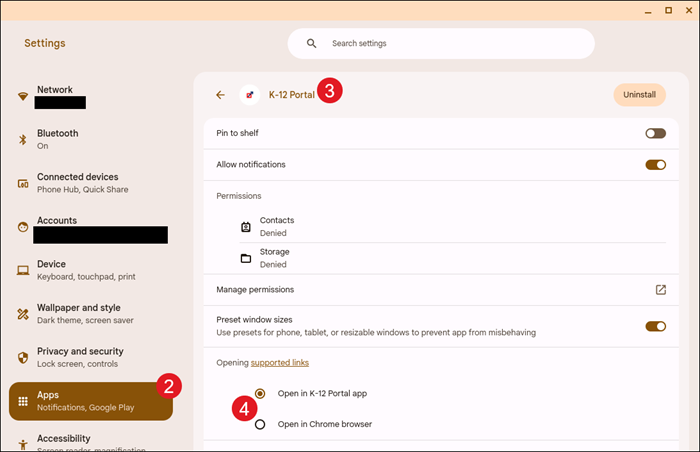
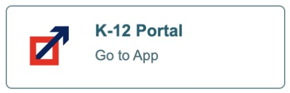
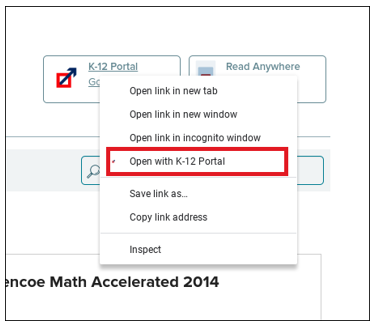
Single Sign-On (SSO) and Auto-Rostering Single Sign-On (SSO) and Manual Rostering This article applies to districts that use the SSO and Auto-Rostering Access Service and Single Sign-On (SSO) and Manual Rostering Access Service. SSO applies to districts that use an SSO portal, district website, or Learning Management System (LMS) to access McGraw Hill digital programs, and Direct Login means that teachers, students, and administrators log in at my.mheducation.com. Auto-Rostering means that account creation, class setup, and roster management are automated through a process handled by your district. Not sure which Access Service your district uses? Click here to learn more about the four Access Services that we support. Article Contents Introduction Install the App Adjust Chromebook Settings Log In Download eBooks Remove eBooks Open Books and Resources Access ConnectED Programs Third-Party Apps Offline Access Introduction Most McGraw Hill K-12 programs offer a mobile version of the course eBooks. The McGraw Hill K-12 Portal app enables you to download and view eBooks even when you are not connected to the internet. In addition to offline access, students will now be able to annotate and complete work in their eBook that will sync with the platform once the student is back online. Be aware that the McGraw Hill K-12 Portal app does not include planning, assigning, or testing capabilities. Install the App Follow the steps below to install the McGraw Hill K-12 Portal app on a Chromebook™. Go to McGraw Hill System Requirements to check the system requirements. If your device meets the system requirements: 1. Access the appropriate App Store. 2. You can search for "McGraw Hill K-12 Portal" or use the following direct link: Google Play 3. Select the McGraw Hill K-12 Portal icon. 4. Follow your normal process to install the McGraw Hill K-12 Portal app. Adjust Chromebook Settings 1. Navigate to Settings. 2. Click on Apps from the menu. 3. Select K-12 Portal. 4. In the Opening supported links section, select the Open in K-12 Portal app radio button. Log In Since Single Sign-On (SSO) users do not log in directly at my.mheducation.com, they cannot directly log into the McGraw Hill K-12 Portal app. SSO users need to launch the app from my.mheducation.com using a web browser. 1. Log into your district's Learning Management System (LMS) or SSO portal. 2. Select the SSO link to access your program content in a web browser. 3. The app links shown below only appear when you are using a tablet, phone, or Chromebook. Teachers right click (or long press on touchscreen) Launch App that appears on the right side of the page. Students right click (or long press 2 to 3 seconds on touchscreen) the McGraw Hill K-12 Portal app button on the right side of the My Classes page. 4. Select "Open with K-12 Portal" from the menu option. 5. The McGraw Hill K-12 Portal app opens and automatically logs you in. Download eBooks The My Classes page contains all of your licensed eBooks. If your account has several books, select the title you wish to access. A program may have one or more eBooks. Tap the download icon next to the eBook to begin the download process. Be aware that it may take several minutes to download each eBook depending on the download speed in your current location. Remain connected to the internet while downloading eBooks. Remove eBooks To provide offline access, eBooks are downloaded and saved on your mobile device. The number of books that can be downloaded is dependent on the amount of storage space on your device. To remove eBooks and free up storage space on your device, on the My Classes page, go to the Download Manager (icon in the top right). Swipe left on the eBook you wish to remove and click the delete button. Open Books and Resources To open a downloaded eBook, select the book title. Keep in mind that functionality may be limited when using a Chromebook™. Greater functionality is provided by accessing the ConnectED program using the Chrome™ browser. It is recommended that teachers access ConnectED program resources, such as videos and worksheets, using the Chrome browser. Access ConnectED Program Resources It is recommended that teachers access ConnectED program resources, such as videos and worksheets, using the Chrome browser. Follow these steps to access ConnectED program content: 1. Launch the Chrome™ browser and log in to your district's LMS or SSO portal. 2. Select the SSO link to access your ConnectED program. 3. Navigate to class and program resources just as you would on a computer or laptop. Third-Party Apps Worksheets and other resources open up as PDFs on mobile devices. There are a wide variety of apps that enable users to save and annotate PDF content. A few apps that store content include Dropbox, Google Drive™, Microsoft OneDrive, Evernote, and iCloud®. Annotation and note-taking apps include PDF Writer, Adobe Acrobat Reader, Pages®, Evernote, Microsoft OneNote, Notability, Google Docs™, Google Keep™, and Simplenote, to name a few. Offline Access Student eBooks can be viewed without an internet connection. Be sure to download eBooks completely before going offline. Students can annotate and complete work in their eBook while offline. All work completed offline in the eBook will synchronize with the platform once the student is back online and has logged into the app. Teachers and students need to remain logged into the app if they plan to view eBooks offline. If a user logs out of the app, an internet connection is required to log back in.
dts
SSO & Manual-Rostering, Customer Support, School Student, Middle School, High School, Classroom Teacher, School Parent, SSO & Auto-Rostering, PreK-12, School Administrator, Preschool, Elementary School, Core, Intervention, Supplemental, AP, Honors & Electives, Literacy, Math, Science, Social Studies, Health, Visual & Performing Arts, World Languages, AP Biology, AP Chemistry, AP History & Geography, AP Psychology, AP Economics, AP African American Studies, AP Precalculus, AP Statistics, AP Computer Science, AP Language and Composition, AP Public Speaking, AP Music Theory, 5 Steps to a 5 - AP Test Prep, Glencoe Health 2022, Teen Health 2021, Arrive Math, Building Blocks 2024, Building Blocks PreK 2025, Number Worlds 2024, SRA Reading Laboratory 2025, SRA Reading Mastery Transformations, Achieve3000 Literacy, Actively Learn, McGraw Hill Literacy Emerge!, McGraw Hill Literacy Summit!, McGraw Hill Literacy Soar!, Open Court Reading 2025, Redbird, StudySync 2021, ALEKS, ALEKS Adventure, CA Reveal Math (K-12), Illustrative Math, Redbird Math, Reveal Math (K-12), Texas Math, CA Inspire Science 2020, FL Science 2025 (K-12), Inspire Science 2020, TN Science (K-12), TX Science 2025 (K-12), CA Impact 2019, FL Social Studies 2024 (K-12), Impact Social Studies, McGraw Hill Social Studies, All Sorts 2026 (K-5), Asi se Dice 2024, CTE - Health Science, CTE - Agriculture, CTE - Computing and Technology, CTE - Culinary Arts, CTE - Early Childhood Education, CTE - Business, Marketing, and Finance, CTE - Criminal Justice, Glencoe Health 2014, McGraw Hill Health 2014, 2Inform, Building Blocks 2015, Connecting Math Concepts, Number Worlds 2015, Corrective Reading, Early Interventions in Reading, Spelling Mastery, WonderWorks 2022 & 2014, Maravillas 2020 & 2017, OCR Foundational Skills Kit, OCR Word Analysis Kit, Open Court Reading 2016, 2018, 2023, StudySync 2015 & 2017, Wonders, Wonders 2014, Wonders 2023 2020 2017, Wonders Balanced Literacy 2016, Wonders EL 2016, World of Wonders 2017, Core Plus Math 2015, Everyday Mathematics 4 (K-6), Glencoe Algebra 1 2014, Glencoe Algebra 2 2014, Glencoe Algebra 1 2018, Glencoe Algebra 2 2018, Glencoe Math, Glencoe Geometry 2014, Glencoe Geometry 2018, Glencoe Math Course 1, Glencoe Math Course 2, Glencoe Math Course 3, Glencoe Math Accelerated, McGraw Hill My Math, McGraw Hill My Math 2013 & 2016, McGraw Hill My Math 2018, Pre-Algebra 2012, Glencoe Science, Glencoe Science 2017, Inspire Science 2017, iScience 2017, Networks, Networks 2014 (K-5), Networks 2018, Networks 2014 & 2016, Music! Its Role, Spotlight on Music, Asi se Dice 2016, Mobile Apps, Chromebooks, Account Management, Log-In & Passwords, Dashboard & Navigation Overview, Auto-Rostered SSO Resources



 Teachers and students need to remain logged into the app if they plan to view eBooks offline. If a user logs out of the app, an internet connection is required to log back in.
