mcgraw hill social studies
illustrative math
5 steps to a 5 - ap test prep
impact social studies
arrive math
reveal math (k-12)
ap-edition
5-steps-to-a-5-test-prep
glencoe-health
teen-health
arrive-math
building-blocks
number-worlds
reading-laboratory
reading-mastery
mcgraw-hill-literacy
open-court-reading
reveal-math
illustrative-math
mcgraw-hill-math
inspire-science
mcgraw-hill-science
impact
mh-social-studies
all-sorts
asi-se-dice
mcgraw-hill-cte
instructor
Programs & Solutions
Programs & Solutions/McGraw Hill Social Studies
Business Unit
Business Unit/PreK-12
Programs & Solutions/AP Edition
Programs & Solutions/AP Edition/AP Precalculus
Context
Context/Education Level
Context/Education Level/High School
Context/Subject
Context/Subject/Science
Programs & Solutions/AP Edition/AP Music Theory
Programs & Solutions/AP Edition/AP Biology
Context/Integration Type
Context/Integration Type/Direct Login & Auto-Rostering
Context/Integration Type/SSO & Auto-Rostering
Programs & Solutions/Glencoe Health
Programs & Solutions/Glencoe Health/Glencoe Health 2022
Programs & Solutions/Impact Social Studies
Programs & Solutions/Impact Social Studies/CA Impact 2019
Programs & Solutions/McGraw Hill Social Studies/FL Social Studies 2024 (K-12)
Programs & Solutions/Open Court Reading
Programs & Solutions/Open Court Reading/Open Court Reading 2025
Context/Subject/World Languages
Programs & Solutions/Illustrative Math
Programs & Solutions/McGraw Hill CTE
Programs & Solutions/McGraw Hill CTE/CTE - Culinary Arts
Asset Format Type
Asset Format Type/Customer Support
Context/Curriculum Type
Context/Curriculum Type/Supplemental
Programs & Solutions/AP Edition/AP Statistics
Programs & Solutions/McGraw Hill Science
Programs & Solutions/McGraw Hill Science/TX Science 2025 (K-12)
Support Topics
Support Topics/Assessments & Reporting
Support Topics/Assessments & Reporting/Online Assessments
Programs & Solutions/AP Edition/AP Public Speaking
Context/Subject/Health
Programs & Solutions/Asi Se Dice
Programs & Solutions/Asi Se Dice/Asi se Dice 2024
Programs & Solutions/5 Steps to a 5 - AP Test Prep
Programs & Solutions/All Sorts
Programs & Solutions/All Sorts/All Sorts 2026 (K-5)
Programs & Solutions/McGraw Hill Literacy
Programs & Solutions/McGraw Hill Literacy/McGraw Hill Literacy Soar!
Programs & Solutions/McGraw Hill CTE/CTE - Agriculture
Context/Subject/Math
Programs & Solutions/McGraw Hill Math
Programs & Solutions/McGraw Hill Math/Texas Math
Programs & Solutions/AP Edition/AP Chemistry
Context/Curriculum Type/AP, Honors & Electives
Context/Curriculum Type/Intervention
Programs & Solutions/McGraw Hill CTE/CTE - Computing and Technology
Programs & Solutions/Building Blocks
Programs & Solutions/Building Blocks/Building Blocks 2024
Programs & Solutions/Arrive Math
Context/Curriculum Type/Core
Context/Integration Type/Direct Login & Manual-Rostering
Programs & Solutions/AP Edition/AP Language and Composition
Context/Subject/Literacy
Programs & Solutions/McGraw Hill CTE/CTE - Health Science
Programs & Solutions/AP Edition/AP History & Geography
Programs & Solutions/Inspire Science
Programs & Solutions/Inspire Science/Inspire Science 2020
Context/Subject/Visual & Performing Arts
Programs & Solutions/AP Edition/AP Computer Science
Context/Subject/Social Studies
Programs & Solutions/Reveal Math (K-12)
Programs & Solutions/Reveal Math (K-12)/CA Reveal Math (K-12)
Context/Education Level/Middle School
Programs & Solutions/McGraw Hill CTE/CTE - Early Childhood Education
Programs & Solutions/McGraw Hill Literacy/McGraw Hill Literacy Emerge!
Context/Education Level/Preschool
Programs & Solutions/AP Edition/AP African American Studies
Programs & Solutions/McGraw Hill Science/FL Science 2025 (K-12)
Programs & Solutions/McGraw Hill CTE/CTE - Business, Marketing, and Finance
Programs & Solutions/Number Worlds
Programs & Solutions/Number Worlds/Number Worlds 2024
Context/Education Level/Elementary School
Programs & Solutions/McGraw Hill Literacy/McGraw Hill Literacy Summit!
Personas
Personas/School Educator
Personas/School Educator/Classroom Teacher
Programs & Solutions/Reading Laboratory
Programs & Solutions/Reading Laboratory/SRA Reading Laboratory 2025
Programs & Solutions/Building Blocks/Building Blocks PreK 2025
Programs & Solutions/AP Edition/AP Economics
Programs & Solutions/AP Edition/AP Psychology
Programs & Solutions/McGraw Hill Science/TN Science (K-12)
Programs & Solutions/McGraw Hill CTE/CTE - Criminal Justice
Programs & Solutions/Teen Health
Programs & Solutions/Teen Health/Teen Health 2021
Programs & Solutions/Inspire Science/CA Inspire Science 2020
Programs & Solutions/Reading Mastery
Programs & Solutions/Reading Mastery/SRA Reading Mastery Transformations
Context/Integration Type/SSO & Manual-Rostering
prek-12
2026-03-24T19:07:57.527-03:00
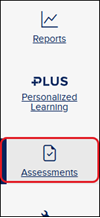
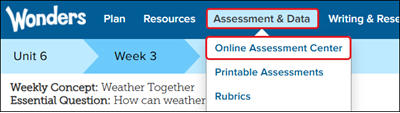
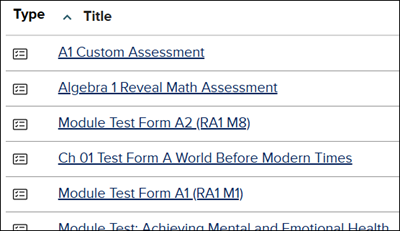
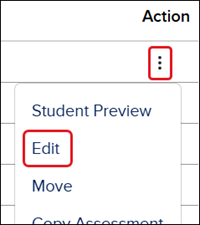
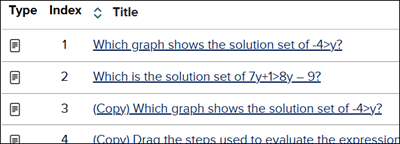
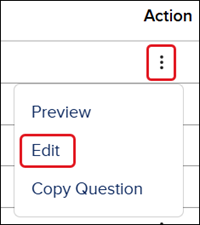
<p>For a full page view of the demo, <a href="https://hub.mheducation.com/share/o7kh0vv7usda" target="_blank">click here</a>.</p> <p>For a Spanish version of the demo, <a href="https://hub.mheducation.com/share/xawvgcljdibf" target="_blank">click here</a>.</p> <p>1. Launch your course.</p> <p>2. Click on <strong>Assessments </strong>from the navigation menu.</p> <p><img src="/content/dam/mhe/support/support-images/migrated/rtaImage-1136530105.jpeg" data-assetref="rtaImage-1136530105-1779974294013"></p> <p>For certain programs, you will need to click on <strong>Assess </strong>or <strong>Online Assessment Center</strong>.</p> <p><img src="/content/dam/mhe/support/support-images/migrated/rtaImage-1136534261.jpeg" data-assetref="rtaImage-1136534261-1779974294013"></p> <p><img src="/content/dam/mhe/support/support-images/migrated/rtaImage-1136546833.jpeg" data-assetref="rtaImage-1136546833-1779974294013"></p> <p>3. Click on the <strong>Title </strong>of the assessment -</p> <p><img src="/content/dam/mhe/support/support-images/migrated/rtaImage-1137448617.jpeg" data-assetref="rtaImage-1137448617-1779974294013"></p> <p>or click on the <strong>Options </strong>menu icon in the <strong>Actions </strong>column and click <strong>Edit </strong>from the menu.</p> <p><img src="/content/dam/mhe/support/support-images/migrated/rtaImage-1137448724.jpeg" data-assetref="rtaImage-1137448724-1779974294013"></p> <p>4. Click the <strong>Edit </strong>button on the question tile.</p> <p><img src="/content/dam/mhe/support/support-images/migrated/rtaImage-1137451411.jpeg" width="657" height="350" data-assetref="rtaImage-1137451411-1779974294013"></p> <p>5. In the <strong>Answer Choices</strong> section of the question, click the <strong>Shuffle </strong>toggle to turn the option of for that question.</p> <p><img src="/content/dam/mhe/support/support-images/migrated/rtaImage-1137452762.jpeg" data-assetref="rtaImage-1137452762-1779974294013"></p> <p>6. Click the <strong>Save </strong>button at the top or bottom of the page.</p> <h3>Shuffle Answer Choices for Individual Question</h3> <p>1. Launch your course.</p> <p>2. Click on <strong>Assessments </strong>from the navigation menu.</p> <p><img src="/content/dam/mhe/support/support-images/migrated/rtaImage-1136530105-1.jpeg" data-assetref="rtaImage-1136530105-1-1779974294013"></p> <p>For certain programs, you will need to click on <strong>Assess </strong>or <strong>Online Assessment Center</strong>.</p> <p><img src="/content/dam/mhe/support/support-images/migrated/rtaImage-1136534261-1.jpeg" data-assetref="rtaImage-1136534261-1-1779974294013"></p> <p><img src="/content/dam/mhe/support/support-images/migrated/rtaImage-1136546833-1.jpeg" data-assetref="rtaImage-1136546833-1-1779974294013"></p> <p>3. Click on the <strong>Question </strong>tab.</p> <p>4. Click on the <strong>Question folder</strong> where the question is located.</p> <p><img src="/content/dam/mhe/support/support-images/migrated/rtaImage-1137453817.jpeg" data-assetref="rtaImage-1137453817-1779974294013"></p> <p>5. Click on the question -</p> <p><img src="/content/dam/mhe/support/support-images/migrated/rtaImage-1137433566.jpeg" data-assetref="rtaImage-1137433566-1779974294013"></p> <p>or click on the <strong>Options </strong>menu icon in the <strong>Actions </strong>column and click <strong>Edit </strong>from the menu.</p> <p><img src="/content/dam/mhe/support/support-images/migrated/rtaImage-1137453496.jpeg" data-assetref="rtaImage-1137453496-1779974294013"></p> <p>6. In the <strong>Answer Choices</strong> section of the question, click the <strong>Shuffle </strong>toggle to turn the option of for that question.</p> <p><img src="/content/dam/mhe/support/support-images/migrated/rtaImage-1137452762-1.jpeg" data-assetref="rtaImage-1137452762-1-1779974294013"></p> <p>7. Click the <strong>Save </strong>button at the top or bottom of the page.</p> dts MH Assess Shuffle Answer Choices: step-by-step guidance, requirements, and tips to help you complete this task successfully. 2025-11-20 Shuffle Answer Choices for a McGraw Hill Assessment MH Assess Shuffle Answer Choices: step-by-step guidance, requirements, and tips to help you complete this task successfully. Follow step‑by‑step instructions to shuffle answer choices for assessment questions.
Follow step‑by‑step instructions to shuffle answer choices for assessment questions.
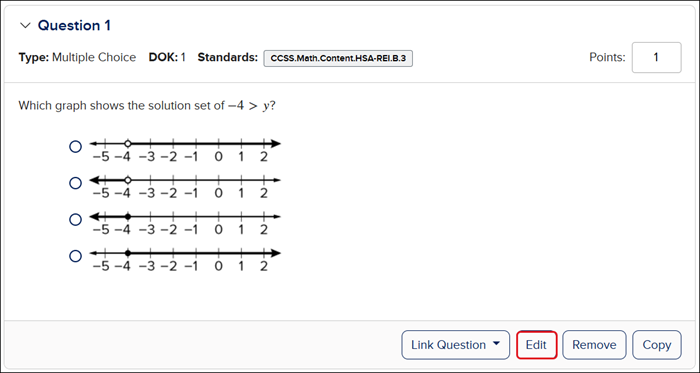
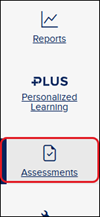
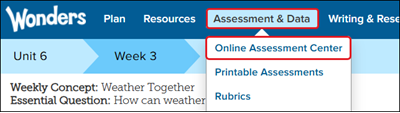
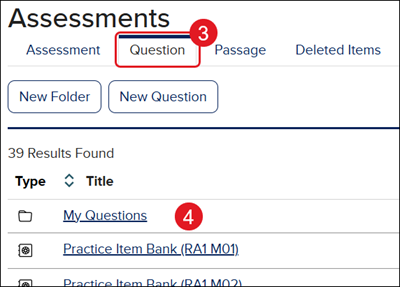
For a full page view of the demo, click here. For a Spanish version of the demo, click here. 1. Launch your course. 2. Click on Assessments from the navigation menu. For certain programs, you will need to click on Assess or Online Assessment Center. 3. Click on the Title of the assessment - or click on the Options menu icon in the Actions column and click Edit from the menu. 4. Click the Edit button on the question tile. 5. In the Answer Choices section of the question, click the Shuffle toggle to turn the option of for that question. 6. Click the Save button at the top or bottom of the page. Shuffle Answer Choices for Individual Question 1. Launch your course. 2. Click on Assessments from the navigation menu. For certain programs, you will need to click on Assess or Online Assessment Center. 3. Click on the Question tab. 4. Click on the Question folder where the question is located. 5. Click on the question - or click on the Options menu icon in the Actions column and click Edit from the menu. 6. In the Answer Choices section of the question, click the Shuffle toggle to turn the option of for that question. 7. Click the Save button at the top or bottom of the page.
dts
Customer Support, Middle School, High School, SSO & Auto-Rostering, PreK-12, Supplemental, Visual & Performing Arts, Health, Literacy, Social Studies, Core, AP, Honors & Electives, SSO & Manual-Rostering, Direct Login & Manual-Rostering, Classroom Teacher, Elementary School, World Languages, Math, Intervention, Direct Login & Auto-Rostering, Science, Preschool, AP Biology, AP Chemistry, AP History & Geography, AP Psychology, AP Economics, AP African American Studies, AP Precalculus, AP Statistics, AP Computer Science, AP Language and Composition, AP Public Speaking, AP Music Theory, 5 Steps to a 5 - AP Test Prep, Glencoe Health 2022, Teen Health 2021, Arrive Math, Building Blocks 2024, Building Blocks PreK 2025, Number Worlds 2024, SRA Reading Laboratory 2025, SRA Reading Mastery Transformations, McGraw Hill Literacy Emerge!, McGraw Hill Literacy Summit!, McGraw Hill Literacy Soar!, Open Court Reading 2025, CA Reveal Math (K-12), Illustrative Math, Reveal Math (K-12), Texas Math, CA Inspire Science 2020, FL Science 2025 (K-12), Inspire Science 2020, TN Science (K-12), TX Science 2025 (K-12), CA Impact 2019, FL Social Studies 2024 (K-12), Impact Social Studies, McGraw Hill Social Studies, All Sorts 2026 (K-5), Asi se Dice 2024, CTE - Health Science, CTE - Agriculture, CTE - Computing and Technology, CTE - Culinary Arts, CTE - Early Childhood Education, CTE - Business, Marketing, and Finance, CTE - Criminal Justice, Online Assessments