mcgraw hill social studies
aleks
illustrative math
actively learn
redbird
networks
impact social studies
arrive math
mcgraw hill my math
music! its role
wonders
corrective reading
achieve3000 literacy
redbird math
glencoe math
ocr foundational skills kit
spotlight on music
5 steps to a 5 - ap test prep
aleks adventure
2inform
glencoe science
connecting math concepts
reveal math (k-12)
spelling mastery
early interventions in reading
ap-edition
5-steps-to-a-5-test-prep
glencoe-health
teen-health
arrive-math
building-blocks
number-worlds
reading-laboratory
reading-mastery
achieve3000-literacy
actively-learn
mcgraw-hill-literacy
open-court-reading
studysync
aleks-adventure
reveal-math
illustrative-math
redbird-math
mcgraw-hill-math
inspire-science
mcgraw-hill-science
impact
mh-social-studies
all-sorts
asi-se-dice
mcgraw-hill-cte
mcgraw-hill-health
connecting-math-concepts
corrective-reading
early-interventions-in-reading
spelling-mastery
wonderworks
maravillas
ocr-foundational-skills-kit
wow
core-plus-math
everyday-math
glencoe-math
my-math
mcgraw-hill-pre-algebra
glencoe-science
iscience
music-its-role
spotlight-on-music
student
instructor
Programs & Solutions
Programs & Solutions/McGraw Hill Social Studies
Context
Context/Education Level
Context/Education Level/High School
Programs & Solutions/StudySync
Programs & Solutions/StudySync/StudySync 2015 & 2017
Context/Subject
Context/Subject/Science
Programs & Solutions/AP Edition
Programs & Solutions/AP Edition/AP Music Theory
Programs & Solutions/ALEKS
Programs & Solutions/Impact Social Studies
Programs & Solutions/Impact Social Studies/CA Impact 2019
Programs & Solutions/McGraw Hill Social Studies/FL Social Studies 2024 (K-12)
Context/Subject/World Languages
Programs & Solutions/Illustrative Math
Programs & Solutions/Actively Learn
Programs & Solutions/Networks
Programs & Solutions/Networks/Networks 2014 (K-5)
Programs & Solutions/Building Blocks
Programs & Solutions/Building Blocks/Building Blocks 2015
Programs & Solutions/World of Wonders
Programs & Solutions/World of Wonders/World of Wonders 2017
Programs & Solutions/AP Edition/AP Public Speaking
Programs & Solutions/Redbird
Programs & Solutions/All Sorts
Programs & Solutions/All Sorts/All Sorts 2026 (K-5)
Programs & Solutions/McGraw Hill Pre-Algebra
Programs & Solutions/McGraw Hill Pre-Algebra/Pre-Algebra 2012
Programs & Solutions/McGraw Hill Literacy
Programs & Solutions/McGraw Hill Literacy/McGraw Hill Literacy Soar!
Programs & Solutions/Wonders
Programs & Solutions/Wonders/Wonders 2014
Context/Subject/Math
Programs & Solutions/McGraw Hill Math
Programs & Solutions/McGraw Hill Math/Texas Math
Programs & Solutions/AP Edition/AP Chemistry
Programs & Solutions/Building Blocks/Building Blocks 2024
Programs & Solutions/Arrive Math
Context/Subject/Literacy
Programs & Solutions/McGraw Hill CTE
Programs & Solutions/McGraw Hill CTE/CTE - Health Science
Programs & Solutions/McGraw Hill My Math
Programs & Solutions/AP Edition/AP History & Geography
Programs & Solutions/Networks/Networks 2018
Programs & Solutions/Music! Its Role
Programs & Solutions/McGraw Hill My Math/McGraw Hill My Math 2018
Programs & Solutions/Reveal Math (K-12)
Programs & Solutions/Reveal Math (K-12)/CA Reveal Math (K-12)
Programs & Solutions/McGraw Hill Health
Programs & Solutions/McGraw Hill Health/McGraw Hill Health 2014
Programs & Solutions/McGraw Hill Literacy/McGraw Hill Literacy Emerge!
Programs & Solutions/Wonders/Wonders EL 2016
Support Topics
Support Topics/User Guides & Account Management
Support Topics/User Guides & Account Management/User Management
Context/Education Level/Preschool
Programs & Solutions/McGraw Hill Science
Programs & Solutions/McGraw Hill Science/FL Science 2025 (K-12)
Programs & Solutions/Corrective Reading
Programs & Solutions/Achieve3000 Literacy
Programs & Solutions/Number Worlds
Programs & Solutions/Number Worlds/Number Worlds 2024
Programs & Solutions/Redbird Math
Programs & Solutions/Reading Laboratory
Programs & Solutions/Reading Laboratory/SRA Reading Laboratory 2025
Programs & Solutions/AP Edition/AP Economics
Programs & Solutions/Building Blocks/Building Blocks PreK 2025
Programs & Solutions/Wonders/Wonders Balanced Literacy 2016
Programs & Solutions/McGraw Hill Science/TN Science (K-12)
Programs & Solutions/Glencoe Math
Programs & Solutions/Glencoe Math/Glencoe Math Course 1
Programs & Solutions/Teen Health
Programs & Solutions/Teen Health/Teen Health 2021
Programs & Solutions/McGraw Hill CTE/CTE - Criminal Justice
Programs & Solutions/Glencoe Math/Glencoe Math Course 2
Programs & Solutions/Core Plus Math
Programs & Solutions/Core Plus Math/Core Plus Math 2015
Programs & Solutions/Glencoe Math/Glencoe Math Course 3
Context/Integration Type
Context/Integration Type/SSO & Manual-Rostering
Business Unit
Business Unit/PreK-12
Programs & Solutions/AP Edition/AP Precalculus
Programs & Solutions/OCR Foundational Skills Kit
Programs & Solutions/AP Edition/AP Biology
Programs & Solutions/Spotlight on Music
Programs & Solutions/Number Worlds/Number Worlds 2015
Programs & Solutions/Glencoe Health
Programs & Solutions/Glencoe Health/Glencoe Health 2022
Programs & Solutions/Open Court Reading
Programs & Solutions/Open Court Reading/Open Court Reading 2025
Programs & Solutions/McGraw Hill CTE/CTE - Culinary Arts
Asset Format Type
Asset Format Type/Customer Support
Context/Curriculum Type
Context/Curriculum Type/Supplemental
Programs & Solutions/AP Edition/AP Statistics
Programs & Solutions/McGraw Hill Science/TX Science 2025 (K-12)
Programs & Solutions/Wonders/Wonders 2023 2020 2017
Context/Subject/Health
Programs & Solutions/5 Steps to a 5 - AP Test Prep
Programs & Solutions/Asi Se Dice
Programs & Solutions/Asi Se Dice/Asi se Dice 2024
Programs & Solutions/ALEKS Adventure
Context/Curriculum Type/Career & Technical Education
Programs & Solutions/Glencoe Health/Glencoe Health 2014
Programs & Solutions/Open Court Reading/Open Court Reading 2016, 2018, 2023
Programs & Solutions/Networks/Networks 2014 & 2016
Programs & Solutions/McGraw Hill CTE/CTE - Agriculture
Programs & Solutions/Glencoe Math/Glencoe Algebra 2 2014
Programs & Solutions/2Inform
Programs & Solutions/Glencoe Math/Glencoe Algebra 2 2018
Context/Curriculum Type/AP, Honors & Electives
Programs & Solutions/WonderWorks
Programs & Solutions/WonderWorks/WonderWorks 2022 & 2014
Context/Curriculum Type/Intervention
Programs & Solutions/McGraw Hill CTE/CTE - Computing and Technology
Programs & Solutions/iScience
Programs & Solutions/iScience/iScience 2017
Programs & Solutions/Open Court Reading/OCR Word Analysis Kit
Programs & Solutions/Everyday Mathematics
Programs & Solutions/Everyday Mathematics/Everyday Mathematics 4 (K-6)
Programs & Solutions/Asi Se Dice/Asi se Dice 2016
Context/Integration Type/Direct Login & Manual-Rostering
Context/Curriculum Type/Core
Programs & Solutions/AP Edition/AP Language and Composition
Programs & Solutions/Glencoe Science
Programs & Solutions/Inspire Science
Programs & Solutions/Inspire Science/Inspire Science 2020
Context/Subject/Visual & Performing Arts
Programs & Solutions/AP Edition/AP Computer Science
Programs & Solutions/Inspire Science/Inspire Science 2017
Context/Subject/Social Studies
Programs & Solutions/Glencoe Math/Glencoe Algebra 1 2018
Programs & Solutions/Connecting Math Concepts
Context/Education Level/Middle School
Programs & Solutions/Glencoe Math/Glencoe Algebra 1 2014
Programs & Solutions/Glencoe Math/Glencoe Geometry 2014
Support Topics/User Guides & Account Management/Account Management
Programs & Solutions/McGraw Hill CTE/CTE - Early Childhood Education
Programs & Solutions/Maravillas
Programs & Solutions/Maravillas/Maravillas 2020 & 2017
Programs & Solutions/Glencoe Science/Glencoe Science 2017
Personas
Personas/School Educator
Personas/School Educator/School Administrator
Programs & Solutions/AP Edition/AP African American Studies
Programs & Solutions/Glencoe Math/Glencoe Math Accelerated
Programs & Solutions/Glencoe Math/Glencoe Geometry 2018
Context/Education Level/Elementary School
Programs & Solutions/McGraw Hill Literacy/McGraw Hill Literacy Summit!
Programs & Solutions/McGraw Hill My Math/McGraw Hill My Math 2013 & 2016
Programs & Solutions/AP Edition/AP Psychology
Programs & Solutions/StudySync/StudySync 2021
Programs & Solutions/Spelling Mastery
Programs & Solutions/Inspire Science/CA Inspire Science 2020
Programs & Solutions/Reading Mastery
Programs & Solutions/Reading Mastery/SRA Reading Mastery Transformations
Programs & Solutions/Early Interventions in Reading
prek-12
2026-03-24T18:39:15.930-03:00
<p>To move students from one school to another, the Organization Administrator must be affiliated with both the student's current school and the destination school, or be a district-level administrator with access to all schools. </p> <p>There are three options when it comes to moving students to a different school within the organization:</p> <ul> <li><a href="#import_tool">Using the Import Users/Rosters Tool</a></li> </ul> <ul> <li><a href="#edit_profile">Editing Individual Student Profiles</a></li> </ul> <ul> <li><a href="https://app.smartsheet.com/b/form?EQBCT=0f586e18aa5c4bc4ab0eae7fe96681e9" target="_blank">McGraw Hill Clean-Up Request form</a><ul> <li>If this option is preferred, you will need to choose Change Student's School Affiliation from Option 1 on the form. In the notes, indicate which school the students will need to be removed from. Our K-12 Technical Support team will send instructions on how to complete this process without sharing student PII (personally identifiable information).</li> </ul> </li> </ul> <p> </p> <h2><span style="font-weight: normal;"><a id="import_tool"></a>Using the Import Users/Rosters Tool</span></h2> <p>This process will only add the students to the destination school and will not remove them from their current school. Follow the steps in the <a href="#edit_profile">Editing Individual Student Profiles</a> to remove any extra schools they should not be associated with.</p> <p>1. SSO or sign in at <a href="https://my.mheducation.com/login" target="_blank">my.mheducation.com</a>.</p> <p>If you have both a teacher role and an administrator role, you will need to <a href="https://www.mheducation.com/prek-12/support/knowledge/how-to-toggle-between-roles-and-orgs.html" target="_blank">toggle over to the administrator tools</a>.</p> <p>If you're assigned to more than one organization, you will also need to select the one that the student is currently assigned to.</p> <p><strong>District Administrators</strong> - Select the district-level organization.</p> <p><strong>School Administrators</strong> - Select the student's current assigned school.</p> <p><img src="/content/dam/mhe/support/support-images/dts-k12-images/move-students-between-schools/move-students-1.jpg" data-assetref="move-students-1-1785504403115"></p> <p>2. Click on <strong>Import Users/Rosters</strong> from the navigation menu.</p> <p>A. If you're at the district level, select the student's current school from the <strong>Select School</strong> drop-down.</p> <p>3. Under <strong>Export Teachers & Students</strong>, select to export the <strong>CSV </strong>or <strong>XLSX </strong>file.</p> <p><img src="/content/dam/mhe/support/support-images/dts-k12-images/move-students-between-schools/move-students-3.jpg" data-assetref="move-students-3-1785504673560"></p> <p>4. In the exported file, keep only the rows for the student(s) you want to move, and delete all other rows.</p> <p><strong>Do not delete the header row!</strong></p> <p>5. Save the file to your computer.</p> <p>6. From the <strong>Select School</strong> drop-down, select the school where the student(s) need to be moved to.</p> <p><img src="/content/dam/mhe/support/support-images/dts-k12-images/move-students-between-schools/move-students-4.jpg" data-assetref="move-students-4-1785505299487"></p> <p>7. Under <strong>Upload File</strong>, click <strong>Choose File</strong> and select the edited student file.</p> <p>8. Click the <strong>Upload </strong>button.</p> <p><img src="/content/dam/mhe/support/support-images/dts-k12-images/move-students-between-schools/move-students-9.jpg" data-assetref="move-students-9-1785506875057"></p> <p>Depending on the size of the file, it may take some time for the file to process.</p> <p> </p> <h2><span style="font-weight: normal;"><a id="edit_profile"></a>Editing Individual Student Profiles</span></h2> <p>1. SSO or sign in at <a href="https://my.mheducation.com/login">my.mheducation.com</a>.</p> <p>If you have both a teacher role and an administrator role, you will need to <a href="https://www.mheducation.com/prek-12/support/knowledge/how-to-toggle-between-roles-and-orgs.html">toggle over to the administrator tools</a>.</p> <p>If you're assigned to more than one organization, you will also need to select the one that the student is currently assigned to.</p> <p><strong>District Administrators</strong> - Select the district-level organization.</p> <p><strong>School Administrators</strong> - Select the student's current assigned school.</p> <p><img src="/content/dam/mhe/support/support-images/dts-k12-images/move-students-between-schools/move-students-1.jpg" data-assetref="move-students-1-1785505731307"></p> <p>2. Click on <strong>Manage Users</strong> and then the <strong>Student</strong> tab.</p> <p>A. If you're at the district level, select the student(s) current school from the drop-down.</p> <p><img src="/content/dam/mhe/support/support-images/dts-k12-images/move-students-between-schools/move-students-6.jpg" data-assetref="move-students-6-1785505892936"></p> <p>3. Click the options menu to the right of the student.</p> <p>4. Click <strong>Edit Student</strong> from the menu.</p> <p><img src="/content/dam/mhe/support/support-images/dts-k12-images/move-students-between-schools/move-students-7.jpg" data-assetref="move-students-7-1785506015120"></p> <p>5. Select the student's new <strong>School(s) </strong>from the drop-down.</p> <p>6. Click the <strong>Save </strong>button.</p> <p><img src="/content/dam/mhe/support/support-images/dts-k12-images/move-students-between-schools/move-students-8.jpg" data-assetref="move-students-8-1785506252461"></p> dts How To Move Students Between Schools: step-by-step guidance, requirements, and tips to help you complete this task successfully. 2025-11-20 Move Students Between Schools for Manual Rostering Districts How To Move Students Between Schools: step-by-step guidance, requirements, and tips to help you complete this task successfully. Learn how to move students between schools while maintaining access and enrollment records.
Learn how to move students between schools while maintaining access and enrollment records.
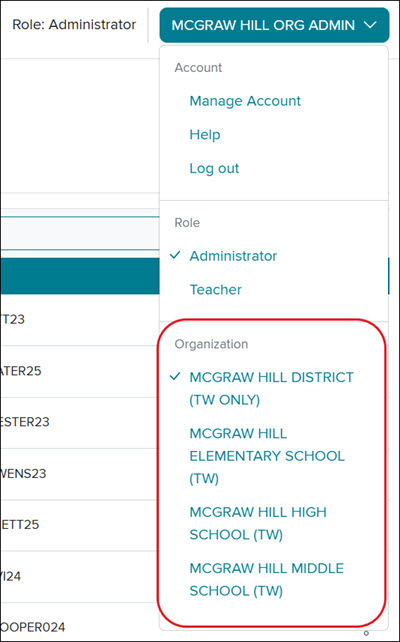
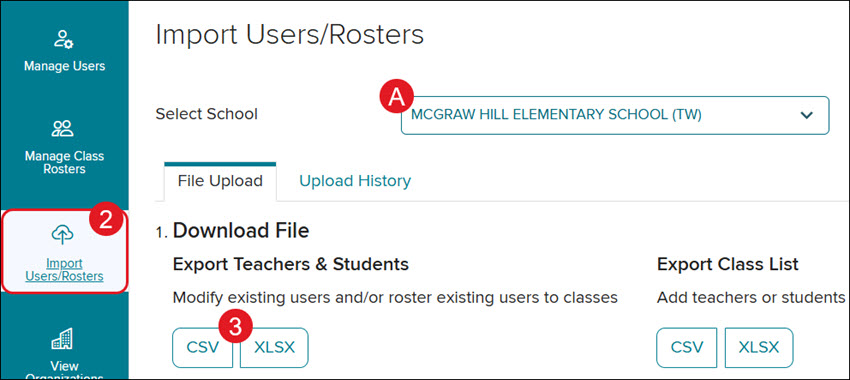
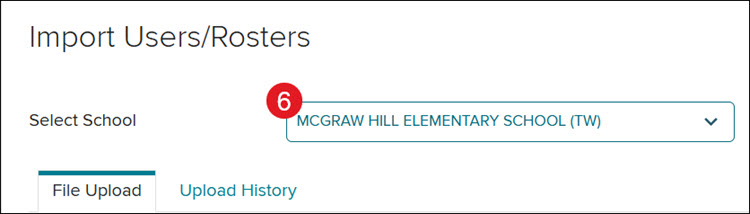
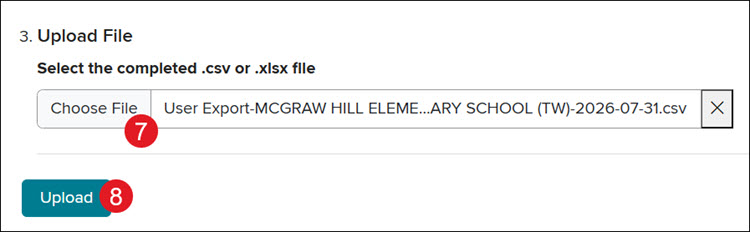
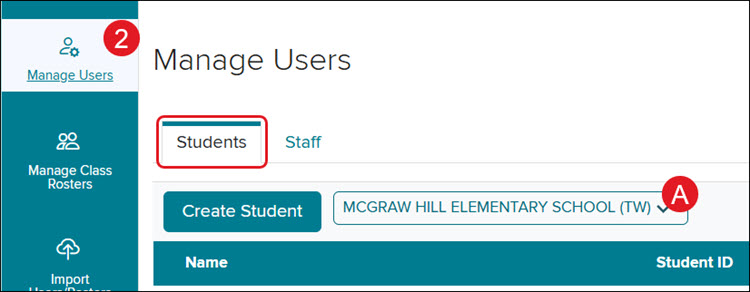
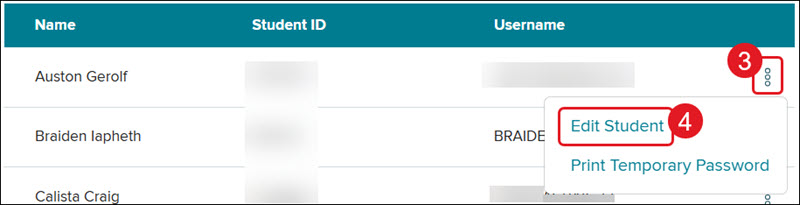
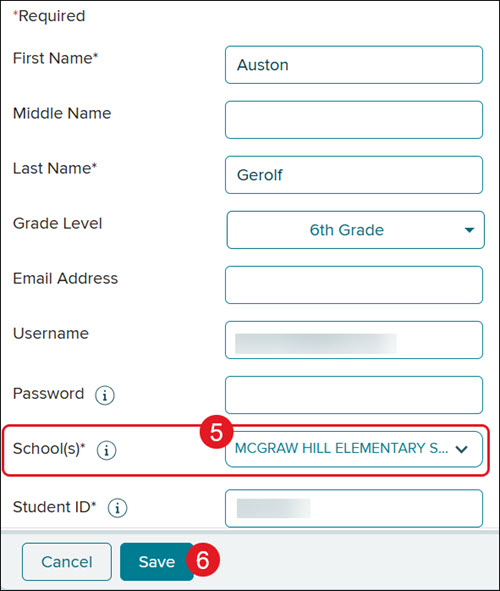
To move students from one school to another, the Organization Administrator must be affiliated with both the student's current school and the destination school, or be a district-level administrator with access to all schools. There are three options when it comes to moving students to a different school within the organization: Using the Import Users/Rosters Tool Editing Individual Student Profiles McGraw Hill Clean-Up Request form If this option is preferred, you will need to choose Change Student's School Affiliation from Option 1 on the form. In the notes, indicate which school the students will need to be removed from. Our K-12 Technical Support team will send instructions on how to complete this process without sharing student PII (personally identifiable information). Using the Import Users/Rosters Tool This process will only add the students to the destination school and will not remove them from their current school. Follow the steps in the Editing Individual Student Profiles to remove any extra schools they should not be associated with. 1. SSO or sign in at my.mheducation.com. If you have both a teacher role and an administrator role, you will need to toggle over to the administrator tools. If you're assigned to more than one organization, you will also need to select the one that the student is currently assigned to. District Administrators - Select the district-level organization. School Administrators - Select the student's current assigned school. 2. Click on Import Users/Rosters from the navigation menu. A. If you're at the district level, select the student's current school from the Select School drop-down. 3. Under Export Teachers & Students, select to export the CSV or XLSX file. 4. In the exported file, keep only the rows for the student(s) you want to move, and delete all other rows. Do not delete the header row! 5. Save the file to your computer. 6. From the Select School drop-down, select the school where the student(s) need to be moved to. 7. Under Upload File, click Choose File and select the edited student file. 8. Click the Upload button. Depending on the size of the file, it may take some time for the file to process. Editing Individual Student Profiles 1. SSO or sign in at my.mheducation.com. If you have both a teacher role and an administrator role, you will need to toggle over to the administrator tools. If you're assigned to more than one organization, you will also need to select the one that the student is currently assigned to. District Administrators - Select the district-level organization. School Administrators - Select the student's current assigned school. 2. Click on Manage Users and then the Student tab. A. If you're at the district level, select the student(s) current school from the drop-down. 3. Click the options menu to the right of the student. 4. Click Edit Student from the menu. 5. Select the student's new School(s) from the drop-down. 6. Click the Save button.
dts
PreK-12, Customer Support, School Administrator, Preschool, Elementary School, Middle School, High School, Direct Login & Manual-Rostering, SSO & Manual-Rostering, Core, Intervention, Supplemental, AP, Honors & Electives, Career & Technical Education, Literacy, Math, Science, Social Studies, Health, Visual & Performing Arts, World Languages, AP Biology, AP Chemistry, AP History & Geography, AP Psychology, AP Economics, AP African American Studies, AP Precalculus, AP Statistics, AP Computer Science, AP Language and Composition, AP Public Speaking, AP Music Theory, 5 Steps to a 5 - AP Test Prep, Glencoe Health 2022, Teen Health 2021, Arrive Math, Building Blocks 2024, Building Blocks PreK 2025, Number Worlds 2024, SRA Reading Laboratory 2025, SRA Reading Mastery Transformations, Achieve3000 Literacy, Actively Learn, McGraw Hill Literacy Emerge!, McGraw Hill Literacy Summit!, McGraw Hill Literacy Soar!, Open Court Reading 2025, Redbird, StudySync 2021, ALEKS, ALEKS Adventure, CA Reveal Math (K-12), Illustrative Math, Redbird Math, Reveal Math (K-12), Texas Math, CA Inspire Science 2020, FL Science 2025 (K-12), Inspire Science 2020, TN Science (K-12), TX Science 2025 (K-12), CA Impact 2019, FL Social Studies 2024 (K-12), Impact Social Studies, McGraw Hill Social Studies, All Sorts 2026 (K-5), Asi se Dice 2024, CTE - Health Science, CTE - Computing and Technology, CTE - Agriculture, CTE - Culinary Arts, CTE - Early Childhood Education, CTE - Criminal Justice, Glencoe Health 2014, McGraw Hill Health 2014, 2Inform, Building Blocks 2015, Connecting Math Concepts, Number Worlds 2015, Corrective Reading, Early Interventions in Reading, Spelling Mastery, WonderWorks 2022 & 2014, Maravillas 2020 & 2017, OCR Foundational Skills Kit, OCR Word Analysis Kit, Open Court Reading 2016, 2018, 2023, StudySync 2015 & 2017, Wonders, Wonders 2014, Wonders 2023 2020 2017, Wonders Balanced Literacy 2016, Wonders EL 2016, World of Wonders 2017, Core Plus Math 2015, Everyday Mathematics 4 (K-6), Glencoe Algebra 1 2014, Glencoe Algebra 1 2018, Glencoe Algebra 2 2014, Glencoe Algebra 2 2018, Glencoe Math, Glencoe Geometry 2014, Glencoe Geometry 2018, Glencoe Math Course 1, Glencoe Math Course 2, Glencoe Math Course 3, Glencoe Math Accelerated, McGraw Hill My Math, McGraw Hill My Math 2013 & 2016, McGraw Hill My Math 2018, Pre-Algebra 2012, Glencoe Science 2017, Glencoe Science, Inspire Science 2017, iScience 2017, Networks, Networks 2014 (K-5), Networks 2014 & 2016, Networks 2018, Music! Its Role, Spotlight on Music, Asi se Dice 2016, User Management, Account Management