Change or shift assignment dates in Connect to adjust schedules and due dates.
Tags
Higher Education
Customer Support
Connect
Instructor
Assignment Management
Share:
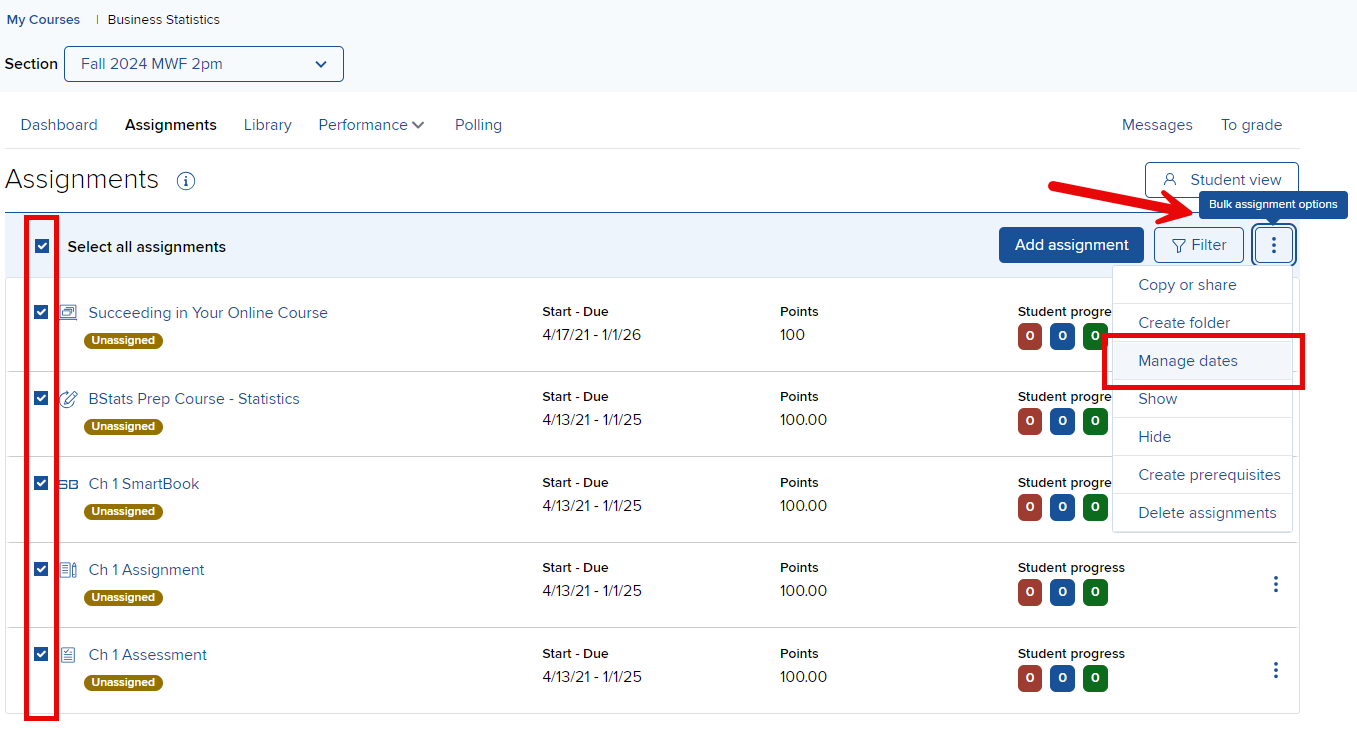
In your section Assignments list, select the assignment(s) that you want to change assignments dates for and click Manage dates.
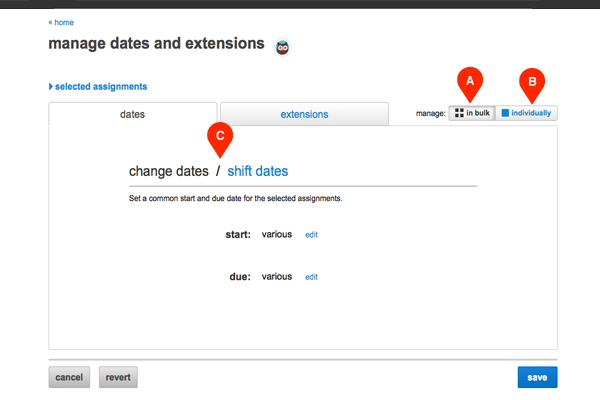
You can change the dates of all selected assignments in the in bulk tab (A), which is automatically selected, or you can change individual assignment dates by clicking the individually tab (B). You click shift dates (C) to push back the selected assignments’ start and due dates by a number of days, weeks or months.
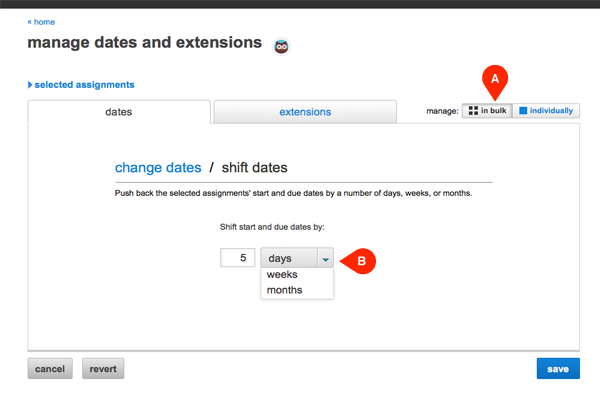
To modify or adjust dates in bulk (A), just input the new dates or specify the number of days, weeks, or months (B) that you wish to delay the start and due dates..
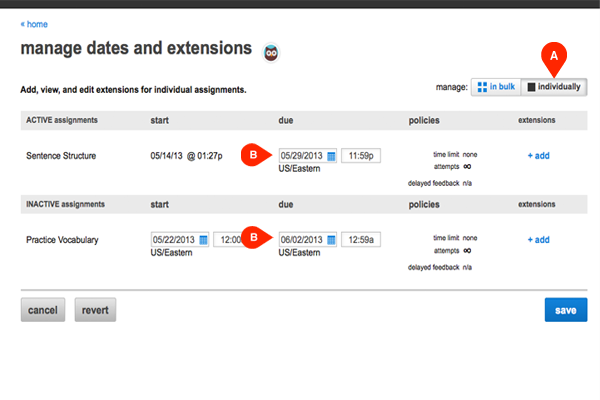
When changing or shifting dates individually (A), enter the new dates (B) each assignment separately.
Help us improve!
Let us know how we can improve our support information by providing feedback in this short survey.
Top
Regional Page Available
It looks like you're outside the United States. Do you want to see your regional version of this page?
connect
instructor
Personas
Personas/Higher Ed Educator
Personas/Higher Ed Educator/Instructor
Support Topics
Support Topics/Classroom & Course Management
Support Topics/Classroom & Course Management/Assignment Management
Asset Format Type
Asset Format Type/Customer Support
Business Unit
Business Unit/Higher Education
Programs & Solutions
Programs & Solutions/Connect
highered
2026-03-24T18:27:17.051-03:00
<p><span>In your section <strong>Assignments</strong> list, select the assignment(s) that you want to change assignments dates for and click <strong>Manage dates</strong>.</span></p> <div> </div> <div> <img alt="1_ChangingAssignmentDates.png" src="/content/dam/mhe/support/support-images/migrated/rtaImage-376977806.jpeg" /> <br /> </div> <p><span><span>You can change the dates of all selected assignments in the <strong>in bulk</strong> tab (A), which is automatically selected, or you can change individual assignment dates by clicking the <strong>individually</strong> tab (B). You click <strong>shift dates</strong> (C) to push back the selected assignments’ start and due dates by a number of days, weeks or months.</span></span><br /><br /> </p> <div> <span><span><img alt="User-added image" height="333" src="/content/dam/mhe/support/support-images/migrated/rtaImage--736990741.png" width="500" /></span></span> </div> <p><br /><br /><span><span>To modify or adjust dates in bulk (A), just input the new dates or specify the number of days, weeks, or months (B) that you wish to delay the start and due dates..</span></span><br /><br /> </p> <div> <span><span><img alt="User-added image" height="333" src="/content/dam/mhe/support/support-images/migrated/rtaImage--736990729.png" width="500" /></span></span> <br /> </div> <p><br /><span><span>When changing or shifting dates individually (A), enter the new dates (B) each assignment separately.</span></span><br /><br /> </p> <div> <span><span><img alt="User-added image" height="333" src="/content/dam/mhe/support/support-images/migrated/rtaImage--736990724.png" width="500" /></span></span> </div> CXG Change or shift assignment dates in Connect to adjust schedules and due dates. 2026-01-20 Connect - Changing and Shifting Assignment Dates Change or shift assignment dates in Connect to adjust schedules and due dates. Change or shift assignment dates in Connect to adjust schedules and due dates.
Change or shift assignment dates in Connect to adjust schedules and due dates.
In your section Assignments list, select the assignment(s) that you want to change assignments dates for and click Manage dates. You can change the dates of all selected assignments in the in bulk tab (A), which is automatically selected, or you can change individual assignment dates by clicking the individually tab (B). You click shift dates (C) to push back the selected assignments’ start and due dates by a number of days, weeks or months. To modify or adjust dates in bulk (A), just input the new dates or specify the number of days, weeks, or months (B) that you wish to delay the start and due dates.. When changing or shifting dates individually (A), enter the new dates (B) each assignment separately.